

The unsavory features of the “Your connection is not safe” virus
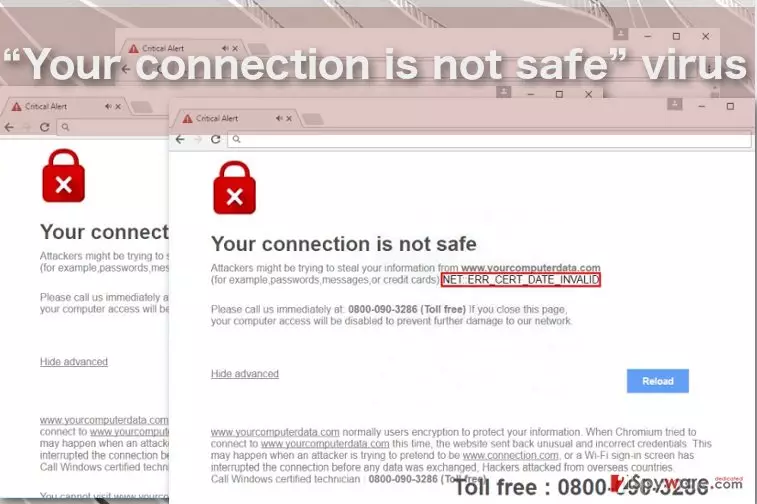
“Your connection is not safe” virus is otherwise known as “NET::ERR_CERT_DATE_INVALID” virus is a fake browser notification that shows up when the computer is infected with some type of malware [1]. Currently, we know little about what this PUP might be, but the practice shows that it is most likely some advertising-based application, typically an adware [2]. You might get accidentally infected by such PUPs while browsing the web or installing software without examining the software package components closely enough. And when you are already infected, “Your connection is not safe” pop-ups [3]will be the first symptom to give the virus away. More suspicious aspects of these notifications reveal in their contents. Look at this extract taken from the fake NET::ERR_CERT_DATE_INVALID alert page:
Your connection is not safe
Attackers might be trying to steal your information from www.yourcomputerdata.com (for example, passwords, messages, or credit cards) NET::ERR_CERT_DATE_INVALID
Attackers hack your data from overseas countries
Call immediately to secure your connection: 0800-090-3286 (Toll Free)
Please call us immediately at: 0800-090-3286 (Toll free)
If you close this page, your computer access will be disabled to prevent further damage to our network.
Hide advanced / Reload
As you can see, the scammers use a lot of the social engineering techniques and scare tactics [4] to convince the users into calling the supposed tech support number. For this reason, experts have also labeled this infection a Tech Support Scam. Needless to say, you should not get into contact with any supposed technicians but rather hurry with the “Your connection is not safe” removal because this virus may lead to serious privacy infringements or financial loss. We suggest you stop the unpleasant consequences of the hijack before they even take place by scanning your computer with a professional anti-malware software. FortectIntego is one of the options you have for this purpose.
We hear about Tech Support scams more often these days [5], and these parasites are appearing in a growing number of different types and forms. Luckily, “Your connection is not safe” malware is not a lock screen type of Tech Support scam. Nevertheless, just like its counterparts which block the access to the computer, this virus may block the browser by not allowing you to close it or properly use it for the web search. In such a case, you will have to work your way around this obstacle before being able to remove “Your connection is not safe” from your computer properly. Our experts will gladly assist you in the process: you will find comprehensive virus decontamination instructions just below the article.
How do the tech support scams infect computers?
“Your connection is not safe” is a notification that starts popping up on the browser after the computer users unknowingly install some adware on their computers. This usually happens when the users download software from some untrusted sources and carelessly install it on their computers. Please keep in mind that any software or programs you are installing on the computer should always be examined for added components and scanned with some antivirus utility to prevent malware from sneaking into the system. We should warn you not to rely on the automatic tools to protect you from “Your connection is not safe” scam. Be proactive and take protective measures yourself.
How should I get rid of “Your connection is not safe” pop-ups?
Some users may feel hesitant to remove “Your connection is not safe” virus because they are dealing with such an infection for the first time. Nevertheless, even the less experienced users can get rid of this virus without much difficulty. It all depends on the technique chosen for the virus elimination. If you choose manual “Your connection is not safe” removal, it is not surprising that the whole process may look slightly overwhelming. Eliminating the virus automatically, though, should not trigger similar feelings simply because the specialized program will carry out all the removal process automatically. Besides, this option is much safer and guarantees that all of the potentially malicious computer components are eliminated from the computer, leaving the system virus-free.
Did this guide help?
Be the first to comment