

RussianRoulette virus started attacking computer users and encrypting their files
Recently discovered RussianRoulette ransomware virus a little bit reminds us of Stampado and Philadelphia viruses, which also uses Russian roulette principals. Sadly, malware developers often are inspired by each other success and creativity. This new file-encrypting malware is still under investigation. However, there’s no doubt that it encrypts files using a strong algorithm that can’t be broken. After infiltration, RussianRoulette virus starts scanning the system, encrypts targeted files and delivers a ransom note. Victims, who do not have data backups, may find paying the ransom the only possibility to rescue their files. However, if you still haven’t encountered the virus, you should backup[1] all important documents, pictures, and other files. In the case of ransomware attack, you will be able to concentrate on virus elimination. Bear in mind that it’s important to remove RussianRoulette as soon as it steps inside the system with a help of FortectIntego or other reputable malware removal tool.
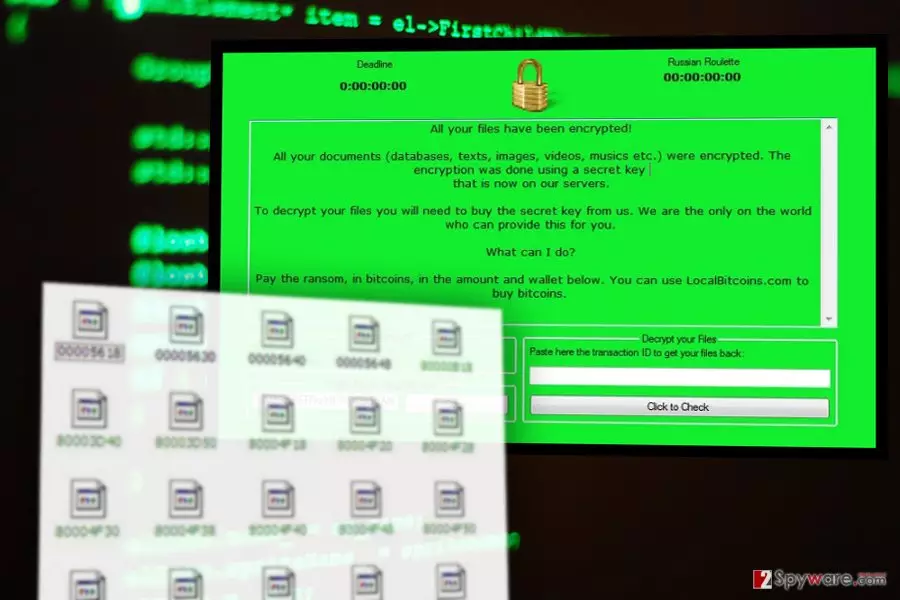
In the ransom note developers inform about data encryption and provide the deadline to complete their instructions. After RussianRoulette ransomware attack victims lose all their files: images, videos, music, texts, databases and other important files. For data encryption malware used “a secret key” that is held on hackers’ servers. Purchasing this key may be the only way to rescue encrypted files; however, we do not recommend doing that[2]. Hackers demand 0.3 Bitcoins and ask victims to transfer them to the particular Bitcoin Wallet. When the transaction is made, they have to enter their transaction ID and click “Click to Check” button. Then, follow other instructions how to decrypt their files. Sadly, there’s no guarantee that decryption tool, provided by the developers of RussianRoulette virus, will restore damaged files. Transferring the money may end up with the money loss and another malware infection. Security experts always remind that in case of ransomware attack, you should never pay the ransom. Moreover, the number of file-encrypting malware attacks keeps growing[3], so you should be prepared for the worst and make data backups. However, with you were unfortunate and got infected, you must concentrate on RussianRoulette removal. It won’t help to recover your files; however, if you do not have data backups, you can try additional data recovery method or backup encrypted files and wait for the decryption software.
How can I get infected with ransomware?
RussianRoulette malware is pretty new and still under investigation. However, the primary ransomware distribution method is malicious spam emails. There’s no surprise that it’s an effective way to attack inattentive and naïve computer users who tend to open any suspicious emails[4] and their attachments. However, some of innocent looking Word or PDF files might include malware executables. What is more, RussianRoulette ransomware might be spreading via malware-laden ads, fake software updates, and downloads or using exploit kits. Hence, you should be browsing the Internet and avoid suspicious places. Avoid high-risk websites and do not trust online ads, especially the ones that warns about low computer’s performance or various errors. It’s nearly impossible to be 100% protected from ransomware; however, you can take all precautions[5] to reduce the risk of the attack. Installing reputable antivirus software is one of the online security tips.
RussianRoulette removal
Bear in mind that it’s nearly impossible to remove RussianRoulette from the computer manually. Ransomware may be hiding under safe-looking files and folders, and you may accidentally delete necessary system components. Therefore, you have to remove malware using reputable and professional tools. We recommend installing FortectIntego, SpyHunterCombo Cleaner or MalwarebytesMalwarebytes and with the help of one of these programs delete ransomware from the computer. Automatic RussianRoulette removal requires scanning computer’s system with up-to-date software; however, malware can prevent you from doing this. If it happens to you, you have to restart your computer to the Safe Mode and try again. Detailed instructions how to reboot your PC and initiate automatic removal are presented below.
Did this guide help?
3 comments
Egards
Ransomware developers should go straight to jail!
bellamy95
Ok. I got inspired to backup my files.
player
Probably, hackers love to play Russian roulette xD