

How dangerous is Cancer virus?
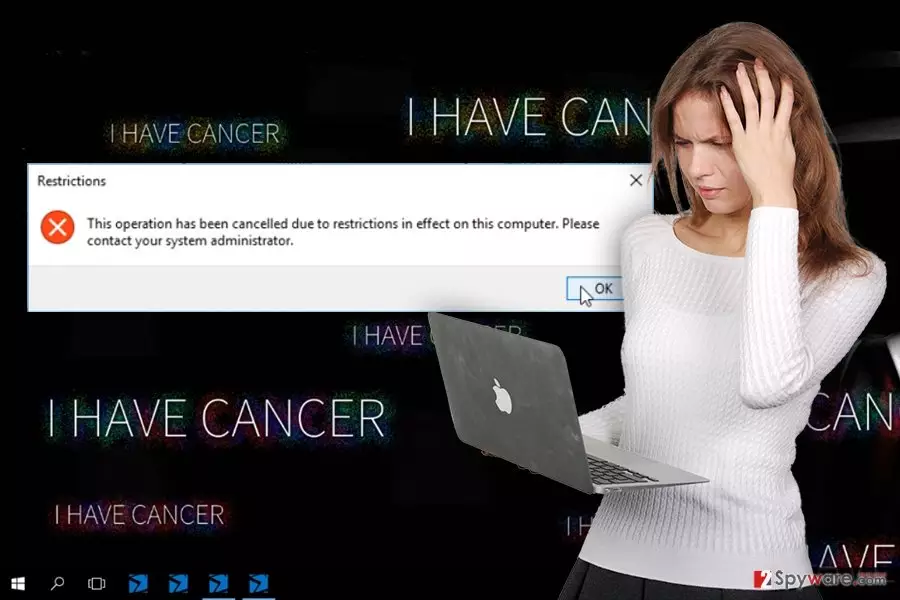
Cancer virus has been recently noticed spreading and pretending to be a hazardous file-encrypting malware[1]. However, it does not act like a typical encryption malware. It does not use any strong encryption algorithm to encrypt targeted files. What is more, malware does not demand to pay the ransom for data recovery. Cancer malware also resembles a lockscreen ransomware[2]. After infiltration, it starts running various processes and delivers unknown errors warning about system-related problems. These alerts might be impossible to close, or they may lock computer’s screen. Surprisingly, malware does not leave any ransom note[3] with instructions how you should treat this cyber infection. It only drops an ewwwwww ~ cancer.png file, which becomes a new background picture that includes unpleasant words “I have cancer.” Sadly, changing the wallpaper won’t help. In order to get rid of this cyber threat and all its negative features, you have to perform Cancer removal.
Cancer ransomware aims at Microsoft Office and OpenOffice documents, PDF and text files, various formats of images, audio or video files, archives, databases, and many other mostly used files. In this way, it makes the attack even worse because users are scared of losing their files. During this fake file-encryption process, malware appends a .cancer file extension to each affected file. However, it seems that you might be able to recover your files simply from Shadow Volume Copies, using Windows Previous Versions features or using other data recovery tools. After infiltration Cancer virus also renames C: drive to “CANCERRRRRRRRRRRRRRRRRRRRRRRRR.” The reason why it behaves in this way it’s unknown. This fake crypto-malware might be just a test version of a serious cyber threat that might appear on the Web soon. Cyber criminals may update the virus and launch another attack. However, next time they might use unbreakable encryption algorithms and demand to pay few Bitcoins for decryption software. Therefore, you should remove Cancer as soon as it appears on your computer and starts messing up with it. When you notice suspicious warnings or the changed wallpaper, run a full system scan with FortectIntego. However, if your computer’s screen is locked or you cannot install security software, scroll down till the end. There you will find instructions how to start the automatic removal.
How do hackers distribute the malware?
Cancer screenlocker virus is a brand new malware, and specific distribution techniques have not been discovered yet. Though, it seems that developers apply same old strategies to infiltrate computers. Malicious spam emails[4] and their attachments stay the main way how malware travels on the Web. Cyber criminals think of many reasons to convince people to open an infected email attachment; so, always be careful and do not rush opening the attachments. What is more, Cancer malware might also be using exploit kits, fake software updates[5], and installers. Hence, it’s important to choose secure sources for software installation and keep your programs updates. We highly recommend setting automatic updates because you won’t be bothered by suspicious ads claiming about the necessity to install some updates.
The step-by-step guide for Cancer removal
Cancer removal requires performing a full system scan with reputable malware removal software. Scanning the system with such tools as FortectIntego or MalwarebytesMalwarebytes ensures that all virus related-components will be found and removed from the system. Malware not only makes a havoc on your PC by messing up with your files, running various processes and delivering system warnings. It also makes your computer vulnerable. As a result, other malware and viruses may try to attack and cause even more damage to you. Therefore, remove Cancer as soon as it steps inside your computer and replaces the wallpaper. However, if you have difficulties with installing an anti-malware program or cannot run a full system scan, follow the instructions below.
Did this guide help?
3 comments
me
People have cancer, computers have cancer...
virus
I need decryptor so much!
josh
thanks to you guys, i got rid of this virus!