

Warnings coming from Winkeyexpired.xyz site – should I believe what they say?
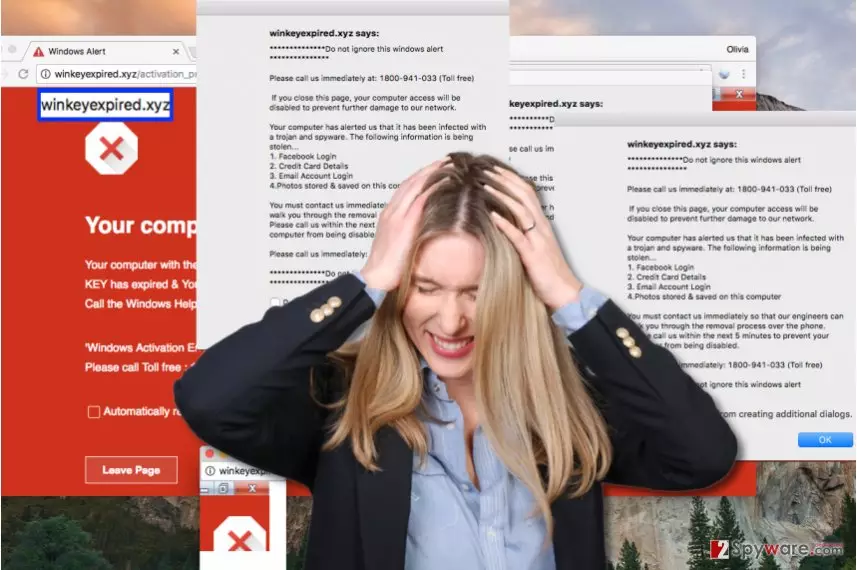
Winkeyexpired.xyz virus is a term that we use to define an annoying phishing[1] website created by tech support scammers. Unfortunately, it is still active. We assume that victims enter Winkeyexpired.xyz website when a malicious program[2] redirects them there, or after clicking a deceptive link while browsing the Internet or exploring email messages they received. The website says:
Your computer has been locked
Your computer with the IP address [redacted] has been infected by the Trojans– Because System Activation KEY has expired & Your information (for example, passwords, messages, and credit cards) have been stolen.
Windows Activation Error Code: 0x44578’ Lock Screen. To immediately rectify issue and prevent data lose
Please call Toll Free : 1800-941-033
The phishing website also repeatedly opens pop-ups that say “Do not ignore this windows alert,” however, let’s look into details. Can you see the grammar mistakes in this message? You should also hear an automated audio message read to you by a robot – it says that your system will crash in 5 minutes if you do nothing. However, we can assure you that it isn’t going to happen. This phishing site urges you to call that number, but rely on your common sense – it is nothing else but a pure tech support scam, which tries to frighten you and make you call scammers that will try to prey you. If you call the number provided in the message, you get in touch with a person who pretends to act like he/she is a “Microsoft technician.” Scammers typically speak with a strong indian accent and talk all kinds of bad things about your computer – that it is infected, that your personal data is stolen, that your windows key is expired, and so on. It is obvious that criminals try to scare victims and make them follow their commands without thinking – do not fall for such social engineering[3] tricks.
Frauds might use your trust to swindle sensitive information from you, for example, they can ask you to visit a legitimate-looking website and provide your credit card details there to “purchase a new windows key” or buy a suspicious security program; if you enter these details, they might be immediately transmitted to scammers. Frauds can also try to convince you to install remote access programs and let them log into your computer with an intention to plant malware there. It goes without saying that you should remove Winkeyexpired.xyz malware immediately – please use automatic malware removal programs for that. We recommend using FortectIntego software, but SpyHunterCombo Cleaner or MalwarebytesMalwarebytes are also good. Do not delay Winkeyexpired.xyz removal or these messages will keep bothering you again and again.
How did I get redirected to this malicious site?
We have already mentioned that Winkeyexpired.xyz malware causes redirects to the indicated phishing site; therefore, you should immediately get rid of it. This malicious program could slip into your computer without drawing your attention. You may have installed it alongside another shady program, or you may have opened a malicious email attachment[4]. Therefore, we recommend you to think twice before opening files added to vague-looking emails from unknown individuals, and install programs only with Custom/Advanced settings to see all additional items added to them. In addition, choose download sources wisely! Avoid shady file sharing sites – files downloaded from them are likely to contain spyware[5] or malware.
How to prevent these alerts from showing up and remove Winkeyexpired.xyz malware?
To remove Winkeyexpired.xyz virus, reboot your PC using guidelines provided below the article. You will need to restart your computer and make it run in a Safe Mode with Networking. This way, your hands will be free to remove the malware without errors or interruptions. For Winkeyexpired.xyz removal, employ a decent anti-malware software. It will thoroughly scan through system, check folders and files and inform you about all malicious detections. It takes only one click to remove all of them with automatic malware removal program, whereas it would take much more time to delete infectious files manually.
Did this guide help?
4 comments
Teyanna
Oh my God, thanks! I was about to call that scam number!
margharet
I cant believe how stupid these tech support scam websites look! I cant believe that there are people who fall for these deceptions... Poor people. Thanks, 2-Spyware, for providing relevant information about Winkeyexpired.xyz phishing site. Hope it will be shut down soon!
Rosy23
These fake warnings overwhelmed me, I was stressed out... im so glad this nightmare is over!
Dana
Thank you - I also fell for this scam. I installed several numerology-related apps, maybe one of them contained a virus?