

FileLocker virus is yet another crypto-ransomware that wants to collect ransoms
FileLocker virus is yet another ransomware[1] virus that some malware analysts identify as Czech-o-Slovak ransomware, Czech/Slovak ransomware or UserFilesLocker ransomware virus. However, we will call this ransomware virus FileLocker because it displays such name on the ransom note, which launches after UserFilesLocker.exe encrypts files on the compromised system. We want to point out that this ransomware targets media files only, and corrupts records that have these file extensions:
.avi, .mp4, .mkv, .div, .xvid, .webm, .flv, .ogv, .ogg, .mng, .mov, .qt, .wmv, . yuv, .rm, .rmvb, . asf, .mpeg, and .mpg.
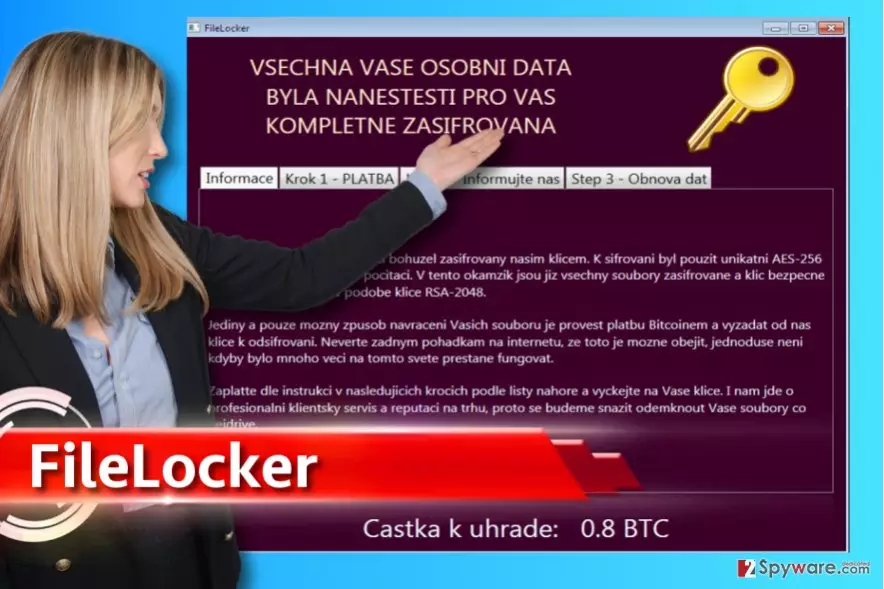
The virus reportedly uses AES-256[2] and RSA-2048 ciphers to damage victim’s files. Each encrypted file also gets .ENCR file extension (added after the original one, so for example, video.flv will become video.flv.ENCR). As a result, the files with .ENCR file extensions can no longer be opened. The ransomware then launches a program window called FileLocker, which provides information in Czech language. It says: “Vsechna vase osobni data byla nanesti pro vas kompletne zasifrovana,” which means “All your files were completely encrypted.” The ransomware explains that without having the decryption key, the victim shouldn’t even dream about the data recovery. The virus asks to transmit 0.8 BTC (approximately 960 USD) to the ransomware authors and promises to provide data recovery tools then. Just like any other ransomware virus, it wants to receive the payment via Bitcoin payment system[3], so it leaves a Bitcoin wallet address. As always, we do not recommend trusting cyber criminals and paying them – we know a lot of cases when they simply deceived the victim and never provided the decryption tool even if the ransom was paid[4]. FileLocker ransomware even gives a lesson for the victim (rough translation): “professional customer service is what makes the reputation in the market, so better do something to unlock your files sooner.” We do not recommend you to follow this advice if you do not want to risk losing your money just like you lost your files. Instead, remove FileLocker ransomware virus with malware removal tools such as FortectIntego.
How did I get infected with this ransom-demanding virus?
Your files were encrypted by ransomware because you either visited a compromised website, opened a malicious email attachment or installed some kind of illegal programs (pirated ones). If you know how you got infected with ransomware, make sure not to repeat the same mistake in the future. However, it is not only careless browsing that can make you end up with ransomware on the system. Malicious viruses can sneak into your system using various technologies that help to exploit software vulnerabilities[5], or you can become a victim of a social engineering attack, too. There is no versatile way to protect yourself from ever-evolving ransomware, but if you layer up with protection measures, you should be fine. To start with, we suggest creating backups and installing anti-malware software. Do not forget to update the anti-malware software, as well as all other programs you have on your PC.
How to remove FileLocker ransomware?
If your files were compromised by FileLocker virus, do not try to improve the situation by deleting virus’ files manually. We suggest you prepare your computer for FileLocker removal by booting the system in a Safe Mode with Networking first. Once you do that, run or install anti-malware software and let it scan the system thoroughly. It might take a while, but be patient. Once it finishes the scan, delete all malicious files at once. Below, you will find a step-by-step FileLocker removal guide that explains everything in-detail.
Did this guide help?
3 comments
Helpz
I cant believe it - i just got infected with this cr4p!
guga
FileLocker virus just encrypted all of my files! I dont know what to do! Please help, I dont have a backup!
9_384
Hey if someone can provide a decryptor for analysis I would be thankful:)