

Lock2017 ransomware can corrupt your files irretrievably
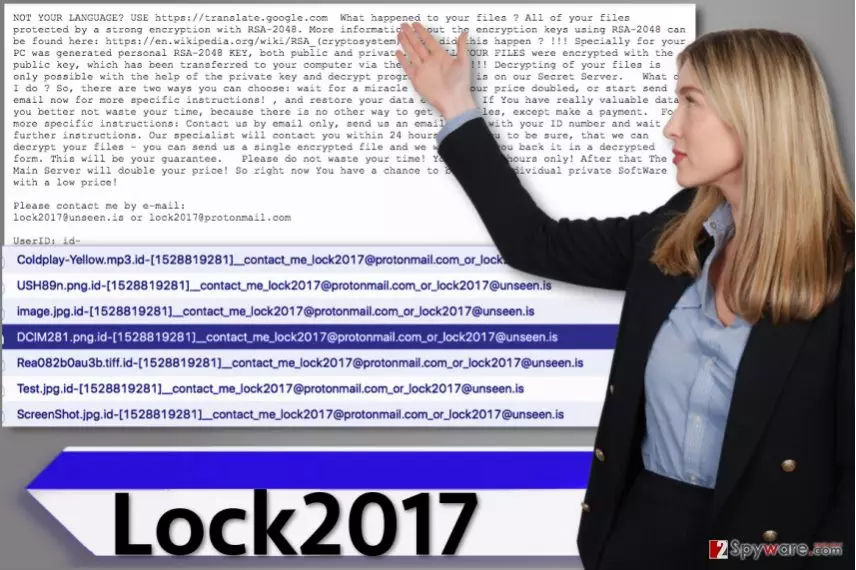
Lock2017 ransomware[1] was first spotted by security researchers back in early 2017. Once installed, it will encrypt all of your files, including pictures, documents, videos, and other important files. This way, you can lose years of work in just a few minutes because ransomware viruses act rapidly[2].
You might not even be able to notice a thing during the encryption process, except when the ransomware finishes its work and encrypts final files on the desktop. The virus then leaves a ransom note[3] which explains what happened to the computer and what needs to be done in order to recover corrupted files. The note is titled README.TXT file and explains that all files were encrypted using the RSA-2048 cryptography method and created a decryption key simultaneously.
| Name | Lock2017 ransomware |
| Type | File locking virus |
| Encryption | RSA-2048 |
| Contact emails | lock2017@unseen.is or lock2017@protonmail.com |
| Malware removal | Perform a full system scan with SpyHunterCombo Cleaner or another anti-malware software |
| System fix | If Windows starts crashing or delivering errors after ransomware elimination, try fixing virus damage automatically with FortectIntego |
Sadly, the decryption key immediately gets transferred to criminals’ private servers, which means it becomes inaccessible for the computer user. Consequently, the virus wants the victim to do something in order to get this key. The virus asks the victim to get in touch with the criminals via two provided email addresses:
- lock2017@unseen.is
- lock2017@protonmail.com.
It asks to provide the victim’s ID, written in the ransom note, and wait for further instructions from ransomware authors. According to the message, their “specialist” should contact the victim within 24 hours. The victim is asked to contact criminals in 72 hours otherwise, the “main server” will double the ransom price for the victim.
The ransomware marks each encrypted file with an extremely long extension. The new file extension contains both email addresses in it. This is how the extension looks as following:
.id-[victim’s ID number(10 digits)]__contact_me_lock2017@protonmail.com_or_lock2017@unseen.is
We assume that the virus's author wanted to be sure the victim notices these emails… and contacts him/her immediately. However, if you noticed that your files became inaccessible or that a suspicious .txt or .hta file reveals a message from strangers asking you to pay money to them, remove Lock2017 ransomware right away using the anti-malware program (FortectIntego or SpyHunterCombo Cleaner).
Although you might not be able to recover your files (if you do not have a backup), paying the ransom is not an option. It is also not safe, and you might just lose your money in exchange for nothing. You can find some data recovery tips right below the malware removal guide below the article.
Ransomware distribution methods
This malware certainly spreads via malicious spam[4], and that means you can get this ransomware via email. It might arrive in your Inbox in the form of a legitimate-looking document, archive, or PDF file, which, once opened, will execute the virus program and encrypt all your files.
To prevent such disastrous events, you have to avoid emails coming from unknown people/companies. Do not be tricked and do not let your curiosity win, no matter what the email subject line says. Even if it says that you just got your medical test results or that you have an invoice waiting for a review[5], ignore it.
The most important thing that you should do is to check the email address of the sender. Chances are, it contains a few grammar mistakes or comes from someone who obviously doesn’t use an official company’s email. Finally, we suggest you keep all your programs up-to-date and install an anti-malware software for computer protection.
Remove Lock2017 ransomware and all malware from you computer
While you can easily remove potentially unwanted programs, ransomware viruses are totally different, and to remove them precisely, you need to have particular computing knowledge and skills. If you are not willing to risk, better remove the virus with anti-malware software.
It is an excellent way to detect all dangerous programs and remove them at once, whereas manual malware removal procedure would take much longer, and you would still risk leaving a couple of malicious components on the system. If you are ready to begin, please read this virus removal tutorial first.
Did this guide help?
4 comments
lordaz
I was infected with this malware!
Joanne
Cannot open my files because they were just locked by this ransomware! I need my documents in less than a week otherwise I will not pass my tests! someone please help me!
Buh273
Please can someone help me and provide the decryption tool...
Phoebe
Thanks so much for your help. i removed the ransomware and used the backup I had!