

Minecraft fans are now targeted by VapeLauncher ransomware:
If you haven’t heard about VapeLauncher virus yet — don’t worry. You will learn everything you need to know about this parasite [1] in the following paragraphs. In case you landed on this page while looking for ransomware removal advice, you will find helpful suggestions at the end of the article as well. In addition, to speed up the process and ensure that VapeLauncher removal goes smoothly, we recommend scanning your device with some automatic anti-malware tools. FortectIntego is one of the anti-malware options you can go for. Of course, you can choose any other anti-ransomware software, just make sure it is legitimate and capable of eliminating ransomware like VapeLauncher from the infected computers.
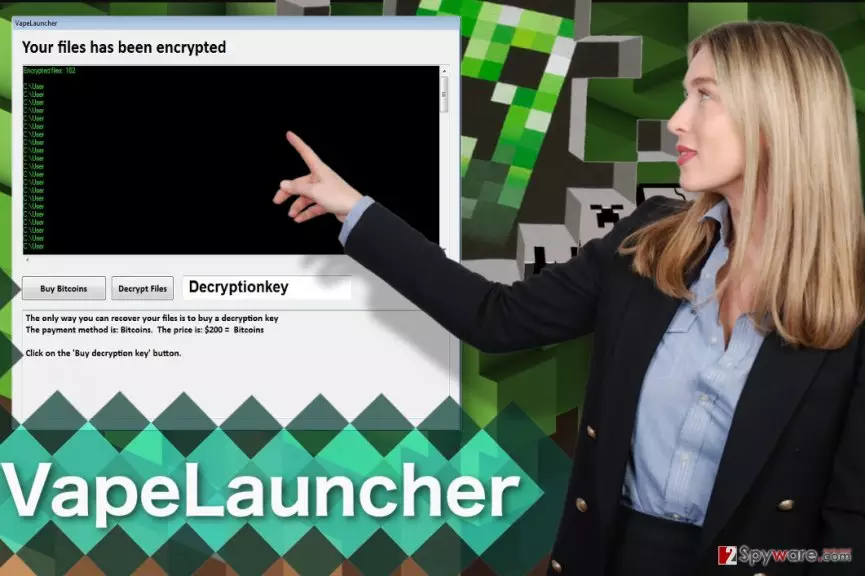
We should start the VapeLauncher overview from the very beginning, in particular, from the very origins of this parasite. After conducting an investigation, the experts have discovered one thing — this virus is not an original malware built from scratch. In fact, Vape Launcher is based on an educational ransomware called CryptoWire which can be downloaded from the software development platform Github [2] for free. Unfortunately, as the history has proven, educational ransomware projects never end well. We have witnessed numerous malicious derivatives of HiddenTear and EDA2 in the past, and CryptoWire is not an exception either. VapeLauncher developers have adapted its source code to create a file-encrypting ransomware (using the AES-256 algorithm) which can only be decrypted with the special key. Besides, the virus is also programmed to delete Volume Shadow Copies [3] of the files as well as destroy backup images [4] to make the files impossible to decrypt using alternative methods or third-party software such as ShadowExplorer. Thus, after the infiltration, the files located in AppData, Program Data, Windows, Program Files and Program Files (x86) folders become impossible to access. Besides, the hackers also claim that the virus also encrypts all data found in “Network drives, Network Shares, USB Drives/Sticks, Externals Disks, Internal Disks, Games (Steam), Onedrive, Dropbox, Google Drive.” We should point out that the encryption is silent and goes by without adding specific extensions to the encrypted documents. Nevertheless, the virus will let you know about its hijack by overwriting your system boot settings. This way, when you try to launch your computer, the boot process will be interrupted by an “error” screen displaying the following message:
‘Your files has been safely encrypted
The only way you can recover your files is to buy a decryption key
The payment method is Bitcoins. The price is $200 = 0.2909 Bitcoins’
While 200 dollars may not seem that big of a price to pay for the ability to access your personal files once again, it is better that you refrain from any type of collaboration with the criminals. Keep in mind that it is not you alone that they target. There are also hundreds of other victims that are being wrenched out of money. So, depending on the dispersion of the virus, the hackers may earn thousands of dollars a day, easily support themselves and dedicate their time for creating malicious software in the future.
How is this cyber parasite delivered on the computer?
VapeLauncher virus seems to be targeted specifically at Minecraft players: the name of the bundle it travels around is called Vape2.6-Minecrafthax.net.zip. This Zip archive contains a file called Vape Launcher.exe which is responsible for launching the scan and encryption of the system. Infectious “MinecraftHax” bundles are likely to be promoted on some unreliable websites and software download pages, so you should be careful about the sources you choose for downloading your software. Besides, it is also advisable to always make sure your downloaded content is safe by scanning the item in question with a reliable antivirus scanner and running the installation in the Advanced mode [5].
Remove VapeLauncher and get back your files:
While most users think it is impossible to remove VapeLauncher virus, our experts can assure you — it is not true. You can eliminate the virus from your computer without much difficulty. You just need to dedicate some time and obtain proper tools to make sure the removal goes smoothly. Even if you get stuck with VapeLauncher removal and the virus tries to prevent your antivirus from running the system scan, there are still ways to work around it. In the instructions below we give detailed instructions for the most effective VapeLauncher elimination.
Did this guide help?
Be the first to comment