

The latest news about File-Help@india.com ransomware virus
File-Help@india.com virus appears to be a ransomware-type program[1] that tries to extort victims after encrypting their files with RSA cryptography. Once this piece of Globe ransomware-based[2] malware slips into a computer, it runs itself and starts a process, which is in charge for encrypting data stored on the computer. The process also scrambles the original file names and adds .File-Help@india.com.mails file extension to them. This extension clarifies that the file has been modified. The virus then completes these tasks:
- bcdedit.exe /set {default} bootstatuspolicy ignoreallfailures
- vssadmin.exe Delete Shadows /All /Quiet
- bcdedit.exe /set {default} recoveryenabled No
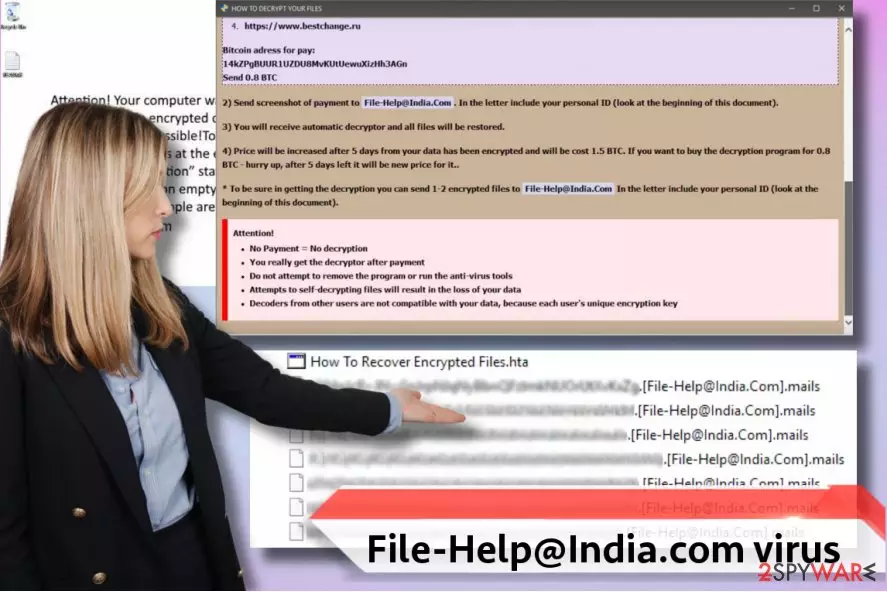
Once these tasks are completed, the victim loses the chance to recover files from Volume Shadow copies[3]. The virus also disables Startup Repair[4]. As soon as the malware modifies all files, it stops and creates a How to Recover Files.hta ransom note, which carries victim’s personal ID, some information about the ransomware and instructions on how to purchase a decrypter. Criminals ask the victim to write them to File-Help@india.com email or use Bitmessage service instead. The ransom note also informs that the victim has seven days to purchase the decryption key; otherwise, it will be removed from criminals’ servers for good. The ransomware says that it wants to get 0.8 BTC in exchange for the unique decryption key, which can restore victim’s files. It promises to increase the price within five days to 1.5 BTC if the victim fails to pay on time. The ransom note says that victims “really get the decryptor” after paying; however, we do not tend to believe what cyber criminals say.

The ransomware industry is booming because of victims who pay ransoms[5] to the cyber criminals, so please, do not motivate ransomware crooks by giving them your money. File-Help@india.com ransomware mostly targets businesses that can and will pay the ransom, but if you are a home user who encountered a ransomware attack, try to find copies of your files in CDs, DVDs, Dropbox, email account, and other data storage means. Before trying to find these files, remove File-Help@india.com ransomware with a powerful virus removal tool such as FortectIntego. We heartily suggest you use an automatic ransomware removal tool instead of trying to delete the virus on your own because you can easily miss a couple of malicious files and leave your system vulnerable to further infections this way. A full system clean-up should be done using only professional anti-spyware or anti-malware tools!
How did ransomware manage to get into my computer system?
You should be extremely cautious when opening emails sent by unsolicited individuals, and remember that cyber criminals can name themselves however they want. They can easily create a fake email that seems to belong to Amazon or Paypal employee, and use it to send malicious letters to people. Before you open an email, inspect the sender’s email address and, if you are unsure about the genuineness of it, search it up online. You can even call the company that ostensibly sent you the letter and ask them about the message and files attached to it. Finally, it is essential to use up-to-date programs, because if you forget to update them and use their old versions, they make your computer vulnerable to malware attacks. Cyber criminals can easily exploit vulnerabilities in outdated software and execute commands via them. This way, they can infect your computer with ransomware or nasty Trojans quickly.
Best tricks to remove File-Help@india.com ransomware
When a certain ransomware hits a computer, users start looking for information about it online, and of course, they try to find ways to decrypt their files. Sadly, speaking about data recovery means, backups are still the number one antidote to ransomware attack. If you have a backup, you can simply remove encrypted files along with the virus and import untouched data copies to the system. However, if you do not have a backup, it can take months, if not years to recover your data. However, you can try using Globe decryption tool after File-Help@india.com removal – it might help you to restore some files. You can find more data restoration options below.
Did this guide help?
3 comments
Josie
Cannot get rid of this ransomware.... The ransom note wont disappear from the screen even if I try to close it... I think my computer is not responding!
AnthonWilliams
Thanks for the help. I had a backup that I used to restore my files. Im glad that you described the ransomware so precisely - now I understand how these viruses work. Good job!
dylan
MY FILES ARE GONE OH MY GOD! I do not have backups!!!! Please, dont tell me it is not possible to recover them!