

Cradle ransomware virus is offered as a RaaS
Cradle is a ransomware virus which emerged in April 2017[1]. It is also known as CradleCore and CradleCore C++ ransomware-as-a-service (RaaS). These names were given to this threat because it tends to add .cradle file extension to the files it corrupts. The ransom note which is opened by default on victim’s web browser is called _HOW_TO_UNLOCK_FILES_.html. It claims that there is the only way to recover encrypted files – to pay the ransom of 0.25 Bitcoins[2]. In case the victim refuses to pay the ransom and fails to change his or hers mind within 14 days, the ransomware promises to leave victim’s files “locked forever,” in other words, it will destroy the decryption key. From the first day of virus detection, the “Contact” page of Cradle ransomware has been saying: “Ransomware Source Code for sale.” It suggested an idea that the virus might be a RaaS[3]. It seems that it is true, so beware that there might be more copies based on the CradleCore spreading on the Internet.
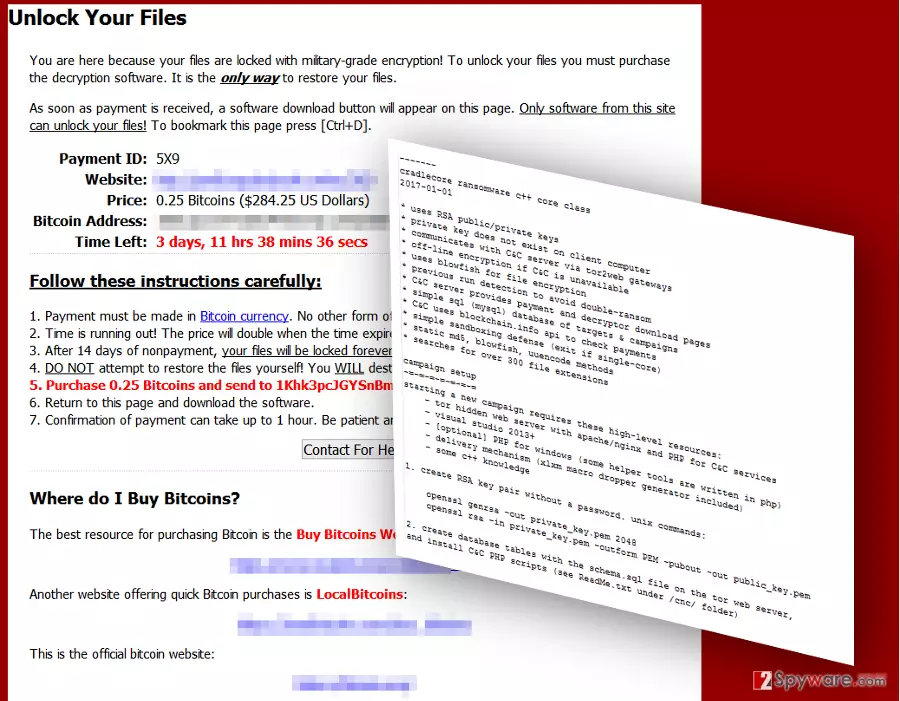
Once installed, ransomware starts encrypting all victim’s files that it finds as it scans the computer system thoroughly. CradleCore makes the encrypted files inaccessible and drops a ransom note on each of web browsers. This ransom-demanding message, just like the majority of similar notes, informs the victim that his or hers files were encrypted with military-grade encryption and that the only way to restore corrupted files is to purchase a private decryption key. The ransomware demands to pay the ransom within seven days; otherwise, the price will be doubled. _HOW_TO_UNLOCK_FILES_.html file also provides the address of Bitcoin wallet that belongs to cyber criminals and asks to transfer purchased Bitcoins to it. Finally, the note provides some links to websites where the victim can obtain some Bitcoins. We really hope that you won’t think about making the payment to hackers. Before you start trying to restore your records, make sure Cradle removal process is completed successfully. For that, we recommend using FortectIntego software.
Cradle ransomware is nothing else than a filthy cyber extortion tool[4] which is used to infect computers of unsuspecting computer users who like to explore the world wide web without having a decent anti-malware software to protect their computers from malware attacks. Consequently, these users lose all of their files in seconds, and there’s no one to blame because it is nearly impossible to track down cyber criminals[5]. If your files were encrypted, we are sure that you will be on a hunt for decryption tools; however, we can save you some time by explaining that it is nearly impossible to restore files once ransomware encrypts them. The only way to restore them is to reverse the encryption process, and for that, the decryption key is needed. It is the private key that is kept in criminals’ servers, and there is no way to get it unless cyber criminals willingly provide it. However, it rarely happens, so we suggest you remove CradleCore using anti-malware tools and use data backup to restore your files.

Speculations have been confirmed: the ransomware comes as CradleCore RaaS
Racketeers seem to enjoy dropping hints. However, their hints often happen to come true. Shortly after the original version was introduced, virus researchers have detected its version as CradleCore C++ ransomware-as-a-service (RaaS). It operates via Tor2Web onion link gateways. Its operation peculiarities do not differ much from the rest of crypto-malware. It employs RSA and Blowfish encryption key for data encoding purpose. It also connects to Command and Control server to make a direct request for the decrypter in case a victim decides to remit the payment. In the ransom note, it does not waste a chance to scare victims not to opt for alternative solutions. The very RaaS malware is offered for $428. Interestingly, that the developer of this malware seemed to make a fatal mistake which helps virus researchers reveal his identity! The Apache elements of the ransomware site trace to the developers’ website used in the clearnet. the indicated onion.link has its identical counterpart used in World Wide Web domain. Thus, this link even leads to the hacker’s personal Twitter and Facebook accounts[6]. Such disclosure indicates that the hacker is a freelancer C++ programmer and software developer. Such fatal mistakes may cost highly more for the crook in contrast to the estimated profit collected from RaaS earnings.
Ransomware prevention techniques
To prevent infiltration of ransomware virus, you should know that the main methods used to infect systems with such viruses are spam and exploit kits. To know more, carefully look into these the following ransomware distribution methods and tips how to protect your PC from a ransomware attack.
- First of all, the main ransomware attack vector is email spam. Typically, users get dozens of malicious emails, but the majority of them falls into Spam section, which users typically tend to ignore. However, some malware-laden virtual letters are designed so precisely and sent from specifically prepared email accounts, and consequently, they manage to slip into Inbox folder, and users usually believe that these emails are trustworthy. The main rule to follow when trying to avoid ransomware is to avoid opening emails sent by unknown users or companies that you recently had no business with.
- The second attack vector is exploit kits. Exploit kits typically are hosted on infected websites or precisely prepared malicious domains, and as soon as the user visits or gets redirected to such site, the exploit kit scan’s victim’s computer for software with security vulnerabilities. If found, it uses such vulnerabilities to execute malicious scripts on victim’s PC. Keep your programs up-to-date if you do not want to be attacked by ransomware spread by exploit kits.
Eliminating Cradle crypto-malware from computer
The easiest and quickest way to remove Cradle virus is to use anti-malware software. We do not provide or recommend trying to delete the virus manually because ransomware is highly sophisticated and shady piece of software that tries to stay in the system for as long as it is possible. To delete the virus efficiently, reboot your PC according to CradleCore removal guidelines provided below. Submit your questions to our support team if you have any – we hope that you have a backup and you will manage to restore all of your files successfully.
Did this guide help?
4 comments
Zalb
Ive been infected with this! patiently waiting for a decryption tool to arrive!
noble
I dont know if I was ever more disappointed in my life than at the moment I saw those words : no decryption tool available...
Whale
Thanks! Deleted the virus, had a backup. No worries for me, whew :D
starlight_c
So ttheres really no way to open the files?:((