

The main facts about Select Region Tech support scam
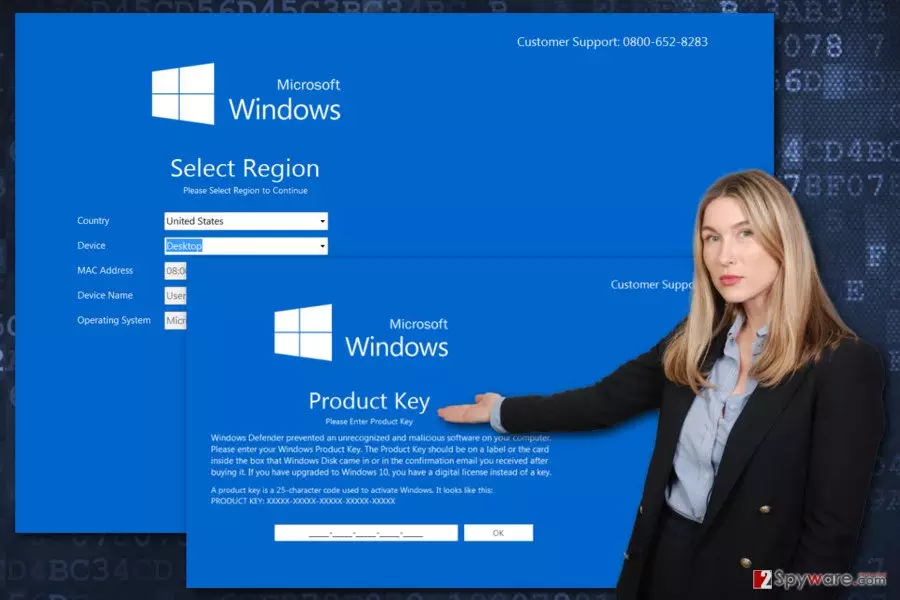
Select Region Tech support scam virus as an example of badware[1] that tries to fool computer users that Windows Defender[2] detected malware on their computers. Some trojan horse is responsible for delivering a misleading lock screen message that resembles a legitimate Microsoft Windows service. However, the phone number provided at the right top corner of the screen exposes that it’s a scam. Thus, the purpose of Select Region Tech support scam is to make victims call to the fake support line. The scammers use a quite sophisticated technique. First of all, people need to select country, region and enter other information to the screen-locker. Once they click “Next” button, they are asked to enter the Product or Licence key. The message explains that Windows Defender detected and prevented some malicious activities on the computer. As a result, people need to enter the key again. However, after entering these details, something will definitely go wrong. For some reason, the key will be invalid, and you will need to dial the tech support number. At least, that’s what people behind Select Region Tech support scam malware are wishing for.
However, reaching for your phone and dialing 0800-652-8283 is not recommended. This number is associated with another tech support scam that was aimed at Mac OS users earlier this year.[3] It seems that scammers try to expand their target field attacking Windows users. Thus, if this Trojan locked your computer’s screen, you should not start looking for your Windows key. Instead of that, remove Select Region Tech support scam virus from the system. Also, we want to remind that Microsoft does not provide support via phone.[4] Hence, if you ever receive some message, pop-up or notification from Window that informs about computer-related issues and asks to call the support line, you can be sure that some scammers are trying to fool you. Lastly, we want to point out that Select Region Tech support scam removal needs to be initiated with a help of reputable security tools. Trojans are dangerous cyber infections that have to be terminated with programs such as FortectIntego or SpyHunterCombo Cleaner.
How does this Trojan spread and infect computers?
The most common way for the Trojan, which is responsible for the “Select Region” virus, to spread is rough downloads. This trojan can be disguised as program, movie or other files that you can download from the Internet. For this reason, it’s crucial to choose reliable sources for the downloads. If you are looking for illegal programs or do not want to pay for watching TV shows, you risk of installing Trojan or other malware on the computer. If you need to install some free program, please choose publisher’s website and use Advanced/Custom installation setup that allows opting out all questionable entries from the software package.[5] What is more, Select Region Tech support scam virus might also be spreading via malicious email attachments and drive-by downloads. Thus, you should never trust unknown emails that urge to open the attached document or link, as well as various ads that offer to check your computer’s security or install unknown security tools.
How to get rid of Select Region Tech support scam?
The main problem with Select Region removal is lock screen windows. Thus, first of all, you need to disable the screen-locker:
1. In the first lock screen, enter necessary information (country, device, etc.) in order to activate the “Next” button. Then, click on it.
2. In the second lock screen enter random 25 characters that are supposed to be your Product key/ Digital license key. Click OK. Now you should see the message that your entered key cannot be used for the activation.
3. Click on the lower right square of the Windows logo:

This action will trigger new support options GoToAssist, Support, and LogeMeIn:

4. Click on the Support button. You will receive a User Account Control window which asks whether you want to allow the following program to make changes on the computer. Click Yes.
5. The previous step will launch the support page on the browser. Do not close it. If you close it, you will lose access to your computer. You just need to minimize it. Now you disabled the lock screen and can perform Trojan’s removal.
In order to remove Select Region Tech support scam virus from the system, you must use reputable security tools. We recommend dedicating this task for FortectIntego, MalwarebytesMalwarebytes or SpyHunterCombo Cleaner. Install one of these programs and run a full system scan several times. Malware removal program will find and delete this nasty Trojan. We want to warn you than trying to terminate this Trojan manually, may lead to the irreparable damage.
Did this guide help?
3 comments
Bee
Thanks for the great removal instructions! Malware is gone!
Marcel
Microsoft should do something about these scams...
Ada
I have no idea how this virus got inside my computer... but i managed to remove it. I promised myself to protect computer with strong antivirus. Dont want to get infected again.