

Oled ransomware encrypts your files to have a reason for demanding a ransom
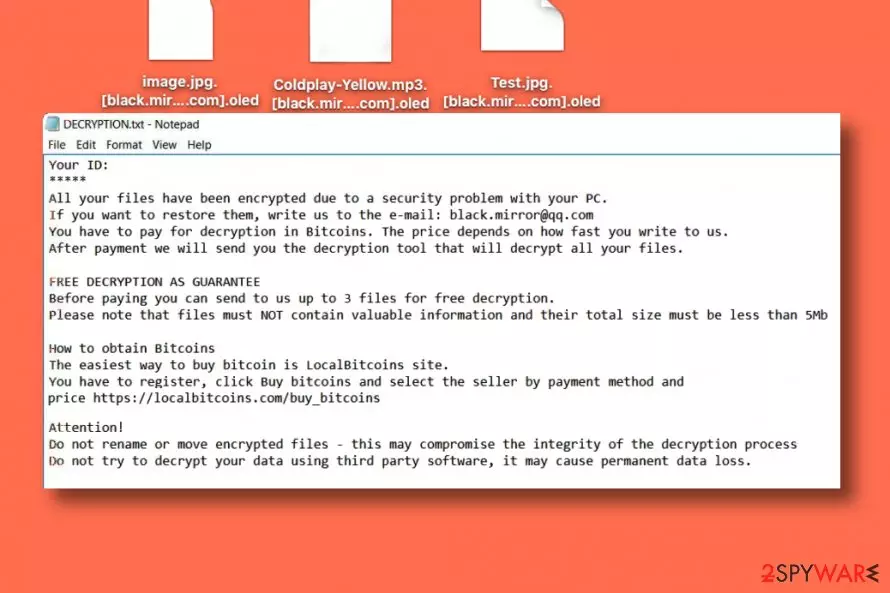
Oled virus is a ransomware program that cripples personal files stored on the system and marks each of them with [black.mirror@qq.com].oled extensions. Following a successful data encryption, the virus drops a text file called DECRYPTION.txt on the desktop. This file is a ransom note[1] that contains information on how to restore files encrypted by the ransomware.
It holds victim’s ID number, criminals’ email address – black.mirror@qq.com, and a link to LocalBitcoins for those willing to pay a ransom. The criminals suggest that the sooner the victim writes to them, the lower the ransom price will be. The attackers also suggest providing proof for those who do not believe that data decryption is within criminals’ discretion – the victim is invited to send up to 3 files for free decryption; however, their total size must not exceed 5 Mb.
The more recent version of the threat also revealed the relation with additional threats and new features that indicate the Oled ransomware virus attack. readme-warning.txt is the ransom note file that is the same for other versions of the same family, like KJHslgjkjdfg ransomware. New releases also include oled@airmail.cc as a primary email for the developers. It is possible that 2020 may present more advanced attacks of this ransomware family. Recent detection[2] rates show that anti-malware tools can possibly help with such infections, there is no reason to consider paying the ransom.
| Name | Oled |
|---|---|
| Type | Ransomware |
| File extension | .oled, full pattern with an email address |
| Emails | oled@airmail.cc, black.mirror@qq.com |
| Ransom notes | DECRYPTION.txt, readme-warning.txt |
| Distribution | Malicious files, other malware, and malicious sites |
| Known since | 2017 |
| Elimination | Oled ransomware removal gives best results when performed using anti-malware tools and security software |
| Recovery | You need to recover the system and repair damage using FortectIntego or system tools before you go for any data recovery options, so secondary encryption can be avoided |
Currently, victims whose computers were compromised by this ransomware can only restore files using data backups since there are no third-party tools capable of decrypting .oled files. We also advise removing the virus as soon as possible because it is an extremely dangerous computer program that poses a threat to the computer and your privacy. Having it on the system increases the risk of attracting even more malware to the system. For Oled ransomware removal, we suggest using proper anti-malware software.
The ransom note that Oled delivers for victims state:
Your ID:
*****
All your files have been encrypted due to a security problem with your PC.
If you want to restore them, write us to the e-mail: black.mirror@qq.com
You have to pay for decryption in Bitcoins. The price depends on how fast you write to us.
After payment we will send you the decryption tool that will decrypt all your files.
FREE DECRYPTION AS GUARANTEE
Before paying you can send to us up to 3 files for free decryption.
Please note that files must NOT contain valuable information and their total size must be less than 5Mb
How to obtain Bitcoins
The easiest way to buy bitcoin is LocalBitcoins site.
You have to register, click Buy bitcoins and select the seller by payment method and price https://localbitcoins.com/buy_bitcoins
Attention!
Do not rename or move encrypted files – this may compromise the integrity of the decryption process
Do not try to decrypt your data using third party software, it may cause permanent data loss.
Oled ransomware can damage your files permanently, and it might no longer be possible to open them ever again. It uses a sophisticated encryption method that allows changing files on a structural level. Such modification can be reversed only with the help of a decryption key, which is also known as a private key[3].
The private key is required to restore corrupted files; however, criminals keep it on their servers and suggest victims buy it for a particular price in order to recover files. Sadly, ransomware crooks are not the people that can be trusted, so we highly recommend you remove Oled virus without any doubts and not pay the ransom.
You have already lost your files – do not take the risk of losing your data as well. If you have a data backup of simply copies of your files on an external data storage device such as USB, hard drive or in online data storage services such as DropBox, kill the Oled ransomware virus and then import intact file copies to the computer system. Fix virus damage using FortectIntego, for example.
Distribution of ransomware includes shady infiltration and malicious files
Ransomware viruses are typically installed on the victim’s computer using various fraudulent means. In most cases, criminals add malicious files to emails they send to thousands of victims with subject lines related to well-known companies and services. Nowadays, ransomware no longer travels in the form of .exe files, and in fact, the majority of email services do not allow sending such file format anymore. Now they either inject the virus into Word or Excel files or spread it in the form of a JavaScript file.
Launching such files makes the malicious script connect to a particular web page and download the ransomware from there. If you want to prevent ransomware from encrypting your files, consider installing a good anti-malware software and bypassing suspicious emails that fall into your Inbox folder.
It is also advisable to never visit Internet pages that seem to be untrustworthy or deceptive. If you follow these easy rules, you shouldn’t lose your files due to a ransomware attack. For extra protection, create yourself a data backup, so you can recover from ransomware attacks quickly.
Remove Oled ransomware fully from the system without leaving anything behind
Ransomware is a fearsome computer infection that should be removed from the system as soon as possible. To remove Oled ransomware virus, restart your PC and run it in Safe Mode with Networking. Once you do so, install a good anti-malware software and run a complete system scan with it. Security tools like SpyHunterCombo Cleaner or MalwarebytesMalwarebytes an help you clean the system.
Be patient while it scans your computer system and wait until it removes all malicious files and folders for you. After Oled ransomware removal, reboot your PC into normal mode again and run one more system scan. This can double-check for you and ensure that all traces get deleted. Of course, PC repair tools like FortectIntego can be useful too since affected files can trigger other processes after the cleaning too.
Before you do anything else, make the system clear of virus damage and any associated threats. Oled files virus is not decryptable but can be eliminated. Once you do that, rely on data backups and replace affected files with safe copies.
Did this guide help?
Be the first to comment