

Widia lock screen virus threatens users with data destruction but does not allow to pay ransom
Widia virus is a new cyber infection which follows the trend of lock screen viruses [1] and unlike crypto-ransomware, prevents victims from accessing their files by interfering with the regular system’s boot up process. The system’s bootup stops at a multicolored Widia’s lock screen window claiming that the victim’s files have supposedly been encrypted and the only way to get them back is to purchase the private recovery key from the virus developers. The victims are only spared miserable 24 hours to pay the ransom. The criminals set up the timer to countdown seconds until the payment deadline, after which the faith of the victim’s files becomes even more obscure. The most unique aspect of this malware is that the criminals behind it ask the victims to pay an unspecified amount of ransom via credit card transaction. Experienced crooks don’t do that simply because banking operations can be easily tracked down, exposing the scammers’ identities and resulting in their prosecution. This might suggest that either this virus was originally intended as a prank, or was designed by inexperienced cybercriminal wannabes as an attempt to generate easy money. If it’s the latter case, the crooks have failed miserably — the “Check” button which should submit credit card details does not work, and the ransomware itself does not seem to have any affect on the computer files. The documents remain healthy; the only problem is the lock screen removal. Virus executable Wd0w.exe disables system management utilities such as Task Manager, UAC [2] and kills processes such regedit.exe or Explorer.exe to prevent the victim from escaping the lock screen. Fortunately, there are alternative ways to get back the access to your computer. We will discuss them at the end of the article. It is important to note that after you regain control over your system, you must carry out a thorough scan with some malware-detection software immediately. You may use FortectIntego — a versatile tool which will remove Widia and clean malicious registry entries at the same time.
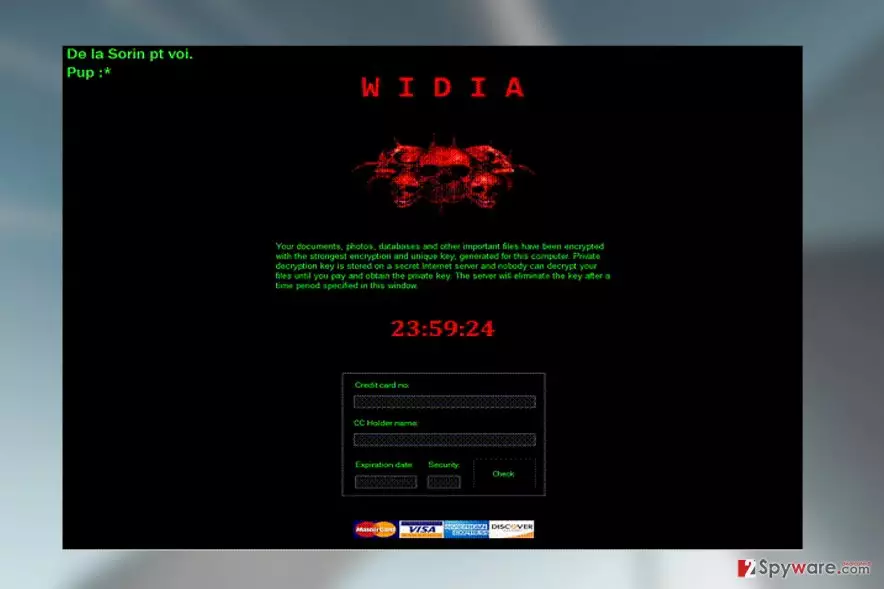
If you are interested to read through the actual ransom note that Widia leaves on the infected computer, you can find its transcription below:
Your documents, photos, databases and other important files have been encrypted with the strongest encryption and unique key, generated for this computer. Private decryption key is stored on a secret Internet server and nobody can decrypt your files until you pay and obtain the private key. The server will eliminate the key after a time period specified in this window.
We should emphasize that though this ransomware does not encrypt files, it does not mean it does not serve some other malicious purpose behind the surface. Perhaps it is some kind of phishing apparatus which collects your banking credentials in order to use them for heists in the future. Thus, you should not even attempt to enter any of your sensitive data in the given slots and proceed with Widia removal immediately.

Scareware employs regular ransomware distribution techniques to infiltrate computers
Widia may not be a full-blown crypto-ransomware but it sure may spread like one. The virus can be easily implemented into freeware download links and you may unknowingly download it on your computer. Besides, you may accidentally allow the malware on your PC when opening infected email attachments disguised as speeding tickets, parcel delivery notifications and other files that provide seemingly relevant information. Regardless of what way Widia chooses to reach your computer, it will need you to activate it by launching its executable. So, memorize the file name Wd0w.exe and do not open it if you find it on your computer!
Widia removal can be completed after terminating the lock screen
It all sounds simple: exit the lock screen, run antivirus and allow it to remove Widia virus from your computer. But when it comes to actual Widia removal, things may get quite complicated. To lessen the chances of the malware elimination errors, we recommend to look through the guidelines our experts have prepared at the end of this article. We hope you will find them helpful!
Did this guide help?
Be the first to comment