

Facebook ransomware — a dangerous cyber threat which wipes out the data on the PC
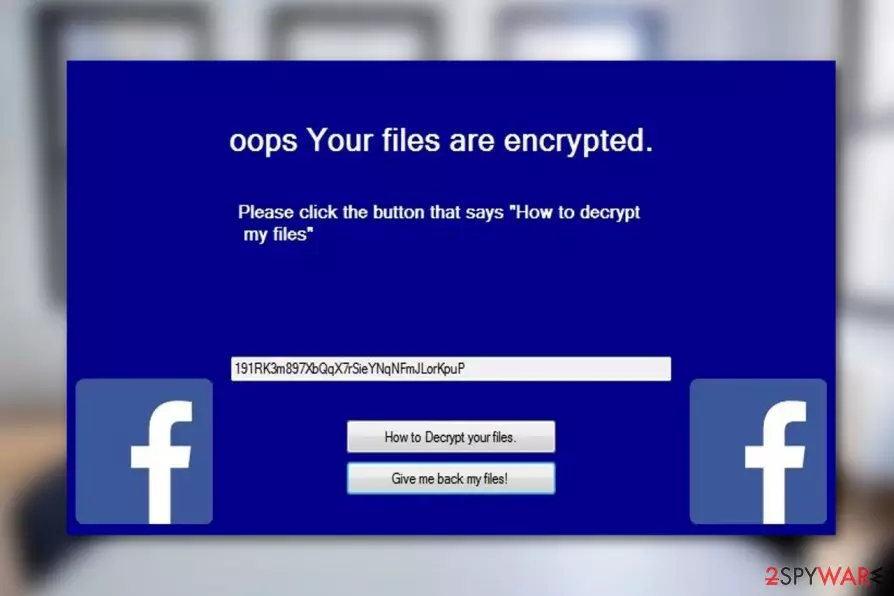
Facebook ransomware is a file-encrypting virus which is designed to encrypt the essential data on the computer without leaving much choice for recovery. Compromised files contain .facebook.facebook extension, and the victim receives a pop-up window that informs about the attack. Although, this version of the virus does not aim to generate profit rather than operates as a data wiper.
| Name | Facebook virus |
|---|---|
| Type | Ransomware |
| Extension | .facebook.facebook |
| Distribution | Peer-to-peer (P2P) file-sharing sites, spam emails, malicious links |
| Decryptable | No |
| Elimination | The only way to uninstall Facebook ransomware for good is with a robust anti-malware software. We recommend FortectIntego |
Once the computer is infected with Facebook ransomware, users receive the following pop-up with M. Zuckerberg's picture on the background and a message written in both, English and Russian:
What Happened to My Computer?
Your important files are encrypted. Many of your documents, photos, videos, databases and other files are no longer accessible because they have been encrypted. Do not waste your time looking for a way to recover your files. Nobody can recover your files.
Can I Recover My Files?
No. My name is Mark Zuckerberg and I have encrypted your files without saving any encryption keys. I appreciate you executing my program because you have allowed me to ruin more lives.
“A squirrel dying in front of your house may be more relevant to your interests right now than people dying in Africa.”
Despite the content of the message, Mark Zuckerberg is not related to this virus in any way. This is merely an attempt to scare novice computer users by stating false facts. Thus, consider Facebook ransomware removal immediately.

It is evident that the developer of the malicious program does not target profit. In fact, there is no Facebook ransomware decryptor which could help you get back the access to the encoded data. However, you can try alternative recovery methods which can help you decrypt:
- Photos;
- Videos;
- Documents;
- Other files.
However, before heading to the decryption steps, you must get rid of Facebook ransomware in the first place. For that, we strongly advise you installing a professional malware removal software. Our top choice is FortectIntego. Although, you can try using other reliable programs.
The original Facebook ransomware version demands a ransom

The original Facebook ransomware version came from the HiddenTear virus family that first emerged as educational ransomware (eduware) but was quickly taken advantage of by the evil-minded criminals who used it to create ransom-demanding spin-offs such as CryptoSpider, Mora Project, CryMore and many others.
Thousands have suffered from these virus attacks and lost access to their files indefinitely. In such cases, the only option the victims had is to eliminate the malware from their computers and prevent the risk of losing their future data. It comes naturally that it is just as important to remove Facebook malware in case you are infected.

Like its other counterparts, the so-called Facebook ransomware activates itself when its malicious executable — Facebook.exe gets deployed on the targeted system via malvertising [1], spam or other deceptive ways of distribution. As soon as it is on the PC, the virus drops a lockscreen, blocking the victim from accessing the computer’s or tablet’s desktop or other folders. The message on the lock screen reads:
oops Your files are encrypted.
Please click the button that says “How to decrypt
my files”
191RK3m897XbQqX7rSieYNqNFmJLorKpuP
[Button] How to decrypt your files.
[Button] Give me back my files!
The code you see in the message is a Bitcoin wallet address to which the criminals demand a set amount of ransom to be sent. This address may change as the criminals try to cover up their tracks. More detailed instructions on how to make the payment presumably can be accessed by clicking the “How to decrypt your files” button, but we do not recommend doing that. You can never know if the criminals will not drop you off on another infectious website just to damage your PC even more.
Instead of following the instructions on the lock screen, it is better to perform Facebook virus removal and make sure the ransomware won’t lock any of the new files you create on your computer.
Ransomware can enter your system in multiple ways
Even though the vast of Facebook virus versions are distributed via this widely used social media platform itself, there are alternative ways how criminals spread more sophisticated variants of this cyber threat. Usually, hackers upload the payloads of the ransomware on peer-to-peer (P2P)[2] websites or distribute via malicious spam emails.
Malspam campaigns are highly successful since the executable of the ransomware is sent to the potential victims’ computers disguised as some essential document, notification or official notice from governmental institutions. Likewise, the computer is immediately infected once the malicious file attachment is opened.
Typically, emails with malicious attachments will be automatically placed in the spam catalog of your email, but more cleverly built scams may slip through to your regular inbox as well, so you should be very careful when opening emails! Don’t take anything for granted just because it has “official” tag on it.
Uninstalling Facebook ransomware can help you get back the lost files
Even though the attackers claim that they do not have the decryption tool to recover encrypted data, you must perform Facebook ransomware removal. Keep in mind that such sophisticated cyber threats usually can open backdoors for other infections and damage your computer completely.
If Facebook virus is still active and prevents you from installing a professional antivirus, check the instructions at the end of this article and learn how to deactivate the ransomware. Later, remove Facebook ransomware from your PC with FortectIntego, SpyHunterCombo Cleaner, or MalwarebytesMalwarebytes.
Finally, Novirus.uk[3] experts say that as all the malicious malware files are out of your PC, you may then proceed to data recovery. Below the article, you will find alternative recovery solutions with brief usage instructions.
Did this guide help?
Be the first to comment