

Fenrir ransomware appends unique 10 character extension to targeted files
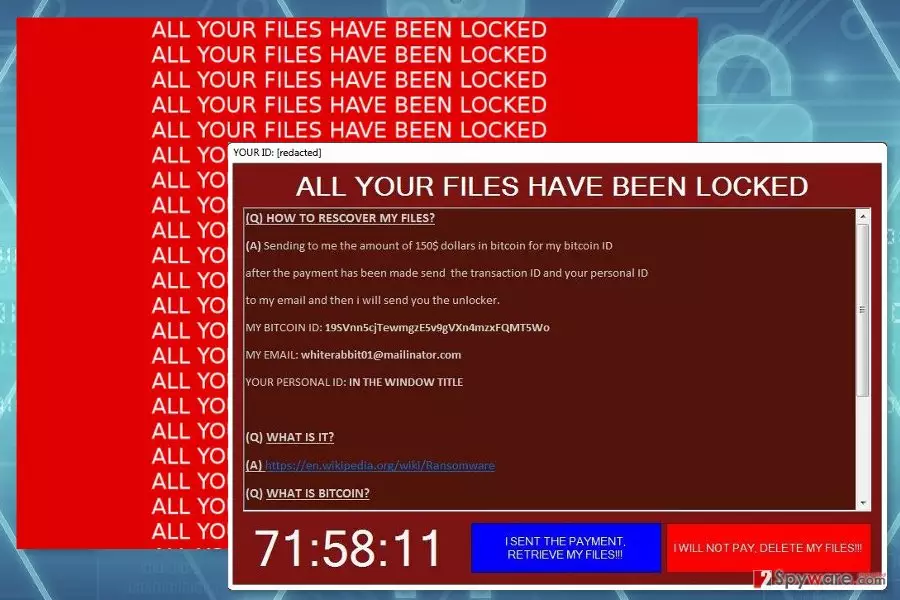
Fenrir is a crypto-malware that uses AES[1] encryption to corrupt files on the affected computer. Malware asks to pay $150 for data recovery and provides all detailed recovery instructions in Ransom.rtf file.
The virus does not append one specific file extension. It creates a unique suffix based on the affected computer’s ID. Malware has an embedded Hardware Identification tool that assists in creating the unique extension from first 10 characters of computer’s ID.
Fenrir ransomware has been noticed spreading as a fake Adobe Acrobat Reader. However, cybercriminals might use numerous strategies to infiltrate devices in China,[2] Sweden or other parts of the world.
The research revealed that malware is written in Visual Studio 2017. It is created to modify Windows Registry and making other changes to the affected system. Such activities are necessary to run the virus with system startup and launch its malicious activities.
Undoubtedly, the major task for Fenrir virus is data encryption. Once all targeted files are encrypted, malware drops a text file and run a program window called “All Your Files Have Been Locked.” The ransom-demanding message asks to send $150 before the timer runs out.
Cyber criminals provide Bitcoin ID address where victims are supposed to transfer the money. When the transaction is made, people have to send personal ID and transaction ID to whiterabbit01@mailinator.com.
Accepting hackers’ offer may be the only possibility to recover your files. Malware is suspected for deleting Shadow Volume Copies of the targeted data. Thus, decryption with third-party software may not be sufficient. However, this situation should not motivate you to take this risky deal.
Ransomware viruses are blackmailing tools that are created to swindle the money from the computer users. Thus, data recovery is just a matter of hackers’ conscience. We do not recommend testing if cyber criminals are willing to keep their word or not. It’s better to remove Fenrir and lose your files than suffering from money loss as well.
Virus elimination is performed with reputable security software, such as FortectIntego. Of course, you can choose your preferred malware removal tool. However, don’t forget to update it first. If you cannot run automatic Fenrir removal, please scroll down to the end of this article and follow the instructions.

Cyber criminals use multiple distribution methods to infiltrate computers
Malware researchers have found a Fenrir spreading with the help of Adobe Reader.exe and pretending to be Adobe Acrobat Reader. Thus, if you need to install this program, make sure that you are downloading it from the official publishers’ site.
Fake downloads are only one distribution method of the file-encrypting virus. It might also enter the system using malicious spam emails and exploit kits.[3] The malicious payload might be downloaded to the system when:
- user clicks on obfuscated Word, PDF or another document;
- user clicks on button or link provided in the email;
- user keeps the outdated software on the computer.
Therefore, in order to avoid Fenrir attack, you need to follow two major rules. First, you have to stay away from unknown emails and avoid clicking provided content in them. Second, to keep software and system updated.
Wipe out Fenrir virus with the help of security software
Fenrir removal must be performed using reputable malware removal software. Ransomware is a complicated virus that might install numerous malicious files and affect system processes. Thus, its removal should be completed correctly.
Before running a full system scan with security software, you may need to reboot the computer to the Safe Mode with Networking first. This mode helps to disable the virus and get rid of it automatically.
If you are not sure what tool to choose, we recommend using either FortectIntego or MalwarebytesMalwarebytes. We can assure that both of these programs can remove Fenrir from the system entirely.
Did this guide help?
Be the first to comment