

FreeFoam ransomware targets Russian-speaking PC users
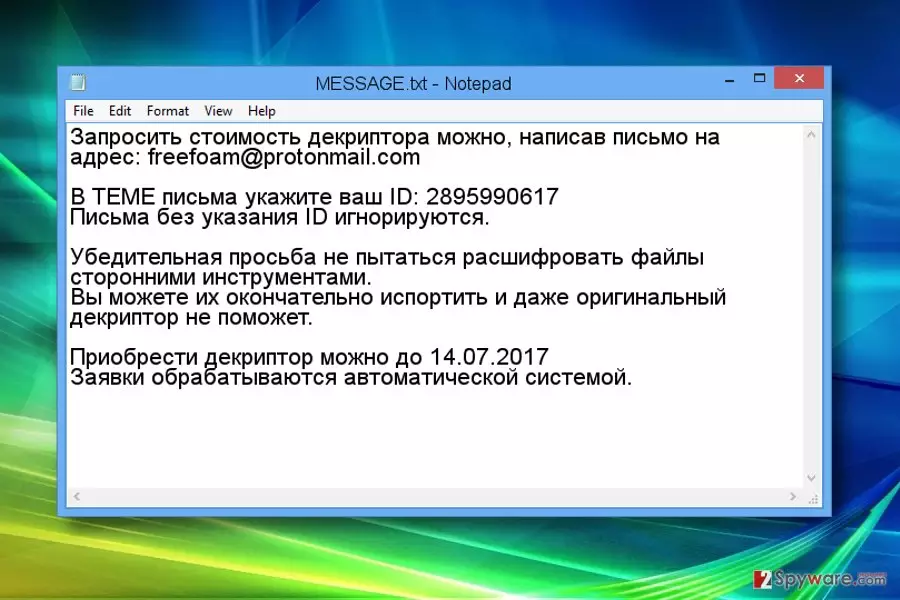
FreeFoam ransomware is computer malware that encrypts victim’s files using RSA encryption algorithm[1]. The ransomware targets Russian-speaking computer users[2] because the ransom note it leaves on the system (MESSAGE.txt) contains a message from criminals written in Russian. During the data encryption, the virus adds .freefoam extension after the original one to every file.
The Message.txt file holds a message that recommends writing to the cyber criminals as soon as possible via freefoam@protonmail.com. The message contains victim’s ID, which has to be included in the email to the cyber criminals; otherwise, it will be ignored. The fraudsters also suggest that third-party decryption tools won’t do any good to victim’s files and may even ruin them permanently.
FreeFoam virus also sets a deadline until the victim has to pay the ransom. If the victim fails to contact cyber criminals and buy the decryption tool from them, the victim’s decryption key will be deleted from frauds’ server.
Unfortunately, at the moment there aren’t many reports from victims, and currently, it is unknown whether the criminals even provide the decryption software for those who decide to pay. We do not recommend paying the ransom because it simply helps the crooks to organize more illegal projects.
Instead of paying the ransom, use anti-malware software to remove FreeFoam ransomware. We suggest using FortectIntego, although you can use another trustworthy anti-malware software[3].
To restore .freefoam extension files, you need to have a data backup. Sadly, there aren’t many data recovery options available – the ransomware corrupts files in a highly sophisticated way. We have provided some alternative options below the FreeFoam removal guide. You can find these tutorials below the description of the virus.

Distribution of the malware
The ransomware variant we described today is known to be delivered via email spam and illegal software packs. Currently, it is unknown whether it employs other distribution techniques (Trojans or exploit kits).
If you want to avoid installing ransomware like Freefoam, you need to apply several layers of protection. First of all, create a data backup. Second, install anti-malware software. Finally, stay cautious when browsing the world wide web.
Stay away from untrustworthy websites and illegal content. Remember that gambling or adult-oriented sites are known to be excellent sources of malware, so avoid clicking pop-ups and banners that appear on them.
Remove Freefoam ransomware and try to recover your files
We hope that you found this ransomware description informative. Now, it is time to remove FreeFoam virus from your computer so that you could start using it on a daily basis again. The first thing you want to do is reboot your PC into Safe Mode with Networking.
Once you restart your computer in this mode, you can start FreeFoam removal. However, we must warn you that in order to complete this task, you need to have anti-malware software installed on your computer. In case you have never installed one on your computer, try one of the tools we suggest using. You can find a list of them down below.
Speaking of data recovery, we must say that you shouldn’t put your hopes up high. The ransomware is a very powerful virus, and sadly even the most experienced malware analysts cannot crack their codes. Besides, ransomware uses encryption algorithms that are typically used to protect military-grade secrets, so there’s no hope to restore these files if you do not have a data backup.
Did this guide help?
Be the first to comment