

MoonCryptor threatens to delete files if victims don’t hurry up with ransom payment
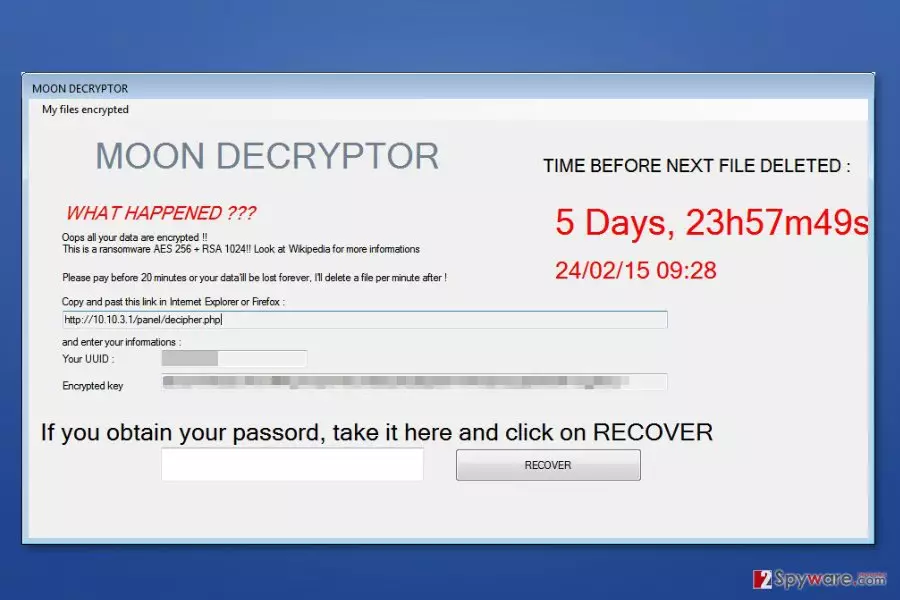
MoonCryptor is a crypto-malware that uses a combination of AES 256 and RSA 1024 ciphers to take user’s files to hostage. Ransomware[1] appends .fmoon file extension to the targeted files and gives five days for paying the ransom.
The threatening part of the ransomware is that it claims to start deleting random files if the ransom isn't paid within 20 minutes. Therefore, we recommend rushing with MoonCryptor removal just to make sure that you do not lose any of your files. After the elimination, you might restore some of your files using alternative recovery methods.
The malware is executed from MoonCryptor.exe file that might be dropped on the system when a person opens malicious email attachment or downloads another infected file. On the affected device MoonCrypter virus might modify the system and affect numerous processes. As a result, the crypto-malware runs at Windows startup and makes the system vulnerable.
The MoonCryptor ransomware aims at the most popular file types that are stored on the affected computer. Therefore, after the attack, MS Office documents, PDF, pictures, multimedia and many other files will be locked with .fmoon file extension.
According to the ransom note, only the Moon Decryptor can help to survive ransomware attack. However, it may not be true. The latest research analysis does not show any signs that ransomware can delete Shadow Volume Copies, so you might be able to restore files using third-party tools
Hence, you should not pay the ransom and run a full system scan with professional security software. FortectIntego or MalwarebytesMalwarebytes can help to remove MoonCryptor quickly and safely. Then you will be able to use backups or try alternative data recovery methods.

Protect your PC from file-encrypting virus
The malicious payload might be installed on your computer in a tricky manner. Crooks might present this file as a:
- crucial software update;
- important email attachment;[2]
- useful program.
The variety of distribution and social engineering techniques help to reach victims all over the world, including China,[3] Japan or Indonesia. Therefore, paying attention to cyber security is a must no matter where you live.
Keep in mind that even the most powerful security software can block ransomware once you download the malicious file yourself. These files typically are designed to bypass computer’s protection and launch hazardous tasks silently. Therefore, in order to avoid MoonCryptor and other viruses from the same category, you should:
- be careful with spam emails and their attachments;
- install updates from reliable sources only;
- download programs from the publisher’s website instead of torrents or similar file-sharing platforms;
- not click on any suspicious link, ad or other content.
Clean your computer from MoonCryptor
FortectIntego, SpyHunterCombo Cleaner, MalwarebytesMalwarebytes or your preferred malware elimination software will help to remove MoonCryptor from the computer safely and quickly. In order to download, install and run security software, you have to reboot the computer to Safe Mode with Networking. This step helps to disable the malware and prevent him from blocking removal procedure.
After MoonCryptor removal, you can look up for data recovery options. If you have backups, you can copy them and replace with encrypted data. Additionally, you can check alternative recovery methods that are presented at the end of the article.
Did this guide help?
Be the first to comment