

Experts have released an official Pendor virus decryption tool
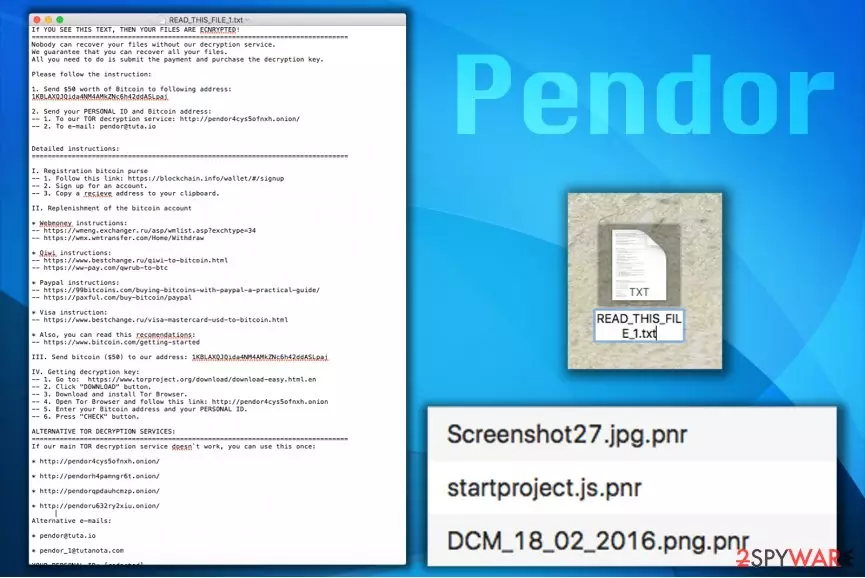
Pendor is classified as a ransomware-type infection[1] which is mainly designed to encrypt most valuable data on the computer and demand a $50 ransom. It is easy to recognize this virus by the .pnr extension it appends at the end of the filenames following the encryption. Likewise, people are unable to open them unless they have the decryptor. Luckily, experts have already generated a decryption tool which you can find at the end of this article.
Those who are infected with Pendor virus receive READ_THIS_FILE_1.txt file which is also known as the ransom note and explains that the ransom must be paid in Bitcoins and provides several domains to obtain some of this cryptocurrency. The criminals suggest sending the required sum of money to the following Bitcoin[2] wallet: 1KBLAXQJQida4NM4AMkZNc6h42ddASLpaj.
Afterward, the victim needs to write to pendor@tuta.io including the personal ID provided in the same ransom note. Alternative email addresses are pendor@tuta.io or pendor_1@tutanota.com. It must be said that the ransom note contains a very comprehensive explanation of how to obtain Bitcoins. Finally, the criminals explain how to install Tor browser and access a particular onion website to download the decrypter.
Pendor ransomware page is very basic. It contains only a few fields and the name of the ransomware at the top of it. The page requires entering victim’s email address, personal ID and Bitcoin address to send a request for the decryption key.
However, you should neither enter your personal details nor pay the ransom since there is a free Pendor decryptor. It is developed by professional IT specialists to help victims of ransomware access their files. Likewise, head to the end of this article and unlock your files with .png extension for free.

We do not recommend trusting the criminals since it is unknown whether authors of Pendor virus actually provide victims with decryption keys after receiving the ransoms. Remember that you are dealing with scammers who are trying to swindle money from you. Therefore, do NOT pay the the ransom.
Note that you must get rid of Pendor ransomware in the first place to use the official decryption tool. The easiest way is to uninstall it automatically. If you already have an anti-spyware or anti-malware program, just update it and scan your PC.
If you do not have a software to remove Pendor malware for you, consider installing FortectIntego or MalwarebytesMalwarebytes. Also, in case you are considering using another malware removal tool, make sure that it is reliable. Scammers online are trying to trick people into purchasing ineffective programs. Thus, get one only from authorized developers.
For those who are not aware how to start Pendor removal we recommend using the instructions below. They will briefly explain you how to disable the virus and uninstall it from your system. Additionally, there are steps how to use the decryptor as well.
Introduction to the most common malware attack vectors
As most of ransomware-type viruses, this one is also transmitted with the help of malicious spam emails. This distribution method is highly employed by various criminals who are spreading other cyber threats as well. Likewise, users are advised to closely monitor their email box to avoid ransomware and other malware attacks.
Firstly, stay away form letters sent by people you don't know. You should avoid opening them and certainly do NOT click on the attachments if they have some. In addition, do not open email attachments or links provided by companies that you weren’t expecting to write you as well. Scammers often abuse the name of reputable companies to trick unsuspecting victims into opening malicious files.
What is more, the malware might sneak into your system if you tend to visit low-reputation websites such as untrustworthy file sharing websites, gambling or adult content pages. LesVirus.fr[3] experts recommend you not to click on ads or download buttons in them as it is a very quick way to be redirected to compromised sites or instantly download a malicious file to your computer.
Steps to uninstall Pendor virus
The most important step is not to try to remove Pendor alone. Manual elimination can damage your computer and files. However, you can easily get rid of the ransomware if you have a professional security software. One of the most recommended tool is FortectIntego. Although, we strongly advise you using SpyHunterCombo Cleaner and MalwarebytesMalwarebytes as well.
Once you have a security software to help you, you can begin Pendor removal by restarting your PC into Safe Mode with Networking and following the given instructions. You may restart your PC using the following instructions and download the desired security product then if you can’t do it while in normal mode. In some cases, ransomware viruses tend to block security software.
Did this guide help?
Be the first to comment