Allcry file-encrypting virus keeps trying to compromise computers worldwide
Allcry virus functions as a new file-encrypting threat[1] which specifically attempts to infect Korean, Chinese[2] computer users. It presents its readme.txt message in English, though users can opt for Chinese or Korean in the ransomware interface. Besides the mentioned text file, the malware functions via its executable allcry.exe file.
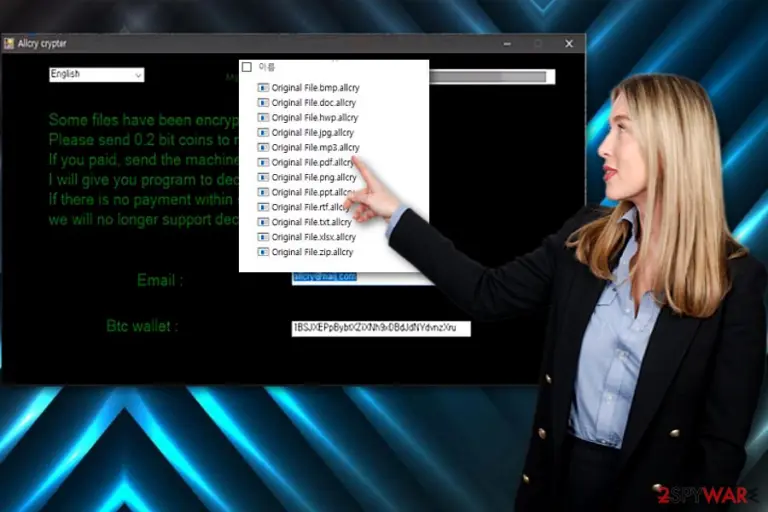
Interestingly, the malware also encodes certain system files such as autoexe.bat and config.sys. After the encryption, the files are marked with .allcry extension. Later on, the interface of the program called Allcry crypter opens up. It displays a short message:
Some files have been encrypted Please send 0.2 bitcoins to my wallet address If you paid, send the machine code to my email I will give you program to decryper If there is no payment within seven days, we will no longer support decryption Email: allcry@mail.com
The ransomware seems to be still under development. However, it is not recommended to remit the payment as the perpetrators do not give you any guarantees about returning the data. Instead, concentrate on Allcry removal. FortectIntego or MalwarebytesMalwarebytes will come in handy in this situation.
Allcry ransomware appears in a couple of different versions, which can be distinguished by the email address presented to the victims. Currently known versions are using allcrys@naij.com or allcry@mail.com.
Doubtful encryption capabilities
Though the malware appends .allcry extension which clearly refers to the notorious WannaCry menace, it happens to be one of the multiple viruses which tend to scare victims more rather than posesses real technical capacity.
Likewise, Allcry malware joins the family of fake crypto-malware. Even though it appends extension and but it does not encode them. Virustotal analysis[3] proves that it is a fake file-encrypting virus. It is detectable as Hoax.Win32.FakeRansom.an, Trojan.Ransom.Allcry, or Unwanted/Win32.FakeRansom.C2174. Thus, there is no need to waste time. Remove Allcry virus.
Ways to prevent ransomware invasion
Besides the mentioned executable file, the malware disguises under show.exe file as well. Consequently, we can assume that the perpetrators opt for standard distribution scenarios:
Spam emails
Trojans
Corrupted apps and browser extensions
Considering the latter, it may arrive in emails which are supposedly sent by official Korean or Chinese institutions. Such emails will urge you to review the contents of an attached file as soon as possible. Most common “baits” are invoices, package delivery notices, and subpoenas.
Instead, verify the sender and scan the extension with an anti-virus before opening it. Note that some viruses tend to wrap the malware with anti-sandboxing features. Thus, double-check before opening similar attachments.
In addition, be wary of trojans and corrupted applications as well as browser extensions. Avoid 9installing unnecessary one, especially the ones which offer faster and safer browsing, but fail to deliver proper credentials of a responsible company. These tips will help you avoid Allcry hijack and similar ransomware intervention.
Remove Allcry ransomware virus from your PC
Since it is not a genuine file-encrypting threat, you should not encounter many difficulties eliminating it. Remove Allcry virus with the assistance of malware elimination tool. In case you cannot get past the lock screen, click Alt+F4. If that does not help, boot the computer in Safe Mode. Below instructions will show how to do that. Then, you should be able to complete Allcry removal.




Be the first to comment