

Buying PC Protect license is a waste of money
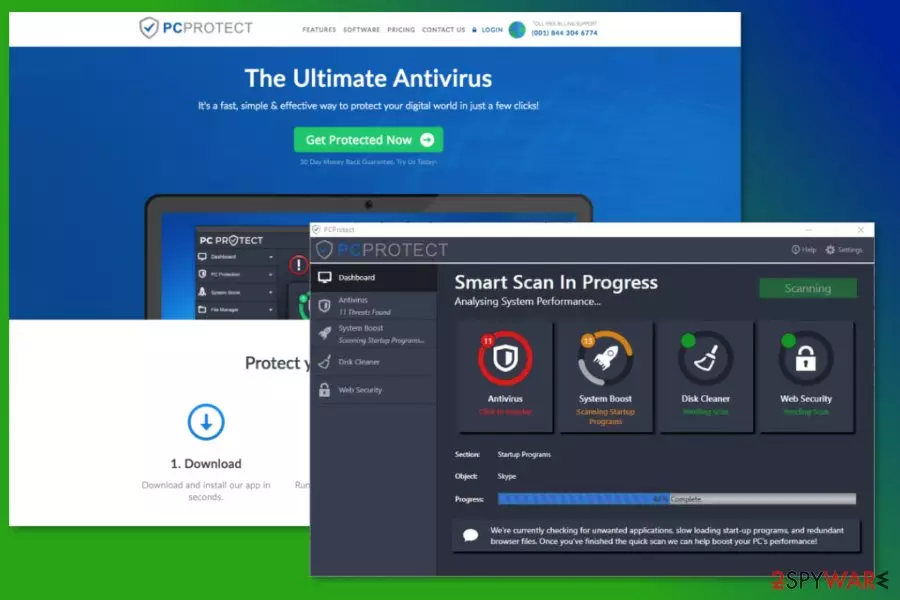
PCProtect is promoted as the “ultimate antivirus” that is compatible with Windows and Mac computer, as well as mobile devices with iOS and Android operating systems. Differently than legit and reputable antivirus programs, this one does not offer a free trial. Users can only test it and learn how it operates after paying €49 for the 12-month license and it seems shady.
Some security experts warn that such activity might be just a trick to get user’s sensitive data, such as full name or credit card information. Therefore, people are advised not to buy PC Protect license. The program’s privacy policy also raise concerns about user’s privacy.[1]
According to this document, the PCProtect might collect various information about the user, including full name, payment information and browsing-related data. It uses a bunch of different types of cookies that track each of your steps. What is worse, this information might be shared with third-parties. Therefore, user’s privacy is non-existent for the developers of this shady tool.
Privacy-related concerns are one of the main reasons why you should not consider getting this antivirus software. However, if you already made a mistake, you should uninstall it immediately to stop data tracking activities. You can remove PCProtect manually by following the instructions below.
Is PC Protect safe for my computer?
If you are still not sure is PCProtect legit and safe tool or not, we are here to kill your beliefs that this tool is worth downloading. Numerous program’s reviews from experts and users report about various issues related to the program’s weak performance.
In this brief PCProtect review we have to tell that it does not provide the best computer’s protection. The software is unable to detect the majority of viruses, offers poor VPN performance and might even cause Windows-related problems. Therefore, there’s no need to waste your money for the useless tool’s license.
Besides, the so-called PCProtect virus has been noticed spreading in software packages.[2] It means that the program might be offered to install together with other free software. If users do not pay attention to freeware installation, this bogus antivirus might get inside the system unnoticed.
When this program enters the system in such a sneaky way, it might launch PCProtect(3).exe or PCProtect.exe processes and deliver fake system scans and aggressively offer to obtain the license to get rid of these errors.
If the program got inside the system unnoticed, you should opt for automatic PCProtect removal with reputable anti-malware software, such as FortectIntego or SpyHunterCombo Cleaner. It will help to delete all suspicious components from your device that may have been installed without your knowledge too.

Software download sources and possibility to infiltrate the device silently
The program is available to download on the official website, as well as Apple Store and Google Play Store. Therefore, users can install PCProtect antivirus manually. However, this software has been noticed spreading in various freeware packages. Thus, users might install it accidentally when they do not pay proper attention to the installation process.
Researchers from Les Virus[3] report that the latter method is used for distribution of the PCProtect free version. After the silent infiltration, this program might start system scans and deliver threatening results. However, detected viruses often are not real and used as a trick to convince users to buy the paid version of the program.
Therefore, bundling helps to promote the paid version of the program. However, you should always choose Advanced/Custom installation of freeware or shareware and reject installation of all optional downloads to avoid computer-related problems.
Uninstall PC Protect from the computer
If you already installed this program on your device or it came in a software bundle, you should get rid of it immediately. This program is shady and does not provide necessary computer’s protection. In order to remove PCProtect from Windows computer follow these steps:
- Access Control Panel.
- Go to Add/Remove programs or Remove a Program.
- Find this security software in the list of installed programs and click “Uninstall” option.
- Follow the uninstallation guide and restart the computer if needed.
PCProtect removal instructions from Mac OS X:
- Open Finder.
- Go to Applications.
- Find the application and move it to Trash (located on the dock).
- Empty the Trash.
To remove PC Protect from the mobile devices, you have to access the Applications folder and uninstall it as the regular app.
Additionally, you can speed up program’s elimination from the computer using reputable security software. All major antivirus or anti-malware should detect this application and remove it without any problems. If you are not sure what tool to choose, take our advice and use FortectIntego or MalwarebytesMalwarebytes.
Did this guide help?
Be the first to comment