

Asasin virus continues what Locky has started
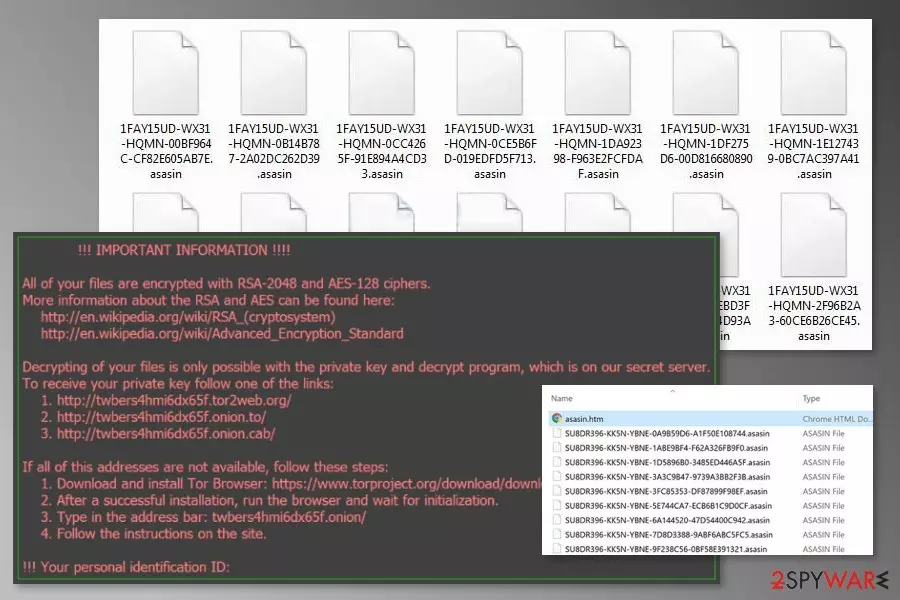
Asasin is another version of Locky virus.[1] The recent variant of crypto-malware has been detected on October 2017 spreading via emails as a fake invoice. After the infiltration, it appends .asasin file extension to all the corrupted files and offers to purchase Locky decryptor in order to get back the files. The major difference of this variant is new file extension and malspam campaign.
The Asasin ransomware has been noticed spreading via spam emails that look like sent from a web and mobile e-signature company RightSignature. Malicious emails are sent from documents@rightsignature.com and typically has a subject line called “Document invoice_95649_sign_and_return.pdf is complete”. However, the malevolent attachment is not visible to the users.
Though, if ransomware executable is dropped and launched on the system, malware starts data encryption procedure using RSA-2048 and AES-128 encryption algorithms. Asasin virus also renames files with 36-characters string and appends .asasin file extension:
[first 8 ID characters]-[next 4 ID characters]-[next 4 ID characters]-[4 characters]-[12 characters].asasin.
Following data encryption, malware drops three new files:
- asasin.bmp;
- asasin-5eac.htm;
- asasin.htm.
The BMP file is set as a computer’s background and provides a brief explanation what has happened to user’s data. Other two files are placed on the desktop and give detailed instructions how to pay the ransom and obtain Locky decrypter to get back access to the files. This time developers of Locky demands to pay 0.25-0.3 Bitcoins which is more than a 1000 USD.
Unfortunately, the ransom note does not lie. There’s no other way to restore files at the moment. Asasin, as well as other recently emerged variants Lukitus, Diablo6, and Ykcol,[2] cannot be decrypted with any third-party tools unless ransomware fails to delete Shadow Volume Copies.
However, paying the ransom should not be considered. Cyber criminals are not reliable and may not keep their promise. Therefore, you can easily lose thousands of dollars or even more. We highly recommend not to increase the damage you already have suffered. It’s better to focus on Asasin removal and try alternative ways to recover your files.
To remove Asasin from the computer correctly, you have to obtain a reputable security software. However, before installing your preferred security tool, you may need to reboot the system to the Safe Mode because ransomware might be resistant. When in Safe Mode, install FortectIntego or another malware removal tool and run a full system scan.

Corrupted malspam campaign is spreading the file-encrypting virus
Developers of Locky remain loyal to the main malware distribution method – malicious spam emails. Researchers spotted Asasin spreading as a fake email from RightSignature. The letter from cyber criminals seems legit. It is sent from documents@rightsignature.com email and has a subject line “Document invoice_95649_sign_and_return.pdf is complete”.
Please note, that there might be numerous similar letters spreading malware. Thus, be careful with received emails and do not open their attachments.
However, there’s a problem with ransomware’s distribution. The malicious email attachment which is supposed to download executable on the system is invisible to the users. Therefore, users cannot download it. The email just shows a base64 encoded text.
Originally, these emails are supposed to have 7zip or .7z archive with VBS file. If users open it, the malicious program would be installed and run on the system. Nevertheless, it seems that this new version of Locky will not be as successful as its predecessor; security experts from France[3] warns to be vigilant with emails and update data backups.
Asasin malware removal instructions
After ransomware attack, you have to act quick. This malicious program might modify the system and install numerous harmful components. Therefore, you have to remove Asasin correctly. For that, you have to use a reputable malware removal software, for instance, FortectIntego or MalwarebytesMalwarebytes. Do not try to locate and terminate virus-related files manually. It might damage the system badly.
Sadly, Asasin removal is not enough to get back access to your files. Once the virus is gone, you can use backups or try alternative recovery methods which are presented below.
Did this guide help?
Be the first to comment