

Atchbo ransomware is a cyber extortion tool that demands a small ransom
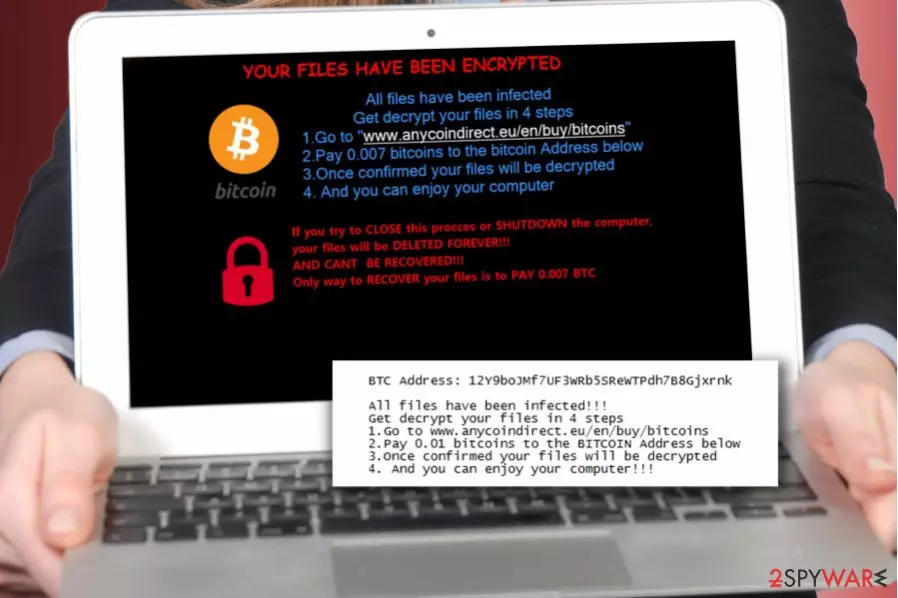
Atchbo ransomware is a highly dangerous computer program created to illegally take victim’s files hostage and demand a ransom.[1] The malicious virus keeps the files encrypted until the victim agrees to pay a defined amount of money to cyber criminals in Bitcoin. An initial analysis of the virus revealed its connection to ExoLock ransomware which was discovered in September 2017.
The malicious virus arrives in Atchbo Ransomware2.0v.exe file which starts scanning the entire computer system and crippling the data using AES or RSA data encryption ciphers.[2] Atchbo virus then displays a message stating that the victim has to pay 0.007 Bitcoin to the provided Bitcoin wallet address.
However, the ransom note left on the desktop, which is called UnlockYourFiles[0-49].txt demands a slightly larger sum of money – 0.01 Bitcoin. The difference of the ransom price in different files left by the virus can strongly confuse the victim.
If we convert the amount of money Atchbo demands in Bitcoins to US dollars, it ranges between 3,34 to 47,65 USD. Comparing to Locky’s or Cerber’s ransom demands, it is quite a small price to pay; however, you shouldn’t do so whatsoever.
There is no reason to waste a single cent paying cybercriminals to unlock your files, so consider removing the ransomware instead and taking proper actions to protect your computer. We strongly recommend using FortectIntego software to remove Atchbo virus ASAP.
Do not react to threats displayed by the ransomware – although it claims that it will delete your files if you shut down your computer, that is not true. Simply reboot the system in Safe Mode with Networking for a successful Atchbo removal. If you have never tried to restart your computer this way, consider using instructions provided below the article.

Prevent the ransom-demanding virus from encrypting your data
Nobody wants to lose their files, memories and work data forever all of a sudden, so it is a must to know how to prevent ransomware infiltration. To prevent ransomware attack, use the provided security tips from Udenvirus.dk team[3]:
- Secure your computer using anti-spyware or anti-malware software;
- Create a data backup – it is a must! Even the most reliable anti-malware programs can be deceived by new and sophisticated malware variants, so data backup is a lifesaver in case your files get encrypted;
- Avoid opening shady emails and especially files attached to them. The same goes for links added to the message body.
Remove Atchbo crypto-ransomware today
To clean up your computer system and make it usable again, remove Atchbo virus immediately. It is a must to protect your system by wiping all malware from it, so consider using a decent anti-malware software.
Manual removal of the ransomware requires special computing skills, so if you are not an IT professional, better do not try to locate virus’ files on your own. Such malicious programs can alter system settings, add or remove Registry keys and perform other modifications that aggravate Atchbo removal.
Did this guide help?
Be the first to comment