

Sad hackers release Sad ransomware
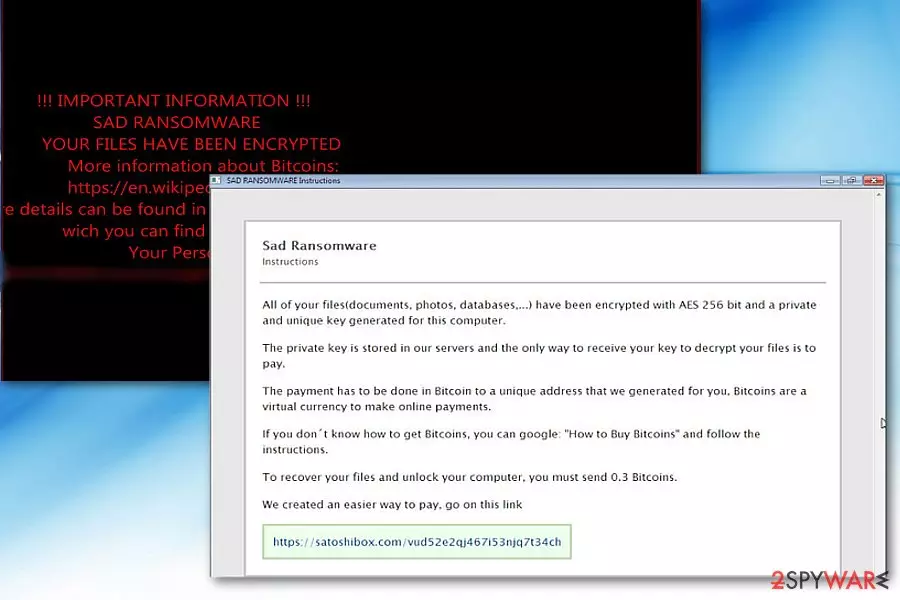
Sad virus defines crypto-malware which encodes data and demands ransom 0.3 BTC in exchange to the decryption software called decrypter.exe.[1] The latter is available on a specific website accessible via Tor browser.
During the infiltration, the malware drops the following files[2]:
- _HELPME_DECRYPT_.txt
- _HELPME_DECRYPT_.hta
- _HELPME_DECRYPT_.html
All of them display a slightly different message. The .txt file includes the link to the general information about bitcoins and ways to purchase them.
The .hta file states that the data has been encoded using AES-256 cipher. According to the style of the message, the developer seems to be a non-native English speaker. The file also includes Tor link to the decrtypter.exe – the tool to decode the data affected by Sad ransomware.
Furthermore, the .html file displays less information and urges victims to purchase the decryption software. The malware also leaves picture.exe file in Shared folder.
The malware is already detectable by the majority of security tools as MSIL.Trojan-Ransom.Sad.A, Ransom.Sad, Ransom.CryptXXX, Ransom_SAD.A , etc. The malware seems to disguise under tGVkDTIb.exe file, though executable files may vary.
The malware appends an extension comprised of random hexadecimal characters. There is no information whether Sad Decryptor functions properly. Instead of paying the ransom, concentrate on the elimination of the malware. FortectIntego or MalwarebytesMalwarebytes will help you complete Sad removal.
Ransomware distribution trends
Usually, trojanized ransomware might be foisted as rogue applications in highly dubious websites, such as gaming, gambling, and sites with adult content.
Alternatively, some ransomware developers prefer using exploit kits and hide their malware under fake Adobe Flash Player update[3]. Do not forget that spam emails also remain a popular distribution method.
In order to limit the risk of Sad hijack, pay attention to the programs and source you download from. Be wary of spam emails which are supposedly sent by the official institutions. Installing a couple of different type anti-malware tools might be practical as well. They will help you evade websites infected with exploit kits or phishing sites promoting counterfeited software updates. Let us move on Sad ransomware removal.
Sad elimination steps
Though the malware has quite sufficient GUI and operation mode, it is not known whether it deletes shadow volume copies and causes Sad removal troubles. If the anti-virus program does not respond, restart the system in Safe Mode.
Later on, you should be able to launch the security tool and eliminate the malware. Only after you remove Sad virus completely, proceed to data recovery. There is also an additional method which helps you access the operating system. Not only English users should be wary of the malware, but other users residing in the Czech Republic, Bulgaria[4], or Spain.
Did this guide help?
Be the first to comment