

Authors of Kristina malware does not reveal the size of the ransom
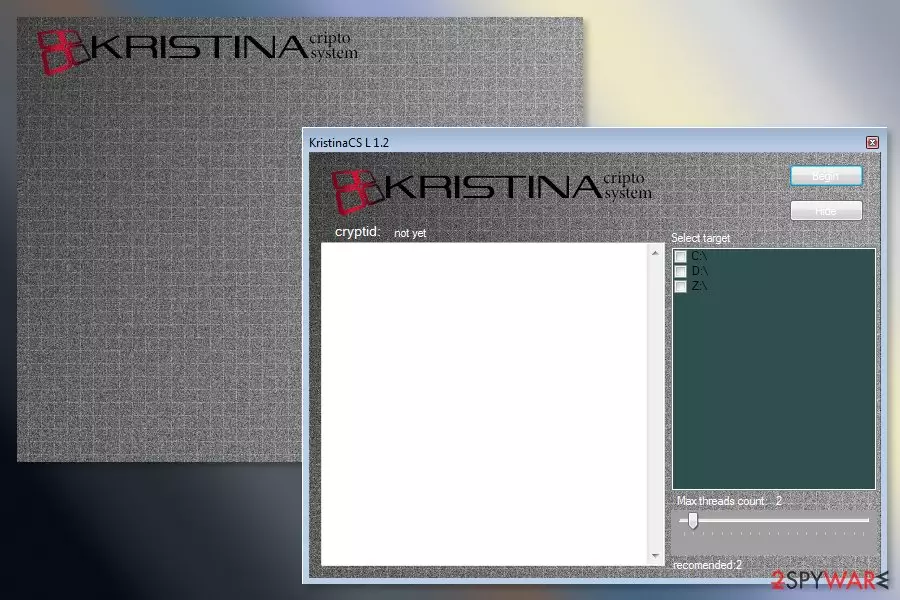
Kristina virus is a crypto-malware that might be related to Crypt12 ransomware virus. The malicious program is launched from KristinaCS.exe which usually gets on the system when a user opens an infected email attachment. Then malware locks targeted files with [victim’s-id]-[developer’s-email].crypt12 file extension and changes desktop wallpaper.
The virus delivers a pop-up window “KristinaSC L1.0” that shows data encryption process. Victims can see how their files saved in various disk driver are being encoded. Security experts assume that encryption is performed manually. It means that criminals hack the computer and get remote access. Then they launch manual encryption in different drives themselves.
Kristina ransomware also changes affected computer’s wallpaper. The black image includes a red text saying:
Your files Have Been Crypted email to: hernansec@protonmail.ch for instructions
There’s no doubt that cybercriminals will ask to pay a particular sum of Bitcoins in exchange for decryption software. However, their offered deal might be a trap.[1] Crooks may not have working decryptor or might not let you use it. Once you transfer the money, they might disappear.
Therefore, after ransomware attack, it is recommended to get rid of the virus using reputable and powerful malware removal tool, such as FortectIntego. In order to remove Kristina virus properly, you may need to reboot the computer to Safe Mode with Networking. It helps to disable the virus and run security software.
Crypto-viruses are dangerous cyber threats. Thus, manual elimination is not recommended. Home computer users might accidentally delete important system files instead of malicious ones. Malware is capable of affecting legit system process and hide under the safe looking file names. Automatic Kristina removal is recommended in order to wipe out this cyber threat safely.

Methods used to spread file-encrypting virus
The malicious payload of the Kristina crypto system spreads via malicious spam emails. Usually, these emails look like sent from an official institution and inform about an important issue. However, opening attached Word, PDF or other safe looking document[2] might lead to the infiltration of malware.
For this reason, users advised to be careful with emails and always double-check the information about the sender, look up for grammar mistakes and think twice if they were supposed to receive such email.
Security experts from SenzaVirus[3] also warn that malware might be spread via:
- malware-laden ads;
- exploit kits;
- fake or illegal software downloads;
- bogus security updates presented in pop-ups.
Computer users should follow basic cybersecurity tips, such as avoid visiting suspicious websites and clicking ads, do not download illegal content, keep software and operating system up-to-date. Additionally, creating and updating backups is recommended as well.
Guidelines for Kristina ransomware removal
Kristina ransomware removal is performed using a professional anti-malware software. Our team recommends choosing one of these tools: FortectIntego, SpyHunterCombo Cleaner or MalwarebytesMalwarebytes. Before you install one of the suggested or your preferred program, you may need to reboot the computer to Safe Mode with Networking as shown below.
This step is needed because ransomware might prevent you from installing or running security software. Thus, you should disable malware first and then remove Kristina virus with anti-malware. Once the PC is virus-free, you can restore encrypted data from backups. Currently, it’s the only possible way to restore all of your files.
However, if you do not have backups, you should try alternative recovery methods presented below that might help to get back at least the most important documents or pictures.
Did this guide help?
Be the first to comment