

HSDFSDCrypt virus targets German-speaking computer users worldwide
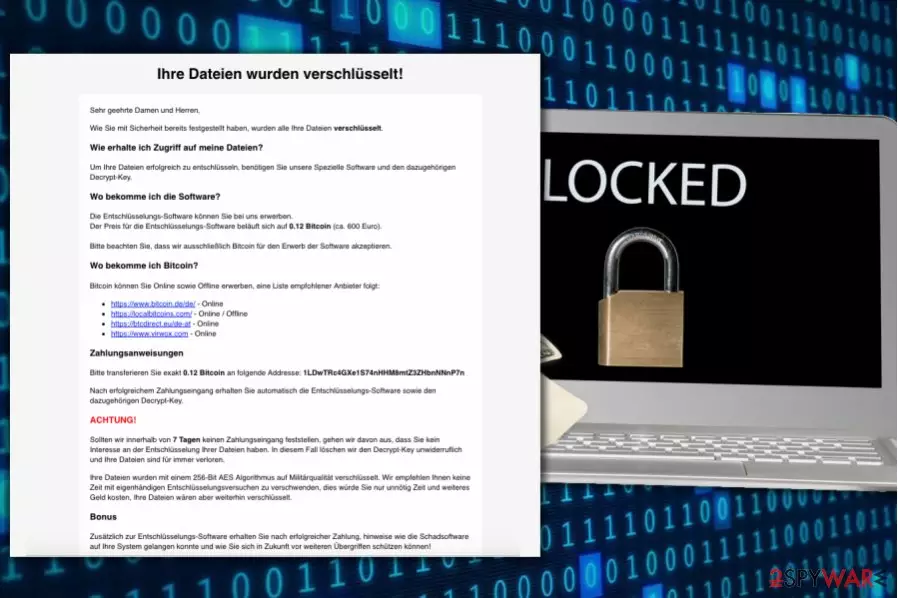
HSDFSDCrypt is a new ransomware[1] virus that was first spotted on November 6th, 2017[2]. After infecting the target system, the virus encodes all files stored on it with the help of AES-256 algorithm at the same time renaming the original filenames with a set of random characters. Finally, the virus creates Wo_sind_meine_Dateien.html file, which stores information regarding data decryption.
The ransomware seems to be designed for German-speaking computer users only. The ransom note greets the victim with a huge black line saying “Ihre Dateien wurden verschlüsselt!” which translates to “Your files have been encrypted!” The ransomware asks to buy 0.12 Bitcoin (currently worth 861 USD or 743 EUR) and transfer them to a provided Bitcoin wallet as soon as possible.
The malicious virus demands the ransom within seven days; otherwise the developers of it “would assume that you have no interest in the decryption of the files” and delete the decryption key immediately.
What is ironic is that in addition to the decryption software, the developers of the virus suggest providing information on how did the virus infect the system and how to protect yourself from such attacks in the future.
We strongly advise you NOT to pay the ransom as the criminals may not provide any decryption solutions at all. Instead, Losvirus.es team[3] suggests deleting the ransomware and taking actions to protect your computer from similar attacks in the future. Of course, an immediate HSDFSDCrypt removal can be implemented with software such as FortectIntego.
Keep in mind that you are dealing with a malicious crypto-malware variant and it is not a regular program that can be uninstalled via Control Panel. Besides, such viruses can erase some of their files and drop other malware on the system, such as keyloggers, Trojans or spyware variants.
Therefore, we strongly recommend you to remove HSDFSDCrypt virus automatically and not manually. Perform the removal while in Safe Mode with Networking (see a guide below the article).

Distribution of the new crypto-malware virus
HSDFSDCrypt is said to be spreading via malicious spam, so stay cautious and avoid opening questionable email messages that you receive in your email Inbox. Please keep in mind that Inbox might not only show you secure messages because some criminal actors know methods how to bypass email security and spam filters.
It is important to remember that the majority of such viruses travel in the form of safe-looking email attachments that might not raise any suspicions at first. For instance, you can receive a message from someone claiming to be from a popular and well-known organization such as Amazon or Netflix.
You might be asked to open the “attached documents” to find essential information; meanwhile, all you’re going to find is a data-encrypting virus. Therefore, stay cautious and do not let scammers fool you so easily.
Remove HSDFSDCrypt malware without any doubts
Do not hesitate and start HSDFSDCrypt removal straight away. You should not let this malicious virus trick you into thinking that paying the ransom is a good idea, even if you have no other data decryption alternatives to choose from. In most cases, ransomware developers do not provide data recovery solutions to the victim, no matter how much they pay.
Remove HSDFSDCrypt virus to clean the malicious files from it and start recovering your files with the help of the methods described below. One of them might help you to restore some files.
Did this guide help?
Be the first to comment