

Sigma ransomware is an infection that not only affects common data directly but can also trigger damage in system folders
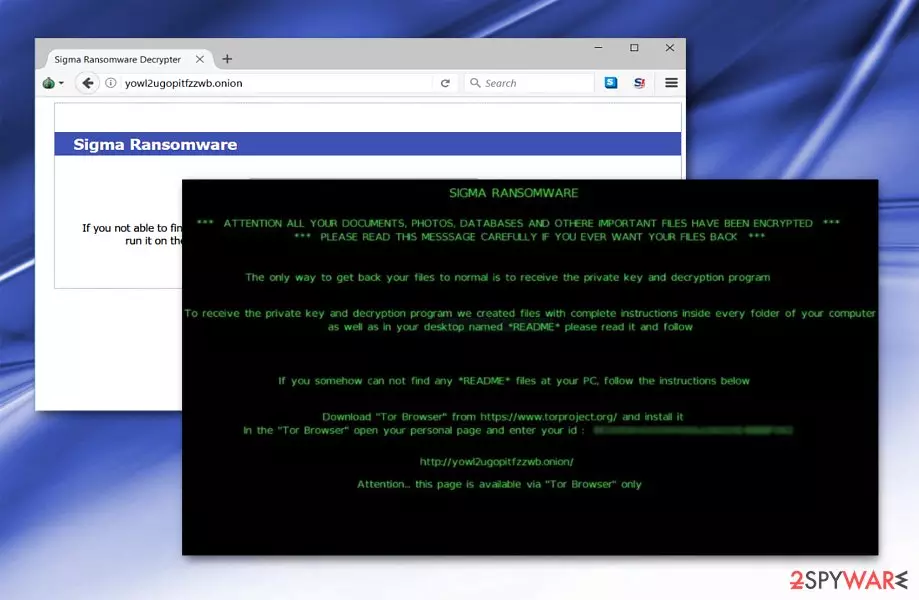
Sigma ransomware is a dangerous cyber threat that uses RSA-2048 encryption and appends a random 4-character file extension to the targeted data. Following data encryption, it drops the ReadMe.html or ReadMe.txt file which redirects to the ransom payment website. The most common way to get infected with this malware is to open a malicious email attachment. Though, security experts warn that a new malspam campaign spreading the virus was noticed in March 2018.
| Summary | |
| Name | Sigma |
|---|---|
| Type | Ransomware, file-locker, cryptovirus |
| AV detection names | Trojan.Agent.CPOW, Trojan.Ransom.Shade!1.A988 (CLASSIC), Trojan.Generic.bcnxb etc. |
| Danger Level | High. Ransomware corrupts important Windows processes, installs malicious components, and encrypts files. |
| Symptoms | Inability to open and use files due to the unknown file extension. |
| File extension | Appends random 4-character file extension. |
| Ransom note | ReadMe.html, ReadMe.txt |
| Files associated with ransomware | GUID.exe, GUID.txt, Automated Universal MultiBoot UFD Creation Tool.exe, |
| Removal | The best option for the virus termination – anti-malware tools capable of detecting the infection fully |
| Repair | Ransomware can itself or with the help of other threats damage the system, running FortectIntego can indicate corrupted pieces and help with those issues |
At the moment, Sigma ransomware analysis reveals that the virus has a high detection ratio. It is spreads disguised as Automated Universal MultiBoot UFD Creation Tool.exe file or Guid.exe.bin. It can be detected by your anti-virus as Trojan.Agent.CPOW,[1], Trojan.Ransom.Shade!1.A988 (CLASSIC), etc. The former sample is only identified by one security tool as Trojan.Generic.bcnxb.[2] Observing that the design of the ransom note is almost identical to Shade ransomware, it seems that their developers are related or maybe the same person.
Once inside the target computer system, virus reads technical computer details, particularly RDP protocols. It also creates a counterfeited system process to disguise its activity. Interestingly, Sigma ransomware has anti-sandboxing feature which is used to prevent the detection.
If the occupied system happens to be natural OS environment rather than a virtual machine, the malware connects to http://ip.api/json.txt[3] and sends the data about victim’s geolocation. Hence, the ransomware removal is needed to prevent additional damage caused by this virus to the device.

However, the main task of the ransomware is to encrypt files on the affected computer. During the process, it places ReadMe.html file which directs users to an online payment site. It briefly informs users about the encrypted data. It instructs them to download TorBrowser and access the specific .onion page.[4] The latter presents a page entitled a “Sigma Ransomware” and asks to enter machine GUID. It also includes a link to download the GUID Helper.
Once the encryption is finished, malware also changes the desktop background. The message urges users to find “Readme” file or visit the mentioned .onion link and enter the personal ID number indicated on the ransom note. Sigma ransomware also leaves GUID.exe and GUID.txt files on computer's desktop.
Speaking of the payment site, it consists of several pages. One of them indicated the exact time when your files were encrypted. It demands $1000 for the decryption software. If payment is not remitted within 7 days, the ransom amount will double. On the same .onion page, victims are encouraged to create a Bitcoin wallet.

Unlike standard ransomware, this malware does not provide an email address but instead suggests using Xamp account. It also includes Pidgin Installation Guide link. Therefore, they contact the perpetrator via Sigmaxxx@jabb.im[3] address.
Instead of complying with the demands, remove the virus. You can do so with the assistance of SpyHunterCombo Cleaner or MalwarebytesMalwarebytes. You might need to boot your computer into Safe Mode. Further instructions are indicated below. Unfortunately, Sigma ransomware decryptor is not available yet. However, you can try alternative recovery methods that are also given at the end of the article.

Fake Craigslist emails were noticed spreading ransomware in March 2018
Authors of the Sigma virus launched a new malspam campaign to spread malware payload. This time crooks sent fake emails from Craiglist that contained password-protected Word or RTF documents. Of course, these documents include ransomware executable.

Users who open an infected email and enter the password are asked to enable content on the document. As soon as it's done, a malicious VBA script is launched. Immediately after the click on “Enable Content Button,” a password-protect RAR is downloaded and extracted to %Temp% folder. This folder contains the svchost.exe file which executes ransomware.

Fake scanned files include malware executable
While the malware presents detailed GUI and payment sites, its distribution campaign is quite distinctive from other crypto-malware. Malware is delivered in a spam email attachment “Scan_[number].doc” file.
The email message briefly states the that the receiver is going to be billed [money amount] on their personal Mastercard balance right away. In order to avoid it, they should review the attachment. It also includes a passcode. However, entering the code activates the virus. Interestingly, though the malware is written in English, it was spotted in Greek[5] domains.
Besides spam emails, users should be also vigilant while downloading applications. Pay attention to what source you download it and whether it is certified. Pay attention to the installation wizard stages to deselect optional and unnecessary add-ons. Now let us move to ransomware fix section.
Instructions on how to remove Sigma ransomware
The proper virus removal is needed to clean the computer and use it normally again. Besides, this procedure will prevent the further loss of your files. Unfortunately, virus elimination does not help to recover encrypted files. However, you can try using third-party software or backups of your encrypted files as soon as your computer is ransomware-free.
To recover yourself after ransomware attack, use one of these tools: FortectIntego, SpyHunterCombo Cleaner, MalwarebytesMalwarebytes. In case you cannot launch any of them to remove Sigma ransomware, perform System Restore or restart the computer in Safe Mode. Only after you eliminate the malware, proceed to data recovery. Options that you can use are provided below as well.
Did this guide help?
Be the first to comment