

Napoleon ransomware performs data encryption to obtain illegal profits
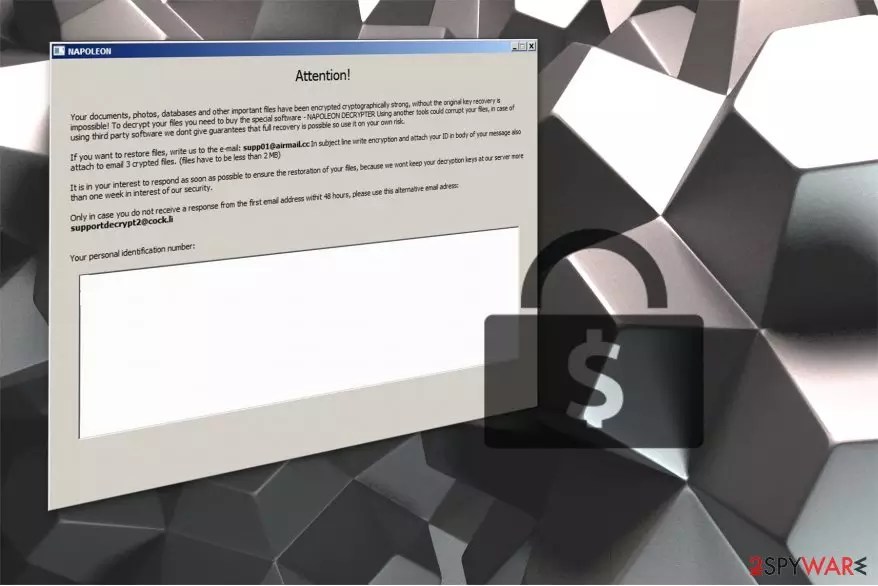
Napoleon is a file-encrypting virus which encodes data and makes it inaccessible to the user[1]. After encryption, it appends .[supp01@airmail.cc].napoleon extension at the end of the file-name and provides the data recovery instructions in How_Decrypt_Files.hta file.
The ransom note of Napoleon virus states the following:
If you want to restore files, write us to the e-mail: supp01@airmail.cc In subject line write encryption and attach your ID in body of your message also attach to email 3 crypted files. (files have to be less than 2 MB).
It is clear that the criminals want to look trustworthy. Likewise, they offer a free decryption of 3 files which are less than 2 MB. Additionally, they urge to contact them within a week, or they will delete Napoleon decrypter which is necessary in order to recover the corrupted data.
Besides, the developers of Napoleon indicate an alternative supportdecrypt2@cock.li email address in case they do not respond within 48 hours. At the moment, there is no reliable information about the amount of money which is demanded to purchase the decryption key.

However, we do not recommend contacting the criminals in either way. Note that not only you might not receive a decryptor after you make a transaction but also get malspam emails to infiltrate other high-risk computer infections[2]. Therefore, you should remove Napoleon ransomware and try alternative recovery methods. This way you will preserve your system from any further damage.
Likewise, pick FortectIntego and let it scan your computer thoroughly. After several minutes, the termination of crypto-malware will be finished, and you will be able to proceed to the decryption steps which are provided below. If you don't know how to start Napoleon removal, scroll down to find the elimination guide.
Distribution techniques
Cybercriminals employ several distribution methods to make sure that their malicious program reaches as many computers as possible. Currently, most of the ransomware spreads via fake software updates or spam emails. These techniques are highly advantageous since they are based on the delusional appearance — both emails and updates imitate legitimate companies, brands or their products.
Usually, malspam campaigns are created in a way to trick inexperienced computer user into opening the malicious attachment in the email. For example, it might look like a legitimate invoice from DHL, UPS or other well-known companies. As a result, the user opens the false document which starts an automatic download of the ransomware.
Moreover, fake software updates employ the same technique — they disguise under the appearance of widely used programs, such as Adobe Flash or VLC Media Player. Typically, you can encounter the fraudulent upgrades on highly suspicious websites appearing as a pop-up. The message might tell you that your access to particular media content is limited and you can fix it by downloading the software update.
At this point, we want to assure you that neither you should open emails from unknown senders nor install any updates offered elsewhere than in the official websites. These ransomware distribution techniques are based on the reckless behavior of gullible people. Therefore, you should carefully monitor your browsing activity and avoid any questionable content online.
Napoleon virus removal guide
It doesn't matter whether you have already been infected or not. Experts from NoVirus.uk[3] suggest you using a powerful security software all the time. It will not only help you to remove Napoleon from your system but protect from ransomware attack in the future as well. Note that this type of a virus is highly dangerous and trying to remove it by yourself might cause even more damage.
Therefore, you can complete Napoleon removal with a few simple steps:
- Download FortectIntego, SpyHunterCombo Cleaner or MalwarebytesMalwarebytes;
- Let one of these antivirus programs to scan your files thoroughly;
- After it finishes ransomware elimination, proceed to the guide below and recover your files.
Did this guide help?
Be the first to comment