

Payment ransomware virus is still in development
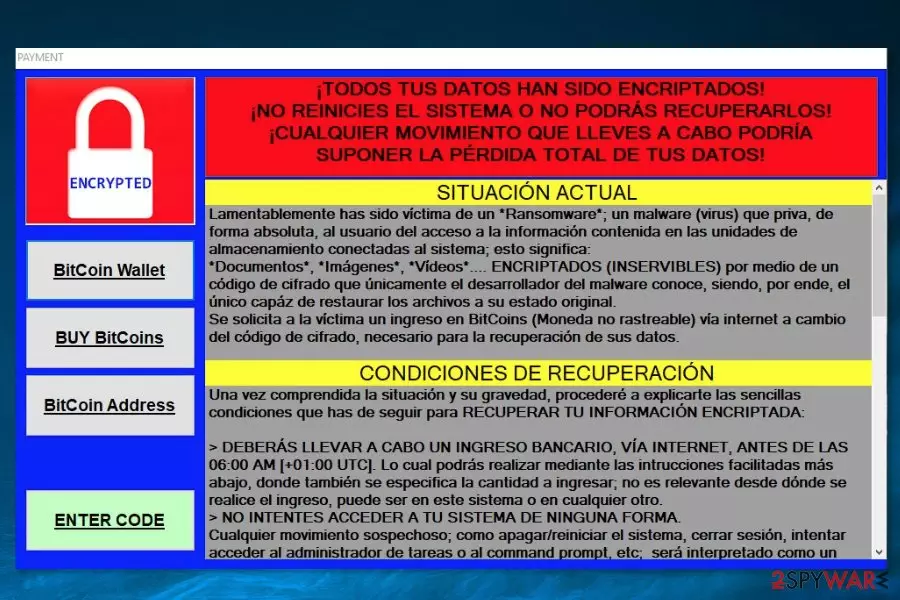
Payment ransomware is a debug version of the file-encrypting virus that is designed to attack Spanish[1] computer users. The virus uses AES cryptography to make files on the targeted devices inaccessible. However, at the moment of writing malware does not encrypt data. Though, the situation might change soon; thus, you should be aware of the latest cyber infection.
The crypto-malware is activated from the PAYMENT.exe file which might be delivered via malicious spam emails, bogus download, and many other common ransomware distribution methods. Once it infiltrates the system, it might cause severe changes to the system.
Typically, file-encrypting viruses modify Windows registry in order to boot with system startup. Additionally, ransomware might affect legitimate processes and disable computer’s security. Therefore, after Payment virus attack, the affected device becomes vulnerable, and user’s privacy might be at risk.
However, the most important task of the Payment malware is to encrypt targeted files. According to the ransom note, this malicious program is designed to encode documents, images, videos and similar files using AES cryptography.
Following successful encryption, malware delivers a ransom note where cyber criminals in the Spanish language provide data recovery instructions. Just like other crypto-viruses, this one also demands to make the payment in Bitcoin. Additionally, crooks want to scare victims that other actions instead of making the payment will lead to serious problems.
However, if you ever get infected with this ransomware, you should not listen to threatening talks of the crooks. Payment removal is the only correct way to treat this malicious program. Though, to perform deletion of the virus is nearly impossible without security software.
We do not recommend even trying to remove Payment manually. This may lead to irreparable damage to the system because ransomware-type threats often hide under legitimate names. So, you might be misled by the title and remove the wrong entry. Thus, use FortectIntego or another malware removal tool for the safe elimination.

Safety tips for ransomware precautions
Ransomware attack might be a harmful experience. However, no one can feel safe from these cyber threats that become more and more aggressive. Thus, installing reputable security software and creating backups is a must in order to minimize the risk or survive ransomware attack.
However, having an antivirus program installed is not enough to avoid ransomware. You should also:
- Check the information about sender and issue reported in the email before opening the attachment.[2]
- Download programs and updates from the official websites instead of torrents or unknown file-sharing networks.
- Install all available system and software updates.
- Avoid visiting high-risk websites, such as an adult-themed[3] or online casino.
Termination guide of Payment virus
If you ever get infected with ransomware, you should not panic and follow hacker’s instructions. The most important task is Payment removal that is performed with professional malware removal program. We recommend using FortectIntego, MalwarebytesMalwarebytes or SpyHunterCombo Cleaner. However, you can choose your preferred tool as well.
Additionally, you should reboot to Safe Mode with Networking in order to remove Payment ransomware without any problems. At the end of the article, you will find detailed malware removal guide and data recovery solutions that might help as well.
Did this guide help?
Be the first to comment