

VC_RED is a part of the Microsoft Visual C++ Redistributable package
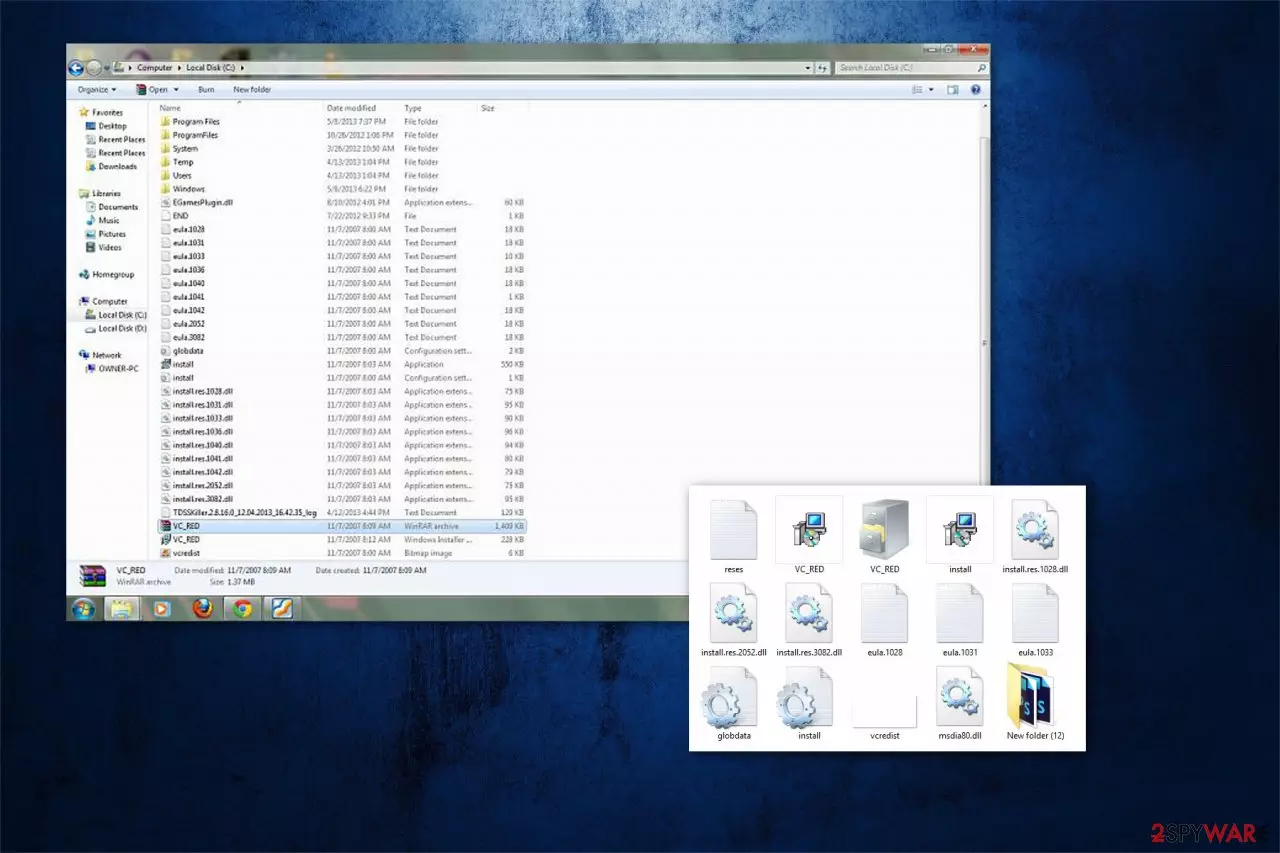
VC_RED is a legitimate temporary file that is left on the computer after the installation of the Visual C++ Redistributable package. It might also be combined together with VCRedist_x64.exe, VCRedist_x86.exe, and VCRedist_ia64.exe executables. Usually, Visual C++ is required to run programs that need this integrated development environment (IDE) product.
| Name | vc_red.cab |
|---|---|
| Type | System file |
| Related files | VCRedist_x86.exe; VCRedist_ia64.exe; VCRedist_x64.exe; |
| Danger level | Low |
| Distribution | Enters the system together with Microsoft Visual C++ Redistributable package |
| Recovery | You can double-check for system errors and damaged files with FortectIntego |
VC_RED.cab installed in the root directory like C:\VC_RED is entirely safe. However, if it appears in random folders on your computer, you should run a full system scan with professional antivirus software. For that, we recommend using FortectIntego since it has high malware-detection rates and is easy to use.
Note that the folder holding can contain the following files, which are also safe[1]:
- VC_RED.MSI;
- VC_RED.cab;
- eula.1040.txt;
- eula.1041.txt;
- eula.1042.txt;
- eula.2052.txt;
- eula.3082.txt;
- eula.1028.txt;
- eula.1031.txt;
- eula.1033.txt;
- eula.1036.txt;
- vcredist.bmp;
- globdata.ini;
- install.exe;
- install.ini;
- install.res.1028.dll;
- install.res.1042.dll;
- install.res.2052.dll;
- install.res.3082.dll;
- install.res.1031.dll;
- install.res.1033.dll;
- install.res.1036.dll;
- install.res.1040.dll;
- install.res.1041.dll.
However, if the temporary file is corrupted, you might face multiple errors while trying to launch specific applications, during the startup or using computer functions like printing. Note that it is possible that the software is infected with malware and disrupting your computer's performance. In this case, you should immediately remove this virus.

Most commonly, you can encounter, such errors related to the program as Vc_red.cab error, Vc_red.cab not found, Runtime Error: vc_red.cab. Usually, such messages appear during the installation of the software which is related to this file, like MSDN Disc 5000.[2]
Likewise, if you have encountered problems mentioned above, you should first identify whether the file is infected with malware or it is merely missing on your computer. Scan your computer with reputable antivirus software and perform removal if necessary.
If you have accidentally deleted or another software has removed the files, you can get the download from the official Microsoft website. Note that there might be similar programs that would try to lure you into installing the bogus version of this product. Thus, stay away from shady pages offering “legitimate” software.
Temporary files are generated during the installation of Visual C++ Redistributable package
According to BedyNet.ru[3] experts, these files can appear on your computer after the installation of the Microsoft Visual C++ Redistributable package which places the components of Visual C++ libraries required to run applications. Likewise, if you have recently performed the setup mentioned above, do not worry since the file is safe.
However, you might encounter a virus if you tend to rush through the steps while installing software recklessly. Hackers might bundle the malicious program disguising as the legitimate file with free applications and do not disclose information about it.
Likewise, you are advised to carefully check each step of the procedure as well as choose Custom/Advanced settings. Make sure that you have de-selected all previously marked boxes to ensure that none of the additional downloads are granted with permission to enter the system.
Delete VC_RED from your computer
Even though this file along with other ones is harmless, they are safe to delete. However, we do not advise doing that since improper removal process can lead to computer damage. Likewise, either leave the program present on your system or get a professional security software to help you.
Additionally, if you have noticed separate files in different directories without a related folder name, you should be aware that malware might have infiltrated on your system. In this case, it is vital to delete this virus from your computer. However, it should also be performed automatically by an antivirus tool.
Therefore, you can remove VC_RED in both cases with powerful anti-malware software. After the full system scan, double-check the system with the FortectIntego to make sure that your system is error-free.
Uninstall from Windows
Uninstall from Windows 10/8:
- Type Control Panel into the Windows search box and open the result.
- Under Programs, select Uninstall a program.


Uninstall from Windows 7/XP:
- Click on Windows Start > Control Panel (Windows XP users should click on Add/Remove Programs).
- In Control Panel, select Programs > Uninstall a program.


Remove the unwanted program:
- In the Programs and Features window, look for any recently installed suspicious entries, select them, and click Uninstall.
- If User Account Control appears, click Yes to confirm, then complete the removal.


Did this guide help?
Be the first to comment