

GarGizer System Repair tries to trick users into purchasing the full version of the software
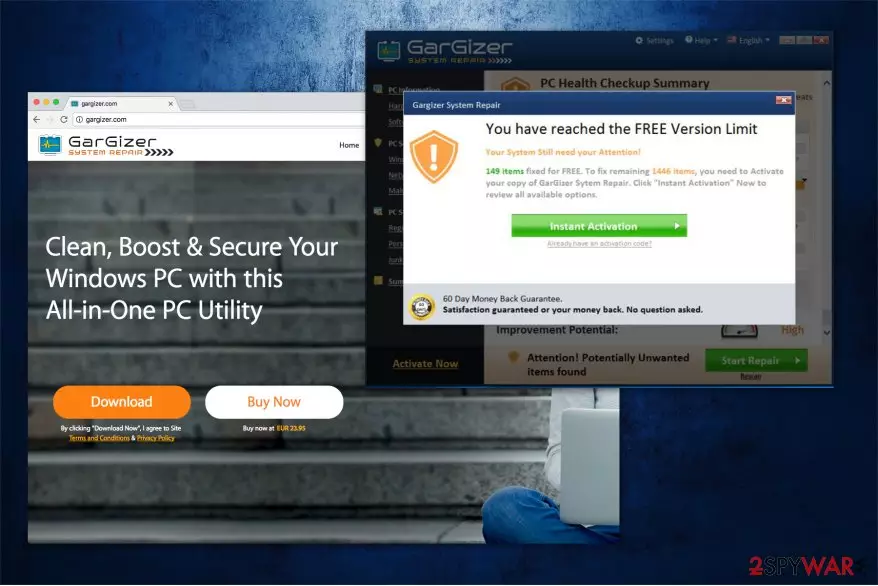
GarGizer System Repair is a system optimization tool which is supposedly designed to clean, boost and secure the computer with Windows OS. Even though the official website states that this all-in-one tool should help you get rid of potentially unwanted programs, it seems that this utility is classified as one itself.
Many users are offered to try a free version of GarGizer software. Unfortunately, people are provided with an excessive amount of fake malware-detection messages which claim that their computers are at risk. Users are encouraged to switch from the trial to the full version.
On the official website, it is said that GarGizer System Repair costs €23.95. However, once the user is redirected to the checkout page, the price increases to €29.95 plus sales tax. It means that the product costs around €36.24 at the end. These deceptive techniques employed by the developers significantly decrease the reliability of the software and makes it a potentially unwanted program (PUP)[1].
Additionally, you should note that excessive amount of delivered notifications about non-existent viruses are not only merely an attempt to lure users into purchasing full versions of GarGizer program, but they also slow down your computer. You might notice that it takes longer for programs to load or they start crashing after a certain period of time.

Likewise, we do not recommend you to trust this system optimization tool. If you want to make sure that this software is unreliable, remove GarGizer System Repair and pick a professional security application. You can use FortectIntego and run an entire system scan. Later, compare the results, and you will notice a significant difference.
GarGizer System Repair removal will protect you from fake virus alerts and attempts to swindle money from you. You can get rid of this potentially unwanted program by following the instructions below. They will show you how to uninstall the software from your system safely.
PUPs can be installed on the computer without your consent
While many people can end up on the official http://gargizer.com/ and download their software there, the contrivers also rely on a popular marketing scheme known as product bundling[2]. Once the developers employ such distribution techniques, potentially unwanted programs can sneak into your computer without your permission.
It is because they pack PUPs with free software and hide the information about such actions from the future consumers. Likewise, the only way to find out whether any additional program is bundled with the application you attempt to download is to pick Custom/Advanced settings of the installer.
This installation process does not skip important steps of the procedure including the once where the information about the potentially unwanted program is disclosed. You should search for pre-selected marks like Get XXX now, or I agree to install XXX now and un-tick them.
Learn how to uninstall GarGizer System Repair virus
According to Virusi.bg[3] experts, you can find reports about GarGizer System Repair virus. However, this system optimization tool is not actually malicious. Despite that, it employs more than unfair distribution methods along with the fraudulent notifications to gain profits from inexperienced computer users.
Therefore, we recommend you to remove GarGizer System Repair and pick a reliable security software instead. Download it from verified developers and run a full system scan. The professional antivirus application should show real malware-detection rates of your system.
Also, you can use manual GarGizer System Repair removal instructions. Although, we kindly ask you to follow them strictly to avoid any misunderstandings or computer damage.
Uninstall from Windows
Uninstall from Windows 10/8:
- Type Control Panel into the Windows search box and open the result.
- Under Programs, select Uninstall a program.


Uninstall from Windows 7/XP:
- Click on Windows Start > Control Panel (Windows XP users should click on Add/Remove Programs).
- In Control Panel, select Programs > Uninstall a program.


Remove the unwanted program:
- In the Programs and Features window, look for any recently installed suspicious entries, select them, and click Uninstall.
- If User Account Control appears, click Yes to confirm, then complete the removal.


Delete from macOS
Remove the unwanted application:
- From the menu bar, select Go > Applications.
- In the Applications folder, look for any suspicious entries, then drag them to Trash (or right-click and pick Move to Trash).


Delete leftover files and folders:
- Select Go > Go to Folder.
- Enter /Library/Application Support and remove any suspicious folders related to the unwanted program.
- Repeat the same check in the /Library/LaunchAgents and /Library/LaunchDaemons folders, deleting any suspicious entries.

- Finally, empty the Trash to permanently remove the leftovers.

Did this guide help?
Be the first to comment