

Annabelle ransomware is a troublesome crypto-virus based on horror movie
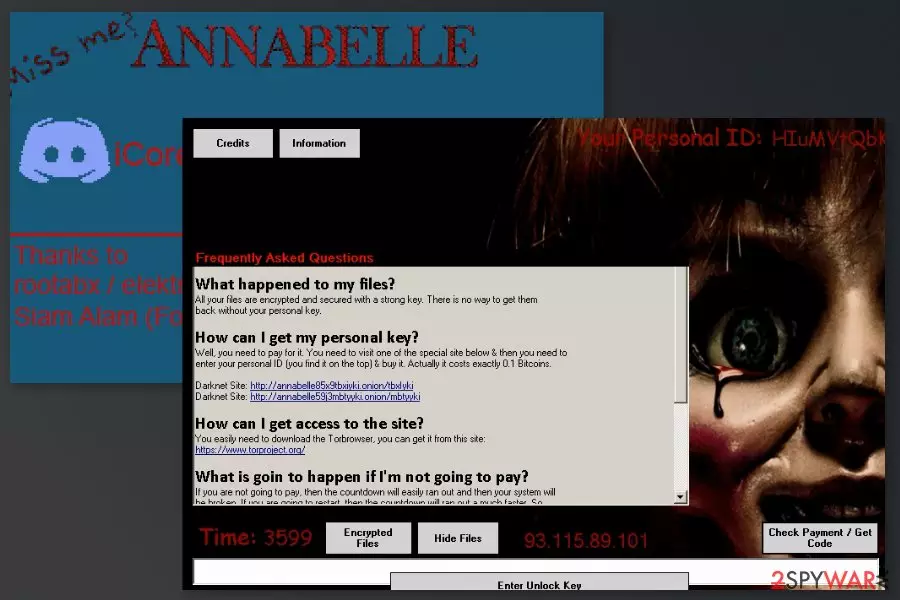
Annabelle ransomware is a file-encrypting malware that seems to be inspired by a well-known horror movie Annabelle. This crypto-virus is closely related to Stupid ransomware. As soon as the malicious code is executed on the user's PC, all the files become unusable after appending .ANNABELLE file extension to each of the targeted files. Additionally, a lock screen is displayed with a message which explains to the user what should be done next.
Fortunately, the virus is decryptable. Previously, users had been offered to rely on a decryptor that was created for Stupid ransomware. However, security experts at Bitdefender Labs created a new decrypter that was designed to deal with this crypto-virus specifically. However, since this malware is complicated, a series of procedures should be executed before data can be recovered.
| Name | Annabelle ransomware |
|---|---|
| Type | Cryptovirus, file-encryption virus |
| Extension | .ANNABELLE |
| Resemblance | The mine with the same name |
| Related | Stupid ransomware |
| Distribution | Files with malicious codes attached to the email or included in the message with links |
| Elimination | Anti-malware programs are needed for the proper ransomware removal |
| Repair | Running the tool like FortectIntego can fix virus damage |
As soon as Anabelle ransomware gets into the system, it makes some changes to the system to boot with Windows startup. Ransomware also disables various processes and programs, such as Msconfig, Task Manager, Process Explorer, etc. Additionally, Annabelle ransomware disables the computer’s security, meaning it turns off Windows Defender, firewall, and any antivirus programs that are installed on the computer. However, these activities are not enough for ransomware viruses.
The malware also modifies the Image File Execution registry[1] to prevent users from accessing various programs, for instance, Notepad or web browsers. For this reason, the computer becomes nearly useless because many programs become unresponsive.
Once it finishes causing chaos on the system, it tries to spread further via USB drives. Finally, it starts the primary task of ransomware – data encryption. Ransomware uses a static key for file encryption and adds .ANNABELLE file extension to targeted audio, video, or image files, documents, databases, and similar entries. Additionally, it deletes Shadow Volume Copies of the targeted data.
Following the successful encryption, ransomware reboots the computer and displays a lock screen message with a character of an American horror movie. At the bottom of the lock screen, a developer known as iCoreX0812, leaves his/her Discord username, assuming that victims should contact to get back access to their computers and files.
The ransomware virus also leaves a ransom note where victims are informed about a necessity to pay the ransom of 0.1 Bitcoin to get back access to the corrupted files and prevent system damage:
What is goin to happen if I'm not going to pay?
If you are not going to pay, then the countdown will easily ran out and then your system will be broken. If you are going to restart, then the countdown will ran out a much faster. So, its not a good idea to do it.
When the timer in the lock screen message counts to an end, the malware displays a BSOD and runs a program that replaces the Master Boot Record (MBR).[2] However, it seems that the purpose of Anabelle ransomware is to demonstrate the developer’s skills because it can be easily decrypted with a Stupid decrypter.
However, before data recovery, victims should proceed with Annabelle ransomware removal and fixing all the damage caused by the malware. You should not try to clean your PC manually because it’s a complicated task that may lead to irreparable damage to your device.
To remove the Annabelle virus and fix its damage, you should obtain a tool like SpyHunterCombo Cleaner or MalwarebytesMalwarebytes which can clean malicious components, replace corrupted registry entries and solve other problems caused by malware.

File-encrypting malware like this ransomware can be distributed in few different methods
This crypto-virus spreads similarly to other ransomware viruses. Therefore, it can infect Windows computers via:
- malicious email attachments;
- malware-laden ads;
- bogus software updates or downloads;
- exploit kits.
Security experts from losvirus.es[3] suggest taking extra precautions to avoid the infiltration of ransomware. Malicious spam emails remain the main crypto-malware distribution strategy. Therefore, you should learn how to identify phishing emails and do not take harsh actions in your inbox.
Apart from avoiding suspicious emails, you should also avoid clicking unknown links, download questionable content, and visiting high-risk websites. It’s highly recommended to install all available updates, strengthen the computer’s security with antivirus, and create data backups.
Annabelle ransomware should be deleted before the file recovery procedure
The ransomware removal should be performed immediately because malware makes numerous changes to the system and prevents from using the computer normally. We want to discourage you from trying to terminate the virus manually. This task can be successfully performed only by experienced IT specialists.
We recommend you remove Annabelle virus using SpyHunterCombo Cleaner or MalwarebytesMalwarebytes. If you cannot run security software, please follow the instructions below. After virus elimination, you can recover your files using backups, Stupid decryptor, or alternative recovery methods that are given below. You also need to run FortectIntego to find and fix file damage in system parts.
Did this guide help?
Be the first to comment