

Bansomqare Wanna is ransomware that mimics infamous WannaCry
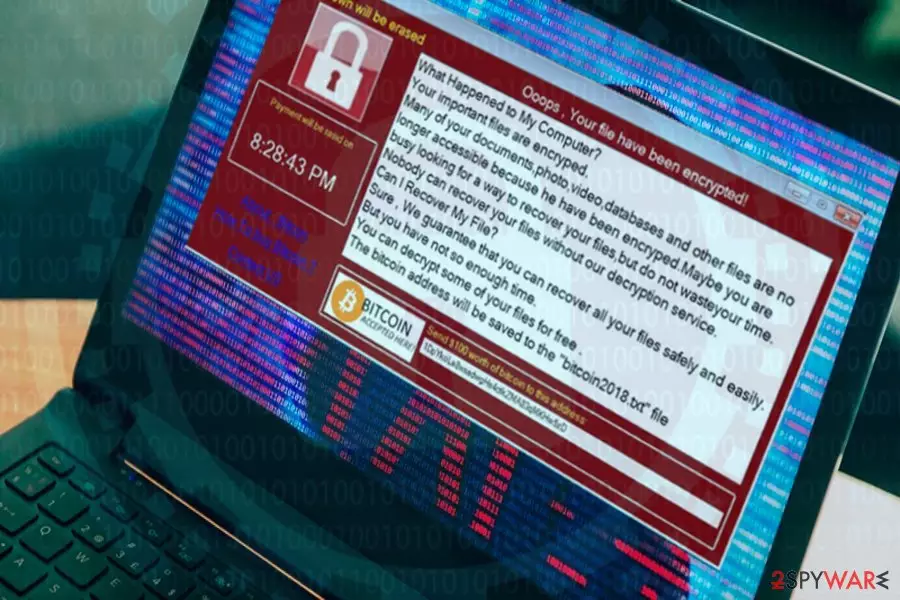
Bansomqare Wanna is a ransomware virus that imitates WannaCry[1] and uses Whatsapp icon. It appends .bitcoin file extension to encrypted files and generates a bitcoin2018.txt ransom note on the desktop, which urges the victim to transfer 100 USD in Bitcoins via provided Bitcoin wallet.
| Name | Bansomqare Wanna |
| Type | Ransomware virus |
| Danger level | Locks personal files, demands a ransom |
| File extension used | .bitcoin |
| Ransom note | bitcoin2018.txt |
| Related files | runas.exe, whatsapp.exe, and notepad.exe |
| Distribution | Malspam, exploit kits, hacked RPD, fake software updates, malicious ads, phishing sites |
| Decryptable | No |
| Elimination | Download FortectIntego and run a full system scan. After Bansomqare Wanna removal, follow the guide on how to decrypt files (at the end of the post) |
Bansomqare Wanna ransomware is distributed in the form of runas.exe or whatsapp.exe. The file can be disclosed in spam email, hacked websites, fake software updates, and similar media that are typically used by hackers to infect users' PCs.
Once the Bansomqare Wanna payload is being executed, the virus enables the runas.exe and whatsapp.exe executables and requires administrative privileges by launching an elevated Command Prompt window. Right after that, it applies an encryption algorithm and locks documents, photos, video, database, and other personal information with the .bitcoin file extension.
Upon successful encryption, the virus generates a ransom note named Bitcoin2018.txt by creating a path C:\Users\Public\Desktop\bitcoin2018.txt. The note says:
Ooops, Your files have been encrypted!
What happened to my computer?
Your important files are encrypted.
Many of your documents, photo, video, database, and other files are no longer accessible because he have been encrypted. Maybe you are busy looking for a way to recover your files but do not waste your time. Nobody can recover your files without our decryption service.Can I recover my files?
Sure, We guarantee that you can recover all your files safely and easily.
But you have not so enough time.
You can decrypt some of your files for free.
The bitcoin address will be saved to the “bitcoin2018.txt” file
The design of the ransom note is similar to the one used by the infamous WannaCry. It features a red background, a countdown clock on the left side, a lock icon at the top-right corner of the screen and a reference to Bitcoin wallet at the bottom. However, WannaCry does not contain a WhatsApp icon, while the Bansomqare Wanna does.
Hackers ask the victim to pay 100 USD ransom in Bitcoins with 24 hours. Before that, the victim is asked to email crooks via MildredRLewis@teleworm.us email address for more information.
The virus has been detected ate the end of March 2018. At the time of writing, no ransom has been sent to the indicated Bitcoin wallet. Nevertheless, dieviren.de[2] experts point out that the ransomware is being rolled out in phases and the rebound of attacks is expected in the nearest future.
It's not yet clear what cipher the Bansomqare ransomware uses for data encryption, but most probably it relies on the well-known AES-256 algorithm. In case the virus has already attacked your PC, we would recommend you to remove Bansomqare Wanna ransomware using FortectIntego, SpyHunterCombo Cleaner or MalwarebytesMalwarebytes security tool.
Although the Bansomqare Wanna removal will not decrypt your files, you will be able to recover at least a part of them using third-party data recovery tools. Do not pay the ransom for cybercrooks. By supporting their fraudulent activities, PC users encourage them to keep the pace and swindle people's money.

To protect yourself from the loss of personal information, make sure to create backups for the most important file types. That's one and the only trustworthy way to evade Bansomqare Wanna virus and similar attacks.
The main ransomware distribution methods
Experts haven't yet particularized the distribution method that this ransomware relies on. However, most of the Crypto-viruses are distributed via malspam campaigns.[3] Hackers steal people's email addresses and connect them to bots. This way, they can disseminate millions of fake email messages with malicious email attachments to potential ransomware victims.
This specific ransomware is closely related to runas.exe, whatsapp.exe, and Notepad.exe files. However, these files might be disguised under legitimate looking DOC files or downloads of fake software. In addition to malspam, people may get infected by crypto-malware via:
- fake software updates;
- hacked websites;
- fake software updates (Java, Flash Player, Windows 10, Google Chrome, etc.);
- exploit kits;
- hacked remote desktop applications;
- drive-by-download attacks, etc.
It not possible to ensure a hundred percent protection. However, those who keep the system updated and rely on a professional anti-virus program with real-time protection and updated definitions are much less prone to fall victims to ransomware attacks.
Remove Bansomqare Wanna virus
Crooks intimidate people that system's reboot will delete all locked files permanently. It's unknown whether it's true or not, but it's a fact that Bansomqare Wanna removal is a must to restore system's performance.
You won't be able to remove Bansomqare Wanna virus manually since it corrupts multiple files and registry entries that can hardly be detected without dedicated software. Thus, to wipe malicious programs and files from the system, you should scan your PC with a powerful security tool. Our top pick programs are FortectIntego, SpyHunterCombo Cleaner, and MalwarebytesMalwarebytes.
Did this guide help?
Be the first to comment