

LittleFinger ransomware – a virus that uses file marker to encrypt your files
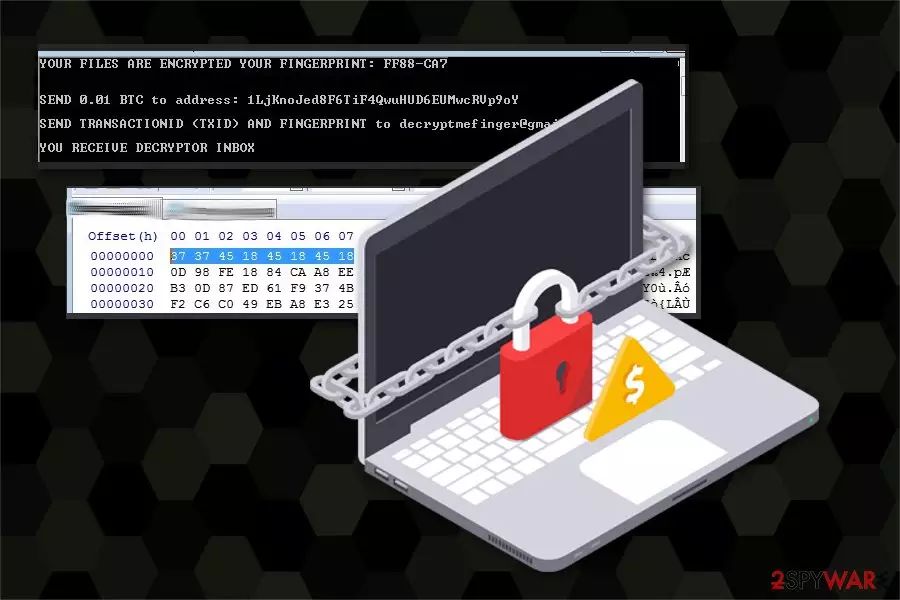
LittleFinger ransomware is a computer virus that belongs to the group of the most dangerous cyber threats because it corrupts files on the computer and might install various malicious components that can cause damage to the system. This virus uses file marker 0x3737451845184518 for file encryption. Most of these ransomware type viruses use extensions on these files, so this feature makes it quite unusual.
| Name | LittleFinger |
|---|---|
| Type | Ransomware |
| Danger level | High. Makes system changes and encrypts files |
| Extension/Encryption | 0x3737451845184518 |
| Indicated email address | decryptmefinger@gmailcom |
| Amount of the ransom | 0.001 BTC |
| Distribution | Infiltrates the system via infected email attachments |
| Elimination | FortectIntego is the best tool for LittleFinger ransomware removal |
After the infiltration, LittleFinger virus finds various data to encrypt. Immediately after the encryption is complete, you get a ransom note from cyber criminals. In this console text message, you get your individual “ fingerprint” that helps cyber criminals to identify you.
YOUR FILES ARE ENCRYPTED YOUR FINGERPRINT: [redacted]
SEND 0.01 BTC to address: [redacted]
SEND TRANSACTIONID AND FINGERPRINT to decryptmefinger@gmailcom
YOU RECEIVE DECRYPTION INBOX
Also, authors of LittleFinger ransomware encourage you to pay a 0.01 Bitcoin and contact them via provided email address for file decryption tool. But we do not recommend to pay or contact those virus developers in any way. It may have no positive results. The situation might get even worse – you might lose the money and still don't have access to your files.
It is known that cybercriminals disappear after the payment is done. Unfortunately, they tend to ignore their victims. They can say that the only way for you to restore your files is their decryption tool, but it might be not the case. Cybercriminals[1] might not even have those decryption tools. That is why the virus elimination is necessary here.
The only way you can restore your files is using external backup, but you should only do that after you remove LittleFinger ransomware from your computer completely. Use certified anti-malware tool for this, to ensure your success. We can recommend FortectIntego.
However, LittleFinger ransomware removal might be difficult, because the virus may contain other malicious components that block security software. If you are dealing with such problems, you should use the guidelines below that will explain how to disable the virus and get rid of it.

Dubious email attachments can contain dangerous viruses
Suspicious email content, questionable and never before seen addresses can be the first things you notice and need to avoid. When you get spam email with an attachment from unknown address delete them without opening. This can ensure that you are not getting any viruses or other malware[2] installed on your computer.
Security specialists from virusi.bg[3] also report that some of the malicious emails might be hard to identify. Scammers can create legit-looking emails that seem to be sent from well-known companies or organizations. So, you should always double-check the information before opening the attachment.
Other things that can be there with those attachments are Trojan viruses. These malicious cyber creatures can open doors for the ransomware and other dangerous viruses. Also, always download and install software from known, certified providers. Do not use free sharing networks for getting your essential software.
First step: eliminate LittleFinger ransomware from your computer
Be aware that you need to remove LittleFinger ransomware from your computer before proceeding with data recovery. File restoration from external drive at this point can be useless if you still have the virus on your system. After the system reboot, malware can encrypt your files again.
LittleFinger ransomware removal can be tricky because of the attached files and programs, but you can use professional anti-malware tools to make sure it is done correctly. We can recommend FortectIntego, SpyHunterCombo Cleaner, MalwarebytesMalwarebytes. Of course, you can choose other professional programs, but do not forget to update them first.
Did this guide help?
Be the first to comment