

LockCrypt 2.0 – newly discovered version of already existing LockCrypt virus
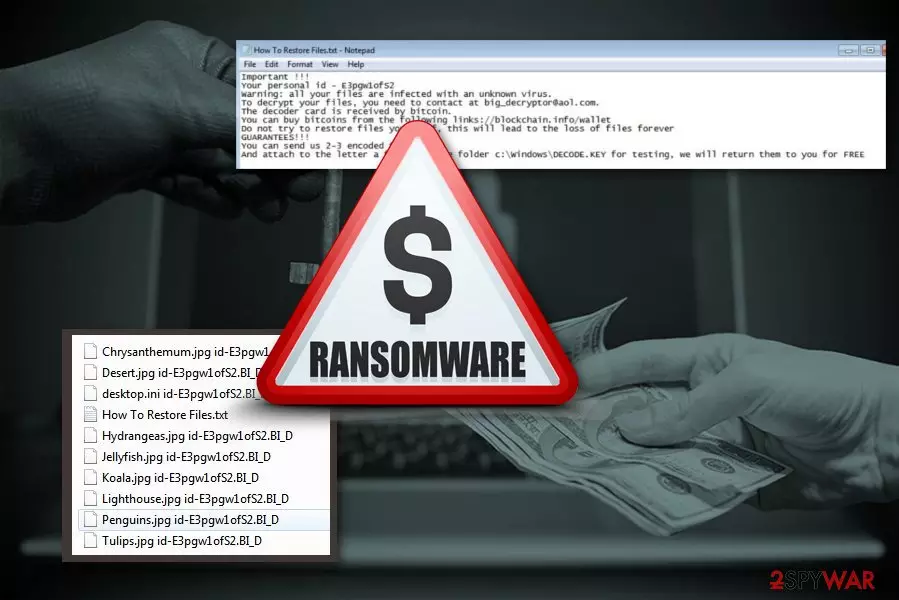
LockCrypt 2.0 is a new variant of LockCrypt ransomware which uses a combination of AES-256 and RSA-2048 encryption algorithms. You can differ the particular version from others because of unique “id-.BI_D“ extension that is added to encrypted files. Unfortunately, family photos and videos to audio files and important text documents cannot be decrypted after ransomware[1] attack. However, criminals state opposite in the ransom note provided in How To Restore Files.txt file.
| Name | LockCrypt 2.0 |
|---|---|
| Previous version | LockCrypt |
| Danger level | High. Changes Windows registry key, that makes decryption not possible. Lock data and makes files useless |
| Distribution | Dubious software providers, spam email attachments |
| Ransom note | How To Restore Files.txt |
| Encryption method | AES-256 and RSA-2048 |
| Contact email | big_decryptor@aol.com |
| Extension | id-.BI_D |
| Decryption | Not possible. |
| Elimination | You can use FortectIntego for the correct virus removal. |
Ransomware uses a traditional and unbreakable encryption algorithm. It uses a combination of previously mentioned AES-256 and RSA-2048 cryptography to lock targeted data on the affected machine. It also tries to save encryption keys in C:\Windows\DECODE.KEY. However, the virus does not check if this file is saved properly.
In case, LockCrypt 2.0 fails to create the key file, data decryption becomes impossible even for authors of ransomware. However, they still follow ordinary procedure and after file encryption, the virus places text file “How To Restore Files.txt” with ransom message. This note has specific information about contacting developers and victims’ personal ID. There is no information about ransom amount, but you can assume that this depends on how fast you contact the cybercriminals.
Important !!!
Your personal id –
Warning: all your files are infected with an unknown virus.
To decrypt your files, you need to contact at big_decryptor@aol.com.
The decoder card is received by bitcoin.
You can buy bitcoins from the following links://blockchain.info/wallet
Do not try to restore files your self, this will lead to the loss of files forever
GUARANTEES!!!
You can send us 2-3 encoded files.
And attach to the letter a file from the folder c:\Windows\DECODE.KEY for testing, we will return them to you for FREE
Although, LockCrypt 2.0 virus developers state that they can decrypt your files and offer a chance to test their tool by sending a couple of encrypted files. Additionally, victims are asked to send c:\Windows\DECODE.KEY which is needed for data recovery. However, we have already explained that victims may not find this file on the computer, so they lost their files forever.
However, even if you see this file, you should not contact authors of LockCrypt 2.0 ransomware. The security team at uirusu.jp[2] recommends focusing on virus removal because this damaging program and a threatening message was created by cyber criminals. They cannot be trusted. Even if they can prove of having a working decryptor, they might not let you restore lost data once you make the payment.
Data loss might be painful, but you should focus on computer's security. Thus, you to opt for LockCrypt 2.0 removal with anti-malware software like FortectIntego. It lets to clean everything that is related to the virus from your computer and recover corrupted registry entries or fix other damage caused to Windows OS. Keep in mind that malware removal software does not recover files. So, after the elimination, your files still be unusable.
However, once you remove LockCrypt 2.0, you can try to recover your files from backups. If you are not sure that your PC is clean, do not insert any drive into a computer. Remaining virus traces can affect those files, and you lose all of your data. 
Be aware of the danger of spam emails
As you may already know spam emails[3] and their attachments might be dangerous. Phishing emails are the main method used for spreading ransomware payloads. Users often rush to open an attached Word or PDF file. Sadly, human curiosity often lead to damaging consequences – malware infiltration.
We want to remind to be careful. Before opening the attached file or clicking a link, you should double-check the information about the sender. You can suspect that the email is malicious if:
- it is already in your spam/commercial box;
- it is sent from unknown address;
- it looks legitimate, but you are not using those services or products;
- there is a lot of advertisement content, deals and offers;
- there is a lot of the same content emails in your inbox;
- the letter of full of mistakes;
- you do not expect to receive such email at all.
Proceed with LockCrypt 2.0 ransomware elimination now
The best way to remove LockCrypt 2.0 ransomware from your computer is using professional anti-malware tools. Manual ransomware elimination can be successfully completed only by experienced IT specialists. Hence, home computer users should not try to do this task in order to avoid damage to the system and incomplete virus elimination.
Tools like FortectIntego, SpyHunterCombo Cleaner or MalwarebytesMalwarebytes can be used for automatic LockCrypt 2.0 removal. We can ensure that these certified utilities can clean the affected machine. However, you can use any other anti-malware program, but make sure you choose legitimate providers. These steps are essential because any unknown software purchase can lead to other infections.
If you have some difficulties with the elimination, please follow the guide below. Additionally, there you can find alternative data recovery methods that might help if you do not have backups.
Did this guide help?
Be the first to comment