Winsecure — ransomware which installs into the system secretly and encrypts various data
Winsecure is a virus which encrypts files using the .crypted extension. It infiltrates the system usually by spam emails and the victim does not even notice the invasion until infected files show up. If you see that your pineapple.doc turned to pineapple.doc.crypted, there is a big chance that your computer is infected by Winsecure virus. The ransomware displays a message which usually is named ransom_pay.html. It announces about the cryptovirus infiltration and that in order to decrypt files, the user needs to pay a particular ransom in Bitcoin[1].
To continue, this ransom-demanding malware affects various computer systems and programs. The longer it is active, the bigger the damage can get. In order to avoid as less hazardous consequences as possible, you need to remove the Winsecure virus from your PC immediately. For this, we recommend downloading an anti-malware tool such as FortectIntego or any other similar one. The program will help you do the cleaning by displaying some guiding steps.
Furthermore, the risk of various other infections will increase as your security tools may not be that strong to protect all computer programs and services. According to IT researchers[3], this crypto-virus just like many others opens a path for other malware to spread. As a result, your computer can be harmed with numerous infections. So, better proceed with the Winsecure removal as soon as you see ransomware-related components on your PC.
However, even if you are very desperate to get encrypted files back, do not trust the cybercriminals. Avoid contact with them and certainly, do not pay the demanded ransom. Users are often scammed and left with empty pockets. A better option would be to use professional anti-malware and try the legitimate Winsecure decryptor.
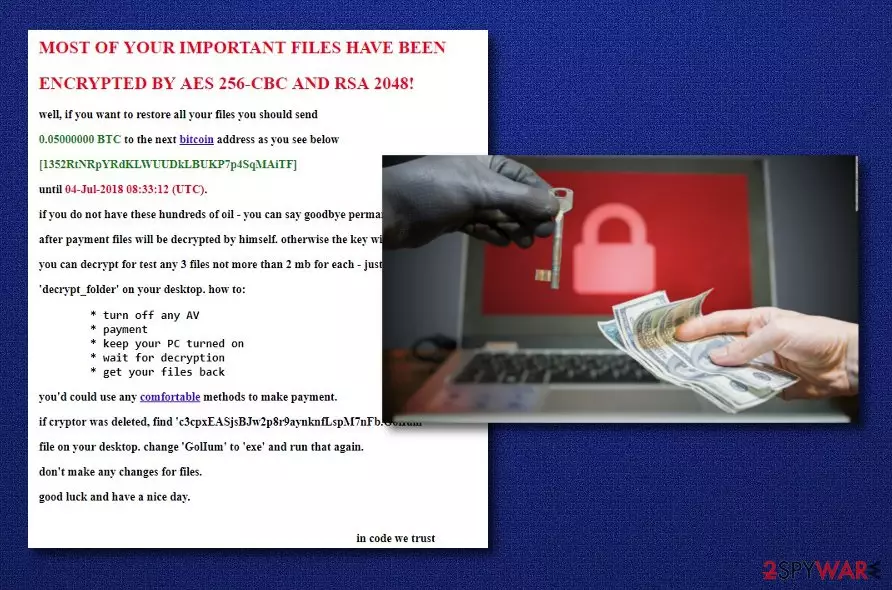
In order to know that your computer is infected by Winsecure ransomware, here is a piece of the ransom_pay.html or ransom_note.txt message which is displayed after the infection:
MOST OF YOUR IMPORTANT FILES HAVE BEEN ENCRYPTED BY AES 256-CBC AND RSA 2048!
well, if you want to restore all your files you should send 0,05000000 BTC to the next bitcoin address as you see below [1352RtNRpYRdKLWUUDklBUKP7p4SqMAiTF] until 04-Jul-2018 08:33:12 (UTC)
Ransomware often spreads through spam messages
Nowadays, ransomware infections are becoming even more common as more and more people are browsing the web and using all computer-provided comfortable features. However, not everyone knows, how to correctly act while surfing the Internet or doing other functions. Due to that, here is a simple guide how and why you should do such actions:
In order to keep your computer and various data safe from ransomware-type viruses and other malware forms, do not open any spam emails. They might look fully legal and trustworthy, but actually, there is a big risk that such messages might include harmful components. So, better delete each spam that you get, if you are not expecting any important letters.
Ransomware can also be distributed via suspicious websites, programs, exploit kits, etc. Pay attention to every page you enter and every link you click on. Remember that your data and computer safety is your own responsibility.
To increase your protection level, consider installing an antivirus. Regular system scans are necessary in order to detect any infections which might bring big damage to your systems. This program will help you avoid such hazardous software and alert if something is going wrong.
Eliminate Winsecure by leaning on professional help
To remove Winsecure virus you need to download and install an anti-malware tool. IT experts advise using programs such as FortectIntego, SpyHunterCombo Cleaner, or MalwarebytesMalwarebytes to do the cleaning. Professional help is required as a ransomware infection is a very serious threat which can deactivate even various computer security systems.
Winsecure removal might be a long path to go but it is definitely worth the effort. If you want to restore your computer system back to normal an avoid further consequences, you need to get rid of the crypto-virus as soon as you notice its activity. Also, we recommend refreshing your entire system after the ransomware infection is eliminated.




Be the first to comment