

Hyena Locker — ransomware which displays a text message and urges victims to pay a ransom for file decryption
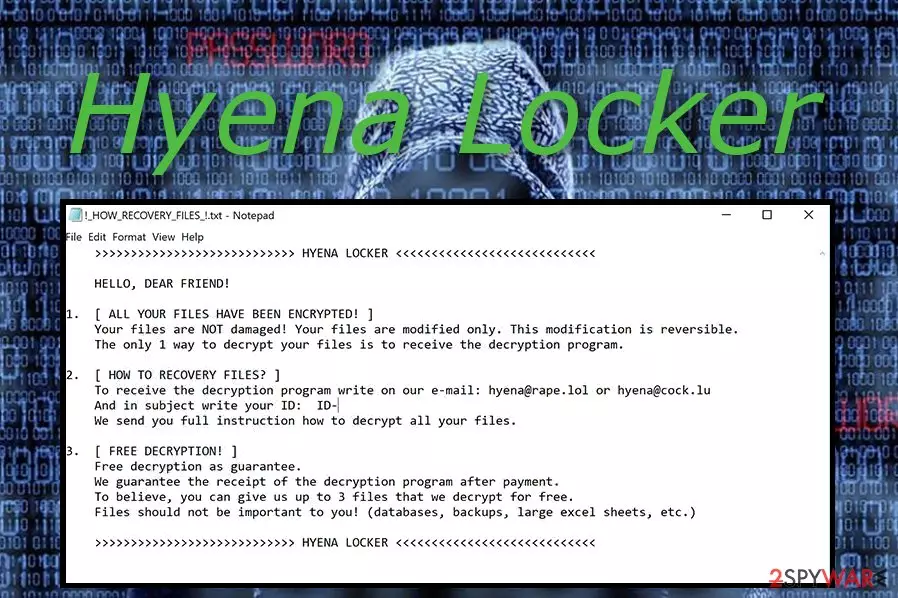
Hyena Locker virus is a serious cyber threat which benefits from file encryption. If you get this ransomware secretly installed on your pc, you will notice that all your files are appended with .[hyena@rape.lol].HYENA extension. Each locked file has a copy of a ransom note named !How-To-Recovery-Files!.txt. This message aims to announce about the harmful infiltration and blocked files. In order to restore important documents, users are urged to contact the cyber crooks via hyena@rape.lol or hyena@cock.lu email addresses and pay a particular ransom.
| Name | Hyena Locker |
|---|---|
| Type | Ransomware |
| Extension | .[hyena@rape.lol].HYENA |
| Ransom note | !How-To-Recovery-Files!.txt |
| Email addresses | hyena@rape.lol, hyena@cock.lu |
| amount of the Ransom | Has to be paid in cryptocurrency and might differ each time |
| Distribution | P2P file-sharing sites or malicious spam emails |
| Decryptable | Currently, there is no official Hyena Locker decryptor. Although, you can try to get back your data by following the steps of alternative recovery techniques at the end of this article |
| Elimination | Use FortectIntego to uninstall Hyena Locker ransomware |
Furthermore, the price of file decryption usually varies and has to be paid in a type of cryptocurrency (Bitcoin, Monero, etc.). Cybercriminals demand such currency in order for the transfer to remain secret. However, do not consider paying the demanded price to unlock files with .HYENA extension. It is definitely not a good option as victims usually are scammed and left with no decryption tool.
Here you can see the text written in the ransom note by Hyena Locker ransomware:
>>>>>>>>>>>>>>>>>>>>>>>>>>>> HYENA LOCKER <<<<<<<<<<<<<<<<<<<<<<<<<<<<
HELLO, DEAR FRIEND!
1.[ ALL YOUR FILES HAVE BEEN ENCRYPTED! ]
Your files are NOT damaged! Your files are modified only. This modification is reversible.
The only 1 way to decrypt your files is to receive the decryption program.2.[ HOW TO RECOVERY FILES? ]
To receive the decryption program write on our e-mail: hyena@rape.lol or hyena@cock.lu
And in subject write your ID: ID-
We send you full instruction how to decrypt all your files.3.[ FREE DECRYPTION! ]
Free decryption as guarantee.
We guarantee the receipt of the decryption program after payment.
To believe, you can give us up to 3 files that we decrypt for free.
Files should not be important to you! (databases, backups, large excel sheets, etc.)>>>>>>>>>>>>>>>>>>>>>>>>>>>> HYENA LOCKER <<<<<<<<<<<<<<<<<<<<<<<<<<<
Hyena Locker virus encrypts files by employing a sophisticated AES algorithm. All decryption keys are stored on remote servers and remain untouched. According to IT experts[1], this is the main reason, why ransomware file decryption can be a very difficult process.
However, there is a way to fix things. First, you need to remove Hyena Locker from your PC immediately. Use FortectIntego for such case. Trustworthy help is needed to take good care of your computer and completely wipe out this serious infection.
After you work on the Hyena Locker removal you can try using professional decryption tools instead of paying the cybercriminals. Notice, a good idea is to keep important files and folders stored on an external device, as the USB flash drive[2]. Such information becomes safe and reachable only for the owner if the flash drive is kept in sight.

Learn how ransomware spreads to avoid damaging consequences
According to statistics, ransomware attacks have increased slightly through the past year[3]. If you want to stay away from ransomware-type viruses, you need to gain some knowledge about their spreading techniques:
- Spam. If you receive a spam message and you are not waiting for any important letter – better delete it permanently. The email might contain an attachment or link which can be a virus activation source.
- Dubious websites. Avoid browsing in questionable sites as they might include various links which once clicked, may activate the cyber threat slightly.
Last but not least, we recommend installing an antivirus. It will protect your computer system at a higher level. Regular system scans will be performed to detect all viruses.
Eliminate Hyena Locker virus and restore your computer
To remove Hyena Locker virus you will need professional help. We strongly advise downloading and installing an anti-malware program. Such tools as FortectIntego, SpyHunterCombo Cleaner, or MalwarebytesMalwarebytes will let you do the cleaning by showing quick guidance.
After you work on the Hyena Locker removal, you need to ensure that no ransomware-related components are still hiding in the system. Refresh the whole computer for this purpose.
If you want to recover various files, try using alternative decryption tools presented below.
Did this guide help?
Be the first to comment