

Evil Locker ransomware is a file-encrypting virus which compromises data on victim's computer
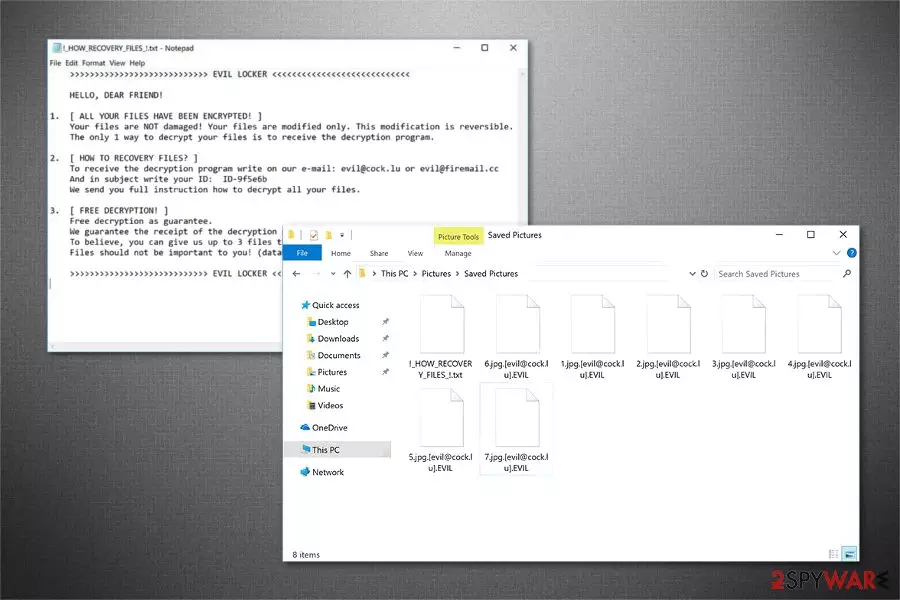
Evil Locker is a virus which is designed to perform data encryption. The compromised files are appended with .[evil@cock.lu].EVIL or .[evil@firemail.cc].EVIL extensions and become unusable. Victims receive !_HOW_RECOVERY_FILES_!.txt ransom note in which users are demanded to contact the criminals via evil@cock.lu or evil@firemail.cc email addresses and pay the ransom. The price of the decryption tool offered by the cybercriminals is yet unknown.
| Name | Evil Locker |
|---|---|
| Type | Ransomware |
| Danger level | High |
| Ransom note | !_HOW_RECOVERY_FILES_!.txt |
| Extension | .EVIL |
| Contact emails | evil@cock.lu, evil@firemail.cc |
| Distribution | Hackers distribute the infection via malicious spam emails or unprotected P2P file-sharing sites |
| Main dangers | It can lead to data and financial losses or infiltrate the system with malware |
| Elimination | The safest way to uninstall Evil Locker ransomware is get FortectIntego or another reliable antivirus |
Usually, the systems can get infected with Evil Locker ransomware if users open suspicious spam emails with malicious attachments which hold the payload of the file-encrypting virus. After the infiltration, the crypto-malware starts encoding the most widely used documents on the system and drops the following ransom-demanding message:
>>>>>>>>>>>>>>>>>>>>>>>>>>>> EVIL LOCKER <<<<<<<<<<<<<<<<<<<<<<<<<<<<
HELLO, DEAR FRIEND!1. [ ALL YOUR FILES HAVE BEEN ENCRYPTED! ]
Your files are NOT damaged! Your files are modified only. This modification is reversible. The only 1 way to decrypt your files is to receive the decryption program.2. [ HOW TO RECOVERY FILES? ] To receive the decryption program write on our e-mail: evil@cock.lu or evil@firemail.cc And in subject write your ID: ID-[redacted 6 hex char] We send you full instruction how to decrypt all your files.
3. [ FREE DECRYPTION! ] Free decryption as guarantee. We guarantee the receipt of the decryption program after payment. To believe, you can give us up to 3 files that we decrypt for free. Files should not be important to you! (databases, backups, large excel sheets, etc.)
>>>>>>>>>>>>>>>>>>>>>>>>>>>> EVIL LOCKER <<<<<<<<<<<<<<<<<<<<<<<<<<<<
Even though the attackers claim that they have Evil Locker decryptor, there are no guarantees that they are willing to send it to the victim after the transaction[1]. Therefore, our experts recommend you not to fall into the trap of cybercriminals and refuse to pay the ransom.
In fact, you can recover files with .EVIL extension if you have backups stored in the cloud. Note that, paying to the hackers might not only lead to financial losses but also motivate them to continue their malicious activity and continue infecting more systems.

If you do not have backups, there are alternative ways how you can get back the access to the compromised data. Although, you must remove Evil Locker first. For that, we suggest employing robust security tools to ensure that all core files are uninstalled from the infected system.
Evil Locker removal is an advanced procedure which should be held with extreme care. Therefore, do not try to get rid of the malware on your own. You can either fail to delete the virus or even damage your system permanently. A more detailed guide showing how to clean your system is presented at the end of this article.
Ransomware attack vectors explained
Usually, ransomware developers employ similar distribution techniques which are widely known for some time now. Likewise, it is essential to understand how file-encrypting viruses spread in order to protect your system. The most common ransomware attack vectors are the following:
- Fake software updates[2];
- Software cracks;
- Spam emails;
- Malicious ads.
Our experts recommend you to stay away from unprotected P2P file-sharing sites where people come to download software illegally. Instead, choose verified websites and avoid clicking on commercial content online. People often fail to identify potentially dangerous ads which are designed to redirect to malicious sites.
Finally, the most critical step is to monitor your inbox carefully. A vast of ransomware payloads are delivered via spam emails as innocent-looking attachments. If you click on one of them, the malware will start data encryption. Thus, NEVER open suspicious emails from people or companies you are not aware of.
Terminating Evil Locker virus is essential
You can remove Evil Locker virus with professional tools only. Ransomware-type cyber threats are sophisticated and programmed to run at the startup. Thus, you cannot get rid of it in a straightforward manner.
Additionally, it is essential to perform complete Evil Locker removal. In other terms, you must delete all files related to the crypto-malware, and it can only be achieved with professional tools.
Cybersecurity researchers[3] indicate that the most effective tools designed for novice PC users are FortectIntego, SpyHunterCombo Cleaner, and MalwarebytesMalwarebytes. We strongly recommend you to stay cautious and get professional help.
Did this guide help?
Be the first to comment