

Like ransomware is a virus that stealthily infiltrates the system and gives you 72 hours to unlock your encrypted files
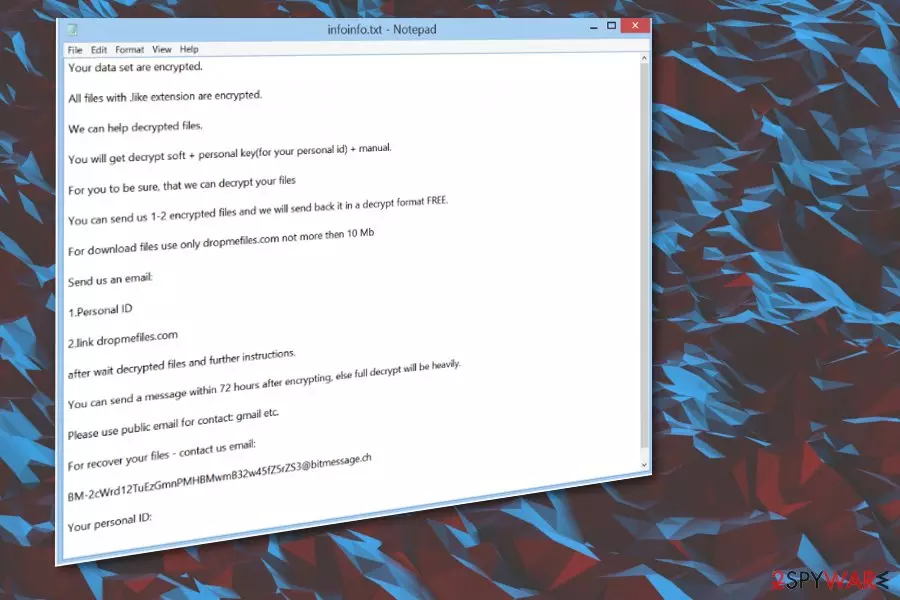
Like ransomware is a file-encrypting virus that modifies most of the data stored on the system. As typical ransomware, this virus encrypts files as soon as its executable[1] file is installed on the system. The malicious payload an e triggered by a file from an email or the malicious site. For data locking, it uses a sophisticated encryption method[2] and marks the affected data with .like file extension. After this procedure, the user's images, videos, documents, and similar files become useless.
Additionally, the threat generates a ransom note called infoinfo.txt and, in this case, places this file in every existing folder on your PC system. The ransom note is used to convince the victim into paying a required ransom in exchange for files' decryption. However, you can always use alternative methods to recover your encrypted files. Malware mainly deletes itself from the machine once those files get locked, but you need to fully clear the machine to recover performance and the affected data. You can find the helpful guide below to achieve the best goals.
| Name | Like ransomware |
|---|---|
| Type | Cryptovirus |
| File extension | .like is the appendix that marks affected files from other safe pieces on the machine |
| Ransom note | infoinfo.txt |
| Contact email | BM-2cWrd12TuEzGmnPMHBMwmB32w45fZ5rZS3@bitmessage.ch |
| Distribution | Spam email campaigns, malicious sites, other malware |
| Symptoms | Files become locked without the ability to open them; a ransom message appears on every folder |
| Elimination | Use an anti-malware tool to terminate the virus |
| Repair | The machine gets affected on a different level. You can run FortectIntego to fic and solve various problems |
The ransomware encrypts most of your stored data and locks it with the .like appendix. It is still unknown what family this malware is hailing from. However, it is very similar to Support_wc@bitmessage.ch ransomware or Waiting ransomware which is using waiting@bitmessage.ch email for making a contact with potential ransom payers.
To make the victim's files useless, the malware is using either symmetric or asymmetric algorithms. After the encryption procedure is finished, files cannot be used in any way. According to the ransom note, Like virus gives its victim only 72 hours to send the money to the provided bitcoin wallet.
Hackers are also offering to test their decryption services by sending them a few encrypted files which are no bigger than 10Mb. However, even if this test works, there is no guarantee that the decryption tool for this crypto virus really exists.
In the ransom note that Like ransomware virus places on every folder, you may see hackers' contact email which is BM-2cWrd12TuEzGmnPMHBMwmB32w45fZ5rZS3@bitmessage.ch. However, as we have already warned you, you shouldn't write them or pay the ransom. The people behind this software are criminals, and cannot be trusted in any way.
Once the virus encrypts files, it displays such ransom note:
Your data set are encrypted.
All files with .like extension are encrypted.
We can help decrypted files.
You will get decrypt soft + personal key(for your personal id) + manual.
For you to be sure, that we can decrypt your files
You can send us 1-2 encrypted files and we will send back it in a decrypt format FREE.
For download files use only dropmefiles.com not more then 10 Mb
Send us an email:
1.Personal ID
2.link dropmefiles.com
after wait decrypted files and further instructions.
You can send a message within 72 hours after encrypting, else full decrypt will be heavily.
Please use public email for contact: gmail etc.
For recover your files – contact us email:
BM-2cWrd12TuEzGmnPMHBMwmB32w45fZ5rZS3@bitmessage.ch
Your personal ID: –
If your files are locked by this malware, make sure that you get rid of this virus at first and only then try to recover the encrypted data from a backup. To make your system clear again, remove any threats using anti-malware like SpyHunterCombo Cleaner, MalwarebytesMalwarebytes. Then, try data recovery suggestions that are provided down below.
Note that ransomware can disable your antivirus program. In addition, viruses like this can change the Windows Registry or write new tasks to make sure that they become active each time your PC is rebooted. This means that the virus can silently work in the background without your knowledge. However, if you happen to notice any suspicious activity, reboot your PC to Safe mode to disable the malware on your computer and proceed with Like ransomware removal.

Hackers adopt different approaches to install malware on the target computer
During the last couple of years, virus developers have found many different techniques to infiltrate computers. When dealing with ransomware, the most common spreading technique is spam email campaigns. Beware that email messages can be filled with malicious content, including:
- Malicious attachments (.pdf, .xls, .xlsx, .png, etc.);
- Fraudulent links;
- Other fake information.
Researchers[3] always advise paying more attention to emails you find in your email inbox. Make sure you always double-check every message you find in your inbox. Malicious people often can disguise their content behind the legal names of other services or companies, so you should always check these messages for grammar or typo mistakes. Alternatively, contact the sender to see if it is a real person. Finally, clean your spam email box more often and do not open any suspicious attachments.
Detect and remove any threats found on the machine using anti-malware applications
To remove Like ransomware and get back to safe use on the computer, you should use trustworthy anti-malware programs like SpyHunterCombo Cleaner or MalwarebytesMalwarebytes. These tools can detect and remove malware you already have on your system. Besides, they will block potential threats in the future. It is crucial not to use manual removal methods when dealing with malware because of the possibility to lead your system into damage.
When proceeding with Like file virus removal, remember to use the latest programs' versions. If you cannot launch the scanner, reboot your computer to Safe mode with Networking. However, make sure you double-check the system with anti-malware software when on normal mode as well. You can try FortectIntego and find any data or system issues. Then, check our suggestions down below for data recovery methods.
Did this guide help?
Be the first to comment