

Super Clean Pro 2018 is a controversial system optimization tool which does not provide accurate scan results
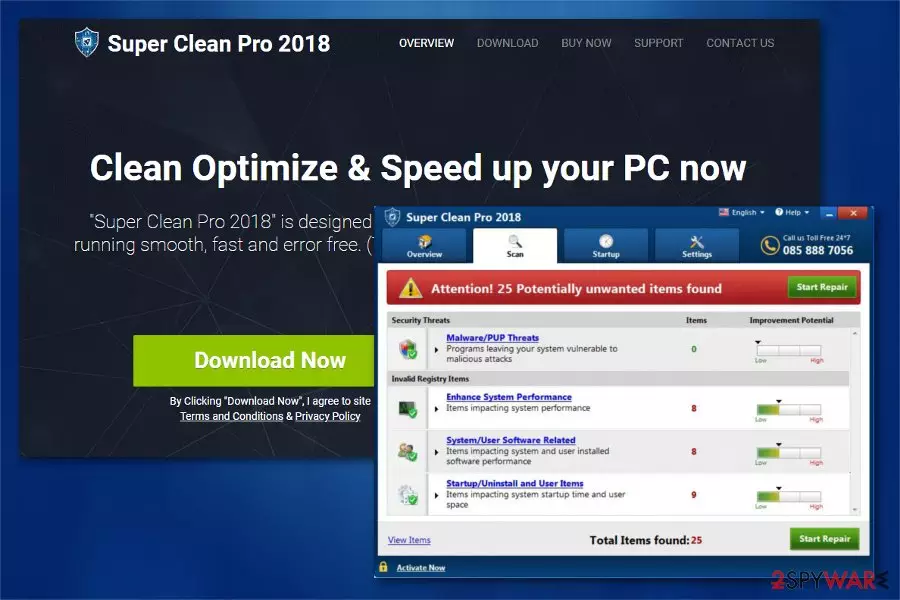
Super Clean Pro 2018 is a potentially unwanted program (PUP)[1] which should supposedly clean, optimize, and speed up your computer. Developers of this questionable system optimization tool say that this software offers award-winning PC protection. However, our security researchers note that Super Clean-Pro program is nothing more than a fraudulent software which generates altered scan results to trick people into believing that their systems need an urgent fix.
| Name | Super Clean Pro 2018 |
|---|---|
| Type | System tools |
| Danger level | Medium. Does not perform any system changes |
| Symptoms | Generates never-ending notifications about non-existent cyber threats |
| Distribution | Can be obtained directly from the official website or installed via software-bundles |
| Removal | The quickest way to uninstall Super Clean Pro 2018 is run a scan with FortectIntego |
Similar to other potentially unwanted programs (PUPs), Super Clean Pro 2018 is promoted on its official website. Although, researchers warn that it might also infiltrate the system bundled together with freeware. At first, this unreliable system optimization tool might seem legitimate as its design is persuasive.
However, after a period of time, users start receiving notifications about potentially dangerous cyber threats which were supposedly detected by Super Clean Pro 2018. The majority of people would fall for these messages as every user aims to protect its computer.
Unfortunately, scan results by Super Clean Pro 2018 are fake as the developers aim to increase their profits by intimidating unsuspecting users. Once the person clicks on “Start Repair” button, the application demands to purchase the full version of the software in order to clean the computer.

Keep in mind that Super Clean Pro 2018 virus is merely a term used to describe an unfair activity of the program and this system optimization tool is not malicious itself. Although, cybersecurity experts recommend switching to professional security tools for real PC protection.
If you still have doubts about this potentially unwanted program (PUP), we advise you installing FortectIntego for comparison. You can run a full system scan by both security tools and check if the results match. We can assure you that the claims about dangerous cyber threats are exaggerated and you should rethink Super Clean Pro 2018 removal.
Luckily, you can not only double-check the scan results by employing a verified security tool but also use it to remove Super Clean Pro 2018 from your computer.
Fraudulent system optimizers have their official websites
Despite how unusual it might seem, potentially unwanted programs (PUPs) are promoted on their official websites as legitimate software. The majority of users are deceived by attractive promotional descriptions and lured into installing the controversial tools by themselves.
However, developers of fake system optimization programs also distribute their products by employing a well-known marketing trick, called bundling[2]. This tactic allows group two applications and spread them as one software. Likewise, people installing the primary program are not aware of the additional PUP which comes inside the software-bundle.
Luckily, you merely need to be attentive during the installation to avoid the infiltration of potentially unwanted programs. First, make sure that you are installing the applications with Custom/Advanced mode and not with Quick/Recommended one. This way, all pre-selected components will be revealed during the procedure and you can de-select them.
Quickest ways to uninstall Super Clean Pro 2018 virus
If you believe that Super Clean Pro 2018 removal would help you protect your computer, you can start it right away. For that, either choose automatic or manual elimination of the potentially unwanted program. Be aware, that manual removal takes time, so pick the best option for you.
We suggest you run a full system scan with a reputable antivirus to remove Super Clean Pro 2018. You just need to download the security tool and let it check your system. This is the fastest way to get rid of the potentially unwanted program from your PC.
However, you can also uninstall Super Clean Pro 2018 by following the instructions at the end of this article. Researchers[3] say that this option is for advanced computer users. Although, if you follow them attentively, you might give it a try. You will find detailed guidelines suitable for Windows OS and Mac OS X.
Uninstall from Windows
Uninstall from Windows 10/8:
- Type Control Panel into the Windows search box and open the result.
- Under Programs, select Uninstall a program.


Uninstall from Windows 7/XP:
- Click on Windows Start > Control Panel (Windows XP users should click on Add/Remove Programs).
- In Control Panel, select Programs > Uninstall a program.


Remove the unwanted program:
- In the Programs and Features window, look for any recently installed suspicious entries, select them, and click Uninstall.
- If User Account Control appears, click Yes to confirm, then complete the removal.


Delete from macOS
Remove the unwanted application:
- From the menu bar, select Go > Applications.
- In the Applications folder, look for any suspicious entries, then drag them to Trash (or right-click and pick Move to Trash).


Delete leftover files and folders:
- Select Go > Go to Folder.
- Enter /Library/Application Support and remove any suspicious folders related to the unwanted program.
- Repeat the same check in the /Library/LaunchAgents and /Library/LaunchDaemons folders, deleting any suspicious entries.

- Finally, empty the Trash to permanently remove the leftovers.

Did this guide help?
Be the first to comment