

AcroWare is a ransomware which demands to pay $80 for data recovery
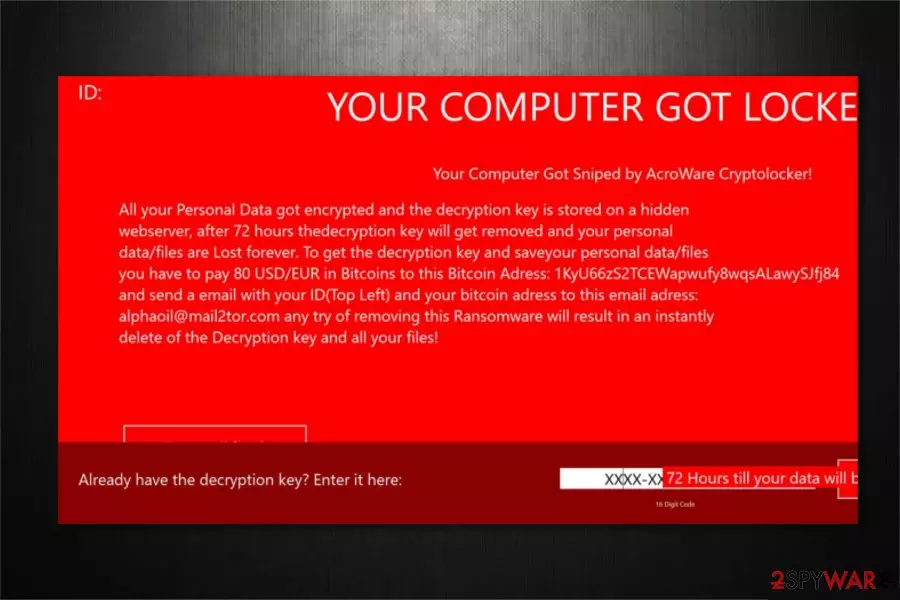
AcroWare is a dangerous virus which is also known as AcroWare CryptoLocker ransomware[1]. According to the experts, this malware does not encrypt information on the targeted device rather than lock the screen. However, the ransom note claims that all files are encrypted with a sophisticated algorithm, and any attempts to remove AcroWare would lead to the loss of data. Victims have 72 hours to pay $80 in Bitcoins for AcroWare decryptor and contact the criminals via alphaoil@mail2tor.com email address.
| Name | AcroWare |
|---|---|
| Type | Ransomware |
| Also known as | AcroWare CryptoLocker ransomware |
| Notable features | Merely locks the screen and does not perform data encryption |
| Amount of the ransom | $80 in BTC |
| Contact email | alphaoil@mail2tor.com |
| Distribution | Noticed spreading via infected attachments in spam emails |
| Removal | You must protect your computer and uninstall AcroWare virus by running a full system scan with FortectIntego |
People might get infected with AcroWare ransomware if they open a malicious spam email attachment. Once they the executable file of the malware is dropped on the system, victims receive a ransom note in a pop-up window informing that the computer got sniped by AcroWare CryptoLocker. The full message states the following:
Your Computer Got Sniped by AcroWare Cryptolocker!
All your Personal Data got encrypted and the decryption key is stored on a hidden
webserver, after 72 hours thedecryption key will get removed and your personal
data/files are Lost forever. To get the decryption key and saveyour personal data/files
you have to pay 80 USD/EUR in Bitcoins to this Bitcoin Adress: 1KyU66252TCEWapwufy8quALawySij84
and send a email with your ID(Top Left) and your bitcoin adress to this email adress:
alphaoil@mail2tor.com any try of removing this Ransomware will result in an instantly
delete of the Decryption key and all your files!
Note that even if the ransom note claims that all files on the system are encoded, AcroWare does not perform data encryption[2]. This malware locks the screen to trick people into believing that they must pay the ransom in order to get rid of AcroWare and get back their information. 
In fact, you will not lose your files if you uninstall AcroWare ransomware. Security researchers[3] note that you should get rid of the virus to protect your system and get back the access to your data. Although, you must perform AcroWare removal properly.
For that, the easiest way is to boot your computer into Safe Mode and install a professional security software. You can learn how to enter Safe Mode from the guidelines at the end of this article and get FortectIntego to uninstall the virus. Additionally, there are tools presented below to help you recover data if it was damaged.
Spam emails are much more dangerous than you think
Despite the accessible information online, people continue opening malicious spam emails and infecting their computers with ransomware. Likewise, malware developers take advantage of credulous people and employ social engineering tactics to trick users.
Usually, malicious spam emails are designed to resemble electronic letters coming from well-known companies. Be aware that they might include the firm's logo or other visual elements. However, this is merely a trick to lure unsuspecting users into opening the infected attachment.
Note that spam emails commonly urge the person to open the attachment or link. Thus, you should never open any content from the email if it raises suspicions. The best way to protect your computer is to use a reliable antivirus with real-time protection.
Advice for successful AcroWare elimination
It is evident that ransomware-type viruses are highly dangerous. Some of the file-encrypting cyber threats might even be able to infiltrate the system with more malware. Therefore, you should get help from professionals to complete AcroWare removal safely.
The most convenient way to remove AcroWare ransomware for regular computer users is to download and install a robust security software. Our top three choices are FortectIntego, SpyHunterCombo Cleaner, and MalwarebytesMalwarebytes. These security tools are effective and easy-to-use when it comes to ransomware attacks.
Did this guide help?
Be the first to comment