

Suri ransomware – a file locking threat which targets Italian speakers and adds the .SLAV appendix to encrypted files
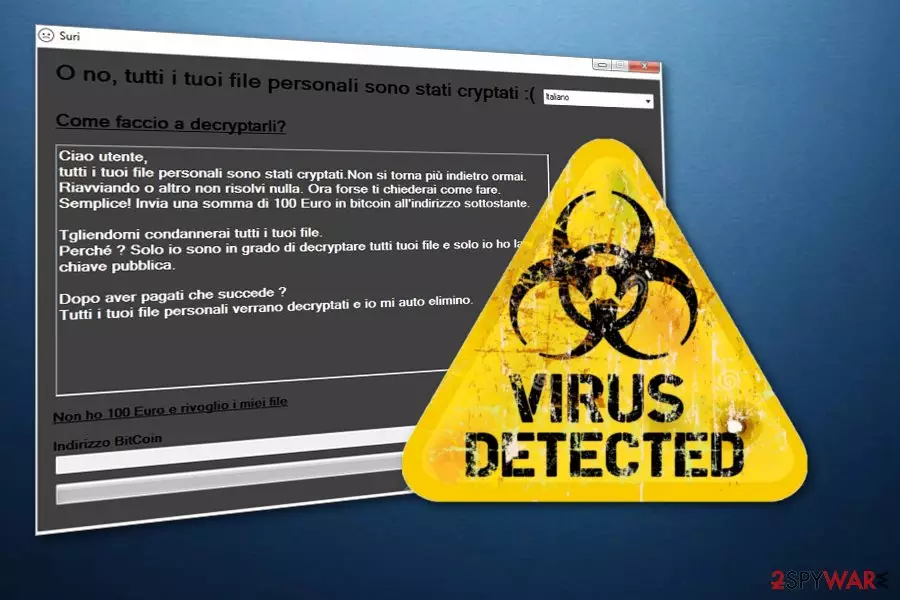
Suri ransomware is a file encrypting virus which enters the system through dubious messages or rogue websites. Once activated, this type of computer infection creates dubious registry entries in the Windows Registry section which lets Suri virus to boot every time the user restarts its computer. Moreover, this ransomware[1] targets Italian-speaking users as the entire ransom note is written in the Italian language. Such message announces about files encrypted with the .SLAV extension and demands 100 euros in Bitcoin[2] in exchange for a decryption key.
| Name | Suri |
|---|---|
| Type | Ransomware |
| Target | Italian speakers |
| Extension | .SLAV |
| Ransom | 100 euros in Bitcoin |
| Main goal | To encrypt files and get payments for decryption tools |
| Fix the damage | Install FortectIntego to repair the damaged system components |
After files are encrypted by Suri ransomware, they look like this: cat.jpg turns to cat.jpg.SLAV. Nevertheless, such documents become out of use. If you try to access the corrupted file, it will just run an error message and not launch. The .SLAV extension lets victims identify what kind of virus has occupied their computers.
To continue, the Suri ransomware ransom message looks like this:
Ciao utente,
tutti i tuoi file personali sono stati cryptali. Non si torna più indietro ormai.
Riavviando o altro non risolvi nulla. Ora forse ti chiederai come fare.
Semplice! Invia una somma di 100 Euro in bitcoin all’indirizzo sottostante.Tgliendomi condannerai tutti i tuoi file.
Perché ? Solo io sono in grado di decryptare tutti tuoi file e solo io ho la
chiave pubblica.Dopo aver pagati che succede ?
Tutti i tuoi file personali verrano decryptati e io mi auto elimino.
We advise not to fall for fake crook's promises and avoid contact with them. More importantly, DO NOT pay the demanded ransom. You are very likely to be scammed and face money losses. As another option, we suggest performing the Suri ransomware removal with a trustworthy anti-malware tool. This needs to be done as soon as possible to avoid further damaging consequences.
Another reason to remove Suri virus is that this ransomware-type cyber threat might have the ability to perform hazardous actions in the background which might open the path for other malware forms such as Trojans. Be aware that if your computer gets infected with other viruses, it can become harder to get rid of all of them. You can fix the damage done by the ransomware with the help of FortectIntego.

Ransomware avoiding techniques
According to malware experts' team from LesVirus.fr,[3] ransomware is a very dangerous malware form that affects numerous users worldwide. Most commonly, such viruses are distributed through phishing messages which come with hazardous payload in a form of an attachment or hyperlink. If you ever receive a spam email and you are not currently waiting for anything important to receive, make sure you get rid of all suspicious-looking messages.
Moreover, you can get infected with ransomware if you are very likely to visit rogue websites. Our own careless actions cause such harmful infiltration. Try to stay away from questionable pages that are promoted by third-parties as you can never know were hazardous content can be hidden. Additionally, installing trustworthy antivirus protection is also strongly recommendable.
Terminate Suri file locking virus
If you have spotted some ransomware-related symptoms and are wondering, how to remove Suri virus from your computer system, we have a solution for you. What you need to do is download and install reliable anti-malware software that will help you to deal with the dangerous infection. Such security tools will take care of the cyber threat and all virus-related components that might be secretly hiding.
After you complete the Suri ransomware removal, you should perform system backups to make sure that the ransomware was deactivated successfully. Moreover, now you can start thinking about techniques which might help you restore corrupted files. Check out our suggested methods which you can find below the text.
Did this guide help?
Be the first to comment