

5H311 1NJ3C706 ransomware is a screenlocker with the encryption code
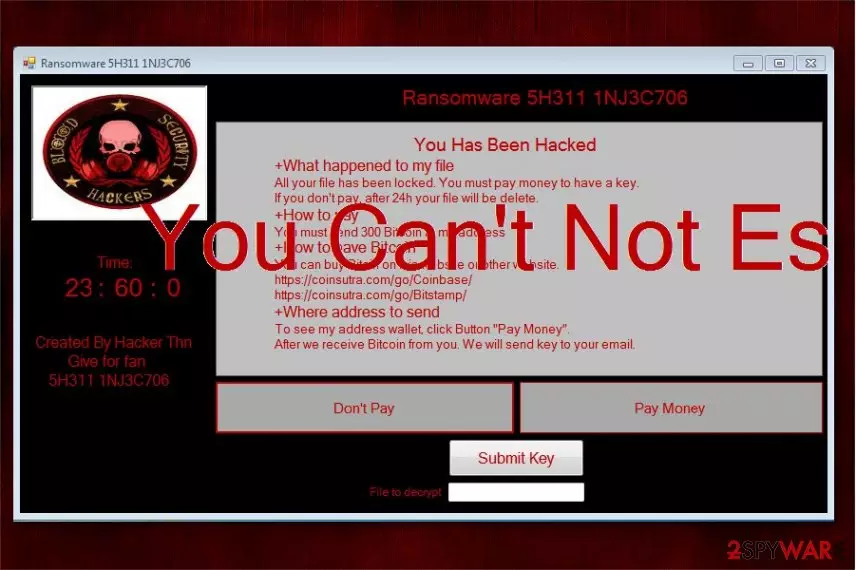
5H311 1NJ3C706 ransomware is a new cyber threat which operates like a screenlocker[1]. Once the targeted computer is infected, users are prompted to the new window with the ransom note which they cannot exit. Researchers discovered that this malware involves the encryption code and should append .5H311 1NJ3C706 extension after encryption. Although, it merely locks the screen after the attack and demands to pay 300 Bitcoins as a ransom.
| Name | 5H311 1NJ3C706 |
|---|---|
| Type | Ransomware |
| Danger level | High. Might prevent people from using their computers |
| Potential extension | .5H311 1NJ3C706 |
| Features | Functions as a screenlocker |
| Amount of the ransom | 300 BTC (approximately 1 878 180 USD at the current exchange rate) |
| Distribution | Might enter the system via malicious spam emails |
| Decryption | You can unlock your computer entering 666HackerThn password |
| Removal | Make sure that you protect your system from further attacks and install FortectIntego to get rid of 5H311 1NJ3C706 ransomware |
As many other file-encrypting viruses, 5H311 1NJ3C706 screenlocker might infiltrate the system via malspam campaigns. According to the researchers, this malware has the encryption code but does not execute it at this time. Likewise, it is essential to keep in mind that criminals might update the virus to perform data encryption in the long-run.
Currently, computers infected with 5H311 1NJ3C706 ransomware are locked and display the pop-up window with the ransom note. Here is the fraction of it:
You Has Been Hacked
+What happened to my file
All your file has been locked. You must pay money to have a key.
If you don't pay, after 24h your file will be delete.
+How to pay
You must send 300 bitcoins to my address
Criminals claim that they will send victims 5H311 1NJ3C706 decryption key to the email after they receive payments. However, you should never fall into the trap of such empty promises and agree to pay an enormous amount of the ransom. In fact, you can unlock your computer for free by using the password which is given by cybersecurity experts.
Find the free 5H311 1NJ3C706 ransomware decryption solution at the end of this article. Although, beware that hackers might decide to upgrade their malicious program and finally include actual data encryption. Thus, you should remove 5H311 1NJ3C706 ransomware before its too late.

For 5H311 1NJ3C706 removal, you will need professional help. We suggest rebooting your computer into Safe Mode and installing a reliable antivirus, like FortectIntego. Additionally, there are instructions showing how to get rid of 5H311 1NJ3C706 virus step-by-step below.
Ransomware infiltration techniques
Commonly, criminals send numerous spam emails with malicious attachments to distribute ransomware. They are designed to impersonate innocent-looking invoices or other documents to trick users into opening them. Once they are opened, users might be asked to enable macros to view content supposedly. In reality, enabling macros[2] allows to execute malicious scripts and drop the payload of the ransomware.
Furthermore, people might encounter ransomware attacks through malvertising — malicious ads are generated on less than suspicious pages which either automatically install malware or redirect to its distribution sources. Note that the advertisements can look attractive. Although, this is merely a trick to make virus distribution campaigns more successful.
If you want to avoid ransomware attacks, you should refrain from clicking on any suspicious content online or in your email inbox. Additionally, it is essential to run regular system check-ups with a professional antivirus software and keep real-time protection enabled.
Get help uninstalling 5H311 1NJ3C706 ransomware virus
If you are not aware how to remove 5H311 1NJ3C706 ransomware, you can either FortectIntego, SpyHunterCombo Cleaner, or MalwarebytesMalwarebytes to uninstall it automatically or check the manual elimination guidelines.
Note that the screenlocker might not allow you to get 5H311 1NJ3C706 removal tool, so you must reboot your computer into Safe Mode. For that, check the instructions at the end of this article.
Finally, researchers[3] warn not to forget that you can unlock your system without paying the ransom. Official password to unlock your computer infected by 5H311 1NJ3C706 virus is appended below.
Did this guide help?
Be the first to comment