

SweepTools PC Cleaner — system optimization tool that has been actively spread via software bundling
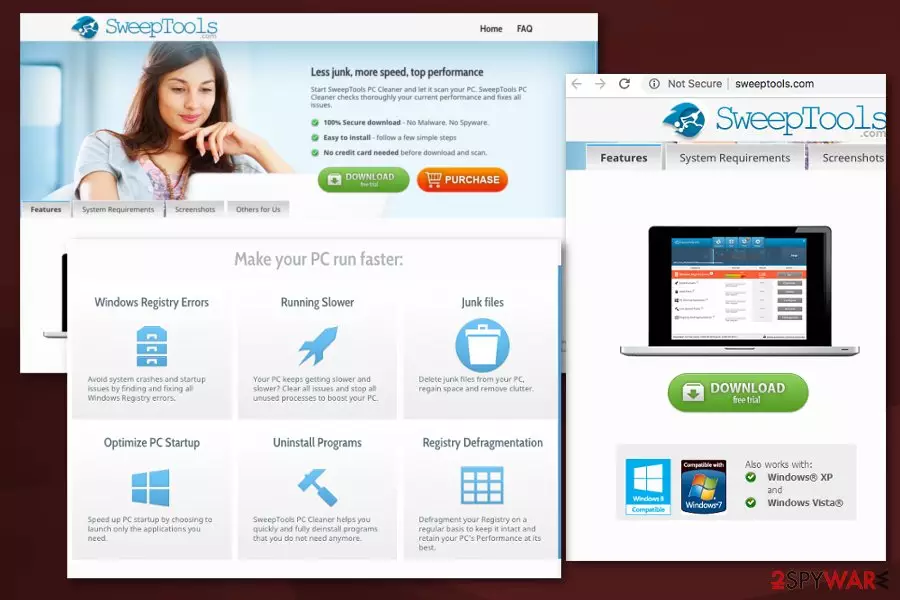
| Name | SweepTools PC Cleaner |
|---|---|
| Presents itself as | PC optimizer |
| Falls into the Category | Potentially unwanted application |
| Purpose | To convince people to purchase the full version |
| Distribution | Software bundles, official site, commercial ads |
| Symptoms | Performs the alleged system scan and delivers results about system issues |
| Removal | Uninstall PC Cleaner by using steps given below. Use FortectIntego for improving your PC's functionality. |
Various unwanted programs come to your system by using deceptive ads, promotional websites or silent techniques like bundling[1]. SweepTools PC Cleaner virus is not an exception. By using this infiltration method, the PC optimization tool gets into the system unnoticed as an optional component. Once it does that, it starts its first scan that reports about numerous issues detected on the system. While we can't declare that each of these issues was invented, we can assure you that paying for program's full version won't help you increase your PCs speed.
However, this is not the biggest issue related to SweepTools PC Cleaner PUP. Just like numerous adware-type programs, redirect viruses and rogue tools, this PC optimizer can collect information[2] about the user and then sell it to the third-party companies. The Privacy Policy section provides this statement that proves such claims:
We may engage third party service providers that assist us in providing or improving our services as explained above and we might need to share some personal or other data with them to enable them to do so. These service providers are either subject to this privacy policy or follow practices that offer an equivalent level of protection and may be located outside the EU. Your information may also be transferred to another company in the event of sale of our company to a third party. We will not sell or rent your personal information to third parties for marketing purposes without your consent.
To prevent data tracking behind your back, you should remove SweepTools PC Cleaner from your computer. Otherwise, you can start noticing that you receive more spam than usual. Additionally, you can start noticing more sponsored content on your web browsers as the collected data (your online browsing preferences, location, and most viewed sites) can be used to create more personalized commercial content.
One of the SweepTools PC Cleaner removal methods can be uninstalling the tool from the system. In this case, you should make sure that the system is free of unknown programs that you can't remember installing. Additionally, to check whether your PC needs assistance in improving its functionality, run FortectIntego or any other repair tool.

Potentially unwanted applications typically come to the system via bundling technique
Various cybersecurity experts[3] advise people choosing software providers carefully. This is because the well-known but deceptive marketing technique called bundling. During insecure freeware installations, programs get bundled with unwanted additional applications and this is how your device gets infected with various intrusive PUPs.
You can avoid this by choosing Advanced or Custom settings when you have the option and during these installations de-select additional applications that you do not need or want to get. Also, make sure that you keep your software up to date and regularly scanning the system with anti-malware tools.
If you happen to notice any of these features, your system is already affected by adware:
- various pop-up ads appear on the screen;
- advertisements promoting rogue tools interrupt your browsing;
- you are redirected to third-party sites without asking;
- you are constantly offered to buy a full version of the program to PC issues.
SweepTools PC Cleaner removal can be done using reputable tools
You should perform SweepTools PC Cleaner removal as soon as you noticed this useless tool on the system. Otherwise, it may affect the performance of your machine and dimish the time online in general. There is no need to have and use the software which is highly suspicious and can hardly improve your PC's functionality by removing several hundred outdated registry entries.
SweepTools PC Cleaner removal is not that difficult if you follow steps that we provided below. Alternatively, you can scan the system with trustworthy anti-malware like the ones we suggest below. Perform a full system scan and say goodbye to unwanted activity.
Uninstall from Windows
Uninstall from Windows 10/8:
- Type Control Panel into the Windows search box and open the result.
- Under Programs, select Uninstall a program.


Uninstall from Windows 7/XP:
- Click on Windows Start > Control Panel (Windows XP users should click on Add/Remove Programs).
- In Control Panel, select Programs > Uninstall a program.


Remove the unwanted program:
- In the Programs and Features window, look for any recently installed suspicious entries, select them, and click Uninstall.
- If User Account Control appears, click Yes to confirm, then complete the removal.


Did this guide help?
Be the first to comment