

Audit ransomware – a file-encrypting virus which relates to the Dharma family
Audit ransomware is a sneaky computer virus which belongs to the Dharma ransomware category. Once installed, this dangerous cryptovirus modifies the Windows Registry[1] by adding dubious registries. Moreover, it encrypts files using unique algorithms and ads the .[payransom@qq.com].AUDIT extension to each locked document. After the encryption process is finished, Audit virus displays a ransom note called FILES ENCRYPTED.txt which announces about the secret infiltration and blocked files. Additionally, criminals urge a Bitcoin ransom that needs to be transferred in order to receive the decryption tool. Crooks give 24 hours for their victims to show any contact via payransom@qq.com email address.
| Name | Audit |
|---|---|
| Related to | Dharma ransomware |
| Category | Ransomware |
| Danger level | High. Locks up important documents on the infected computer |
| Extension | .[payransom@qq.com].AUDIT |
| Ransom note | FILES ENCRYPTED.txt |
| Ransom type | Criminals urge for Bitcoin |
| Email given | payransom@qq.com |
| Removal | Get rid of the infection instantly. Moreover, try FortectIntego to detect the damage |
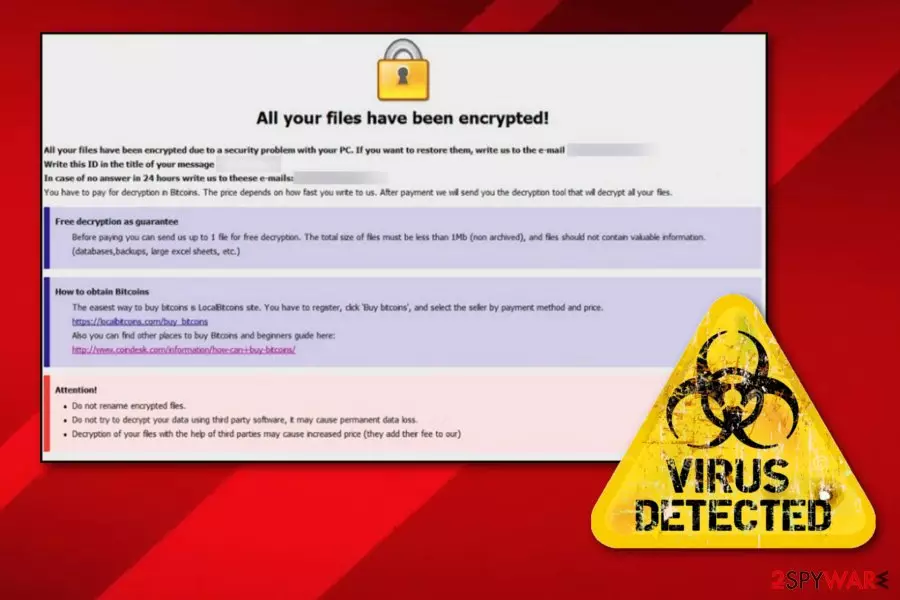
Audit ransomware[2] is a tricky computer virus which can enter the system by spam messages and their phishing attachments. Once that happens, you will recognize the ransomware virus from its specific extension and this ransom message:
All your files have been encrypted!
All your files have been encrypted due to a security problem with your PC. If you want to restore them, write us to the e-mail payransom@qq.com
Write this ID in the title of your message 1E857D00
In case of no answer in 24 hours write us to theese e-mails:payransom@qq.com
You have to pay for decryption in Bitcoins. The price depends on how fast you write to us. After payment we will send you the decryption tool that will decrypt all your files.
Free decryption as guarantee
Before paying you can send us up to 1 file for free decryption. The total size of files must be less than 1Mb (non archived), and files should not contain valuable information. (databases,backups, large excel sheets, etc.)
How to obtain Bitcoins
The easiest way to buy bitcoins is LocalBitcoins site. You have to register, click 'Buy bitcoins', and select the seller by payment method and price.
https://localbitcoins.com/buy_bitcoins
Also you can find other places to buy Bitcoins and beginners guide here:
http://www.coindesk.com/information/how-can-i-buy-bitcoins/
Attention!
Do not rename encrypted files.
Do not try to decrypt your data using third party software, it may cause permanent data loss.
Decryption of your files with the help of third parties may cause increased price (they add their fee to our) or you can become a victim of a scam.
As we can see, criminals urge for Bitcoins as the ransom price. They try to convince naive users that paying the money and receiving the decryption tool is the only way to return encrypted files back to normal. However, such people cannot be trusted. According to cybersecurity specialists[3], there is a big chance of getting scammed. So, we recommend performing the Audit ransomware removal and avoiding contact with the crooks.
Moreover, ransomware viruses might be able to open paths for other computer infections. However, even if there is not a 100% chance that such thing will happen, you still should remove Audit virus to avoid this type of possibility. You can use reliable anti-malware tools to complete the process. Moreover, our experts recommend downloading and installing software such as FortectIntego because this program might be very helpful in the detection of all rogue components.
Furthermore, you can use our below-given data recovery methods. Pick the most suitable one for you and perform all steps as required to reach the best results. For future, you should consider purchasing a USB flash drive[4]. Why needed? Here users are able to keep their valuable documents separately from their personal computers. If you keep this device unplugged from your PC, the information that is stored in it will be reachable only for you.

Take precautionary measures to avoid ransomware viruses
If you have caught a ransomware infection recently, there is a big possibility that such malware landed on your computer through a rogue email attachment. When receiving email messages, make sure all of them come from recognizable senders and do not include any grammar mistakes. If it appears to be the opposite, better delete all suspicious-looking messages to avoid the risk of infecting your computer.
Some other great help would be to install a reputable antivirus tool. Such software needs to be updated regularly in order to function properly. These programs will allow you to perform regular system scans and clean it from various threats. Moreover, stay away from all third-party and suspicious-looking websites. Especially, do not click on dubious hyperlinks as they might redirect you to a malware-laden page.
Terminate Audit ransomware virus
To remove Audit virus, you will need to download and install some reliable software. Moreover, you can consider using computer tools such as:
These programs have the ability to detect all damaged objects that could have been left in the system due to the ransomware infection. Note that manual elimination is not possible for this case as the process cannot be carried out without computer software help.
After you perform the Audit ransomware removal, make sure you refresh your entire computer system. Furthermore, you can check out our provided third-party data recovery tools. We cannot guarantee that these programs will restore your files 100% but it is definitely a better option than paying the demanded ransom and taking a risk of getting scammed by the cybercrooks.
Did this guide help?
Be the first to comment