

CmdRansomware is a cryptovirus that uses data encryption for money extortion purposes
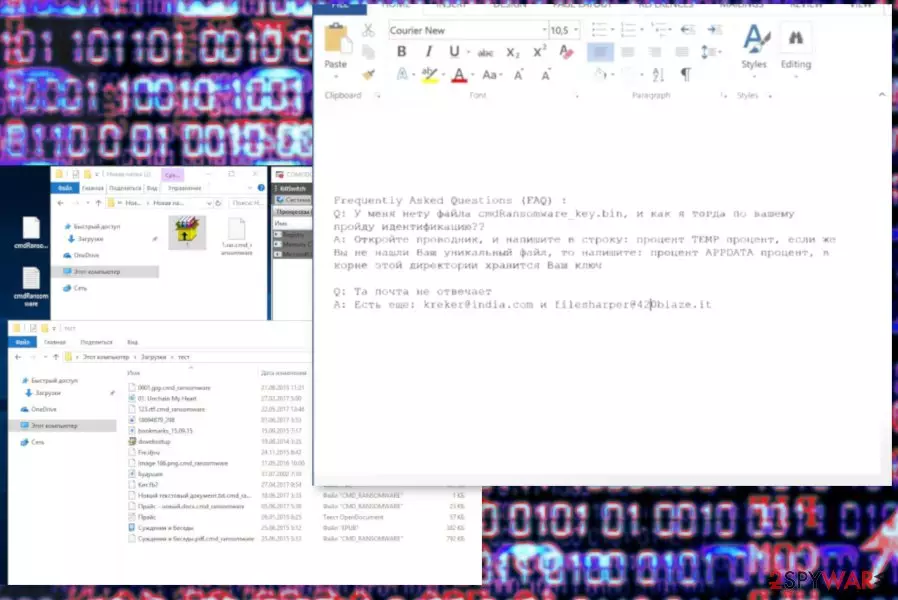
CmdRansomware is a malicious cryptovirus designed to lock files by encoding them with AES encryption code. The main purpose of this encryption process is to make victims' data useless to make them pay for a decryption key.[1] Hackers behind this threat suggest that the only way to get your files back is to send them this ransom but there is no guarantee that files marked with .cmd_ransomware or .ransomware extension will be decrypted. Instructions on the CmdRansomware virus payment are provided in the ransom note called cmdRansomware.txt that is placed on the system after the encryption process. The ransom message is written in the Russian language and the main target is Russian-speaking users. However, this note doesn't reveal any details on ransom amount or encryption methods, only provides the contact emails – kreker@india.com and filesharper@420blaze.it.
| Name | CmdRansomware ransomware |
|---|---|
| Type | Cryptovirus |
| File marker | .cmd_ransomware, .ransomware |
| Contact emails | kreker@india.com, filesharper@420blaze.it |
| Ransom note | cmdRansomware.txt |
| Targets | Russian-speaking computer users |
| Elimination | Get rid of this malware with your antivirus and eliminate CmdRansomware ransomware virus damage with FortectIntego |
When this virus enters the targeted system, it drops its files at first to make sure the threat is persistent. After that, it checks files for the encryption and starts this procedure. Typically, people notice alterations as locked documents, photos, archives and ofter type files having either .cmd_ransomware or .ransomware file extension appended at the end of their name.
CmdRansomware ransomware virus also drops a cmdRansomware.txt file, hence the name of the virus. The text file contains a ransom message that is written in the Russian language. However, the ransomware can infect computers located in any country. This ransom message file displays the following:
Frequently Asked Questions (FAQ) :
Q: У меня нету файла cmdRansomware_key.bin, и как я тогда по вашему пройду идентификацию??
A: Откройте проводник, и напишите в строку: процент TEMP процент, если же Вы не нашли Ваш уникальный файл, то напишите: процент APPDATA процент, в корне этой директории хранится Ваш ключQ: Та почта не отвечает
A: Есть еще: kreker@india.com и filesharper@420blaze.it
CmdRansomware ransomware developers in this note write answers to two most important questions:
- What to do if “cmdRansomware_key.bin” file that supposed to be used for identification can't be found?
- What to do if the payment doesn't work?
According to the hackers, the bin file needed for the decryption should be found in “TEMP” or “APPDATA” folder and they can be reached via kreker@india.com and filesharper@420blaze.it email addresses. There is no additional information on the ransomware attack or ransom amount, but we do not recommend paying or contacting criminals because of the possible danger.[2]
For CmdRansomware ransomware removal, experts[3] recommend employing reputable anti-malware tools and scanning the system fully for better results. Antimalware tools can detect threats, malware, and corrupted files or programs. Then, the elimination and cleaning improve the overall performance of your machine.
Also, you should remember that there is no decryption tool for data locked by this cryptovirus. So for encrypted data you have one solution – remove CmdRansomware ransomware and try restoring files from backup or use data recovery tools. Make sure that there is no additional virus damage and clean the device with FortectIntego, then follow our suggestions below.

Malicious files from spam emails have direct ransomware payload
The main malware distribution technique used by cybercriminals is spam email attachments because it helps spread the malicious file via the internet widely. Various spam email campaigns are used to spread various scams, malware and other cyber threats every day. However, these emails often pose as notifications from legitimate companies like PayPal, FedEx, Amazon.
This fact makes it look safer and people tend to open these emails with attached files. The minute you download and open the document on your system the malicious payload is installed and starts running in the background immediately. You cannot notice this, unfortunately, but there is a way to avoid these infections.
You need to avoid opening suspicious emails from services you do not use and remember that attached MS files can be infected with malicious macros.[4] You can check short links provided in the email online or scan the file before opening.
CmdRansomware ransomware termination requires attention and professional tools
The best tip for CmdRansomware ransomware removal is to employ reputable anti-malware tools and scan the system thoroughly. This way you can eliminate all possibly related program or files and fix additional virus damage. However, we also recommend checking the system with FortectIntego, SpyHunterCombo Cleaner or MalwarebytesMalwarebytes additionally to double-check.
Make sure to remove CmdRansomware ransomware from the system fully before entering any external device on the system because cryptovirus can encrypt your data yet again. When the system is clean from malware you can plug in external device with file backup or use online stored replacements. We also have a few alternative data recovery methods listed below.
Did this guide help?
Be the first to comment