

FilesLocker ransomware v2.0 is a cryptovirus that encodes your data and then demands payment in two ransom notes
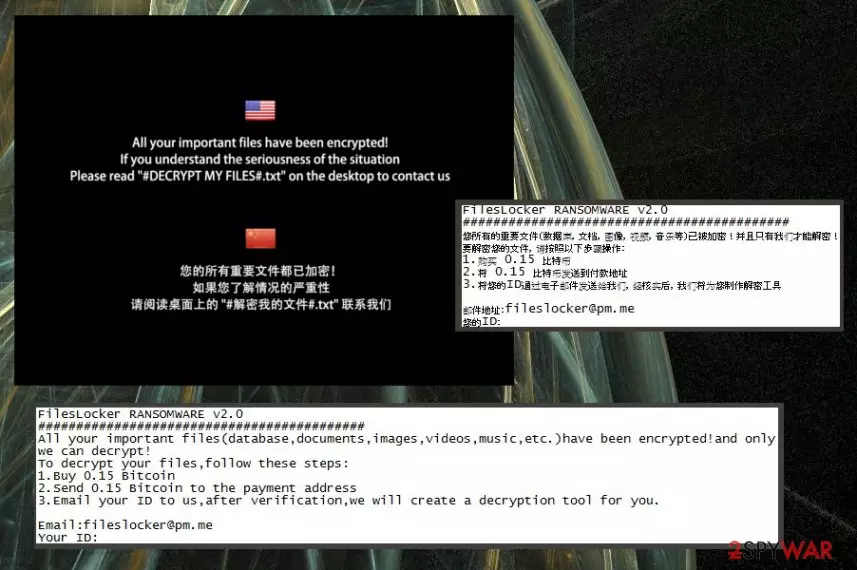
FilesLocker v2.0 is a ransomware virus that belongs to a family of identical threats known since October 2018. The family is known as FilesLocker due to its straight and simple name. It focuses on data encryption and uses the AES encryption algorithm for this process. The particular version came out in early December and now marks encrypted files using .[fileslocker@pm.me] extension. Ransomware then displays a ransom note known as #DECRYPT MY FILES#.txt and #解密我的文件#.txt which states about the ransom amount and payment methods. These files haven't changed since the first attack a few months ago. The virus also changes the desktop picture and displays a short message in English and Chinese languages which suggests reading the ransom note and contacting cybercriminals responsible for this malware. However, we do not recommend doing so because of the possible danger.[1]
| Name | FilesLocker ransomware v2.0 |
|---|---|
| Type | Cryptovirus |
| Related | FilesLocker |
| File marker | .[fileslocker@pm.me] |
| Ransom notes | #DECRYPT MY FILES#.txt and #解密我的文件#.txt |
| Ransom amount | 0.15 Bitcoin |
| Encryption method | AES |
| Contact email | fileslocker@pm.me |
| Fix | Use FortectIntego for FilesLocker ransomware v2.0 removal |
FilesLocker ransomware v2.0 virus is a cryptovirus that belongs to a notorious ransomware family. Because of this fact, it has various features that are not changing from version to version. For example, the first version and this new threat both use the same AES encryption algorithm for the data-locking process.[2]
During this encoding, your files get locked because the original code is changed. Photos, videos, documents, and even archives get locked and marked with a file extension .[fileslocker@pm.me]. When your data is useless, and you cannot open any of these files, your Desktop wallpaper gets changed, and two ransom files #DECRYPT MY FILES#.txt and #解密我的文件#.txt gets placed on the system in various folders containing encrypted files.
Then FilesLocker ransomware v2.0 instructs people contacting them and paying the ransom in the message which reads the following(English version):
FilesLocker RANSOMWARE v2.0
###########################################
All your important files(database,documents,images,videos,music,etc.)have been encrypted!and only we can decrypt!
To decrypt your files,follow these steps:
1.Buy 0.15 Bitcoin
2.Send 0.15 Bitcoin to the payment address
3.Email your ID to us,after verification,we will create a decryption tool for you.Email:fileslocker@pm.me
Your ID:
–
FilesLocker ransomware v2.0 also displays a pop-up window that contains more instructions on the payment methods and offers test decryption when you can email three files to get them recovered. However, experts[3] do not recommend even contacting people behind threats like this.
The ransom amount for FilesLocker ransomware v2.0 locked files is 0.15 Bitcoin that equals to 578 at the time of writing. The amount has decreased since the first version because before the demanded amount was 0.18 BTC. However, paying the ransom cannot guarantee the decryption.
There is no reason to trust these hackers, and the better solution than paying is FilesLocker ransomware v2.0 removal. You can eliminate the virus from your system and then restore your encoded files with copies from the file backup on external device or cloud service.
Based on the detection rate,[4] FilesLocker ransomware v2.0 is a persistent threat. However, various anti-malware programs can indicate this virus ant its main executable file INSTALLER.EXE as malicious and dangerous. Remember that detection results may be falsely positive, so use a few different tools to make sure.
We can recommend using FortectIntego to remove FilesLocker ransomware v2.0 and scanning the system entirely to get rid of all potential threats related to this ransomware and other possible cyber infections. You need to clean your machine thoroughly if you want to recover your data from a backup or use data recovery software.

Ransomware-type virus distributed via spam email
Most of the cybercriminals use email spam campaigns to spread such infections as trojans, malware, and the notorious ransomware. These campaigns distribute emails widely all over the world and spread macro-filled files as email attachments.
Microsoft Word or Excel documents contain a malicious script that gets loaded on the system the minute user downloads and opens the attachment. Unfortunately, malicious actors misuse names of well-known companies and services to fake legitimacy.
You can avoid these infections by scanning the document before opening on the system and deleting emails from questionable senders before opening or downloading. Pay more attention to emails you get because malicious emails may be found on the regular email box instead of the spam email.
Terminate FilesLocker ransomware v2.0 and clean the system using trustworthy tools
To get rid of FilesLocker ransomware v2.0 virus, you need to pay more attention to processes happening on the system. Ransomware alter registry keys and other system files to make sure the infection is persistent, so you need a full malware removal and virus damage fix.
To remove FilesLocker ransomware v2.0 from the system completely, employ reputable anti-malware tool like FortectIntego, SpyHunterCombo Cleaner or MalwarebytesMalwarebytes and scan the machine thoroughly. Then, follow suggested options and delete all threats that your program indicates as malicious. The double check if the system is clear and restore your files.
After FilesLocker ransomware v2.0 removal and ensuring that the system is malware free, employ data recovery software or file backups. You may need to enter the Safe Mode to terminate the virus completely. Then you can try data recovery methods listed down below and recover encoded files.
Did this guide help?
Be the first to comment