

Project57 ransomware is a Russian cryptovirus that can be found on the internet as an open-source threat
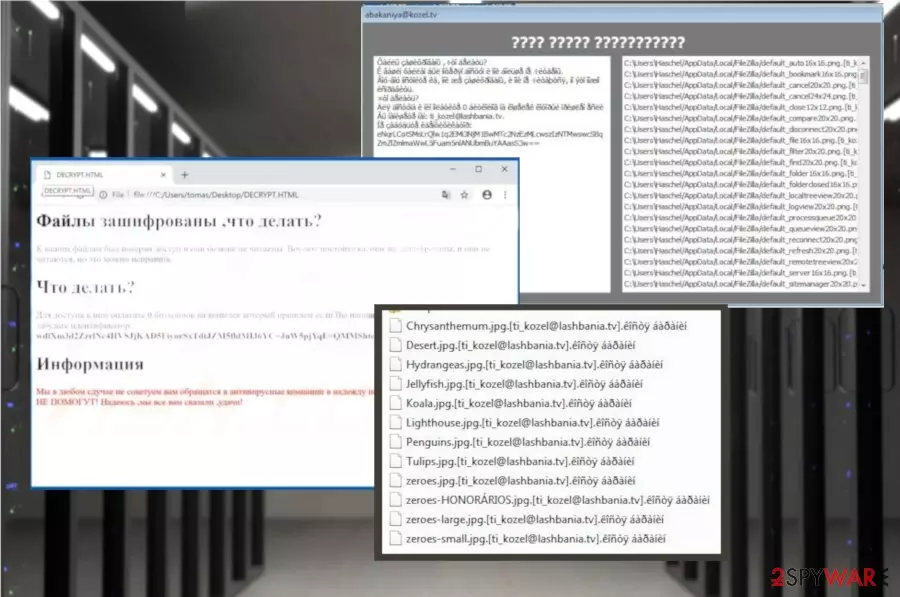
Project57 ransomware is a virus that uses the outdated Dephi+PHP encryption algorithm. These encryption methods[1] are not used often since there are a few newer algorithms but this cryptovirus is still a very dangerous threat because it encrypts users' files and demands ransom when the data gets locked. Since the virus is written in the Russian language, the ransom note called DECRYPT.txt is also written in the same language. However, it doesn't mean that the only target of this ransomware is Russia, it is possible that people all over the world get to encounter this malware on their device. This ransom message gets placed on the device after the file-locking process when your data gets marked using .[ti_kozel@lashbania.tv].костя баранин (.[ti_kozel@lashbania.tv].êîñòÿ áàðàíèí if your system doesn't have the right codepage installed) appendix. The ransom note displayed in the text file or HTML window with the same name states about the encryption and suggests to pay if you want to get your files back but we do not recommend doing so because cybercriminals cannot be trusted.
| Name | Project57 ransomware |
|---|---|
| Type | Cryptovirus |
| Encryption algorithm | Delphi/ SHA-256 |
| Ransom note | DECRYPT.HTLM; DECRYPT.txt |
| File extension | .[ti_kozel@lashbania.tv].костя баранин |
| Main executable | Project57(1).exe |
| Language | Russian |
| Preferred cryptocurrency | Bitcoin |
| Removal | Use FortectIntego for the best results if you want to completely remove Project57 ransomware |
Project57 ransomware virus is a notorious cyber threat that can be found on the internet because it is an open-source malware that can be downloaded and used by various criminals online. The virus is developed to make targeted files unreadable and locked until the ransom is paid for the developers. Unfortunately, paying is not the best option because it can lead to permanent data or money loss without the decryption.[2]
The ransom note displayed by Project57 ransomware and file extension that goes at the end of every encrypted file are in Russian and it means that the main target is Russian-speaking PC users. However, this fact is not keeping the virus from spreading around the world and affecting various other countries and continents.
Project57 ransomware generates ransom note in a text file and HTML window, both of them are called DECRYPT and informs the victim about possible dangers and later steps. The DECRYPT.txt file displays the following:
Original text:
Файлы зашифрованы ,что делать?
К вашим файлам был потерян доступ и они больше не читаемы. Воу-воу постойте ка, они же зашифрованы, и они не читаются, но это можно исправить.
Что делать?
Для доступа к ним оплатите 0 биткойнов на кошелек который пришлем если Вы напишете нам: ti_kozel@lashbania.tv. Не забудьте идентификатор: [VICTIM'S_ID]
Информация
Мы в любом сдучае не советуем вам обращатся в антивирусные компании в надежду на помощь. ОНИ ВАМ НИ С ЧЕМ НЕ ПОМОГУТ! Надеюсь ,мы все вам сказали ,удачи!
English translation:
Files are encrypted, what to do?
Access to your files has been lost and they are no longer readable. Wait, wait, wait, they are encrypted, and they are not read, but this can be fixed.
What to do?
To access them, pay 0 bitcoins to the wallet that you send if you write to us: ti_kozel@lashbania.tv. Do not forget the ID: [VICTIM'S_ID]
Information
We in any case do not advise you to contact antivirus companies in the hope of assistance. THEY DO NOT HELP YOU WITH ANYTHING! Hope we all told you good luck!
You need to remove Project57 ransomware as soon as possible and various researchers[3] note that the best solution is anti-malware tools like FortectIntego. Based on the detection rate[4], this is a persistent malware that can disable other security features or programs, so reboot your device in Safe Mode before the system scan.
After Project57 ransomware removal you should also double-check if there is any virus damage on the system or some alterations that can affect the performance of your PC. Added Windows registry keys or additional changes on the device may lead to severe damage that needs to be fixed after the initial virus termination if you want to use your device normally again.

Open-source ransomware as other crypto malware intruders distributed via spam email attachments
Spam campaigns often distribute malware and cyber threats, ransomware is not an exception because infected email attachments contain malicious installs of cryptovirus or trojans that are designed to infiltrate more dangerous threats further on the device.
If you ever receive an email with suspicious attachment in a form of ZIP, RAR, EXE format or even Microsoft Word, Excel and PDF document, be aware that there is a possibility of an infected attachment. The minute you open the file on your system which contains malicious macros direct ransomware code gets on the system and infiltrates the computer.
To avoid these incidents, you can focus on keeping your anti-malware tools up and running. Also, try scanning the downloaded file before opening. But the best tip is deleting unwanted emails with file attachments and avoiding questionable emails in the first place.
Terminate Project57 ransomware and fix virus damage before any other steps
The main thing people tend to focus on is the data decryption but the first thing you need to do when dealing with the notorious cyber threats like Project57 ransomware virus is malware elimination and system cleaning. These are the steps you should first take to make sure that the system is clear and data recovery can be safely performed.
To remove Project57 ransomware from the device completely, you should get professional anti-malware tools and scan the system thoroughly. This is the best way because programs like FortectIntego, SpyHunterCombo Cleaner or MalwarebytesMalwarebytes scans the system fully and indicates what programs or files you need to delete immediately.
Follow the steps during the automatic Project57 ransomware removal and make sure to clean the system thoroughly be scanning the computer again. When you are sure that the machine is malware free you can plug in the external device with your backups or use other alternatives for data recovery.
Did this guide help?
Be the first to comment