

VACv2 ransomware is a file locker that belongs to Paradise malware family
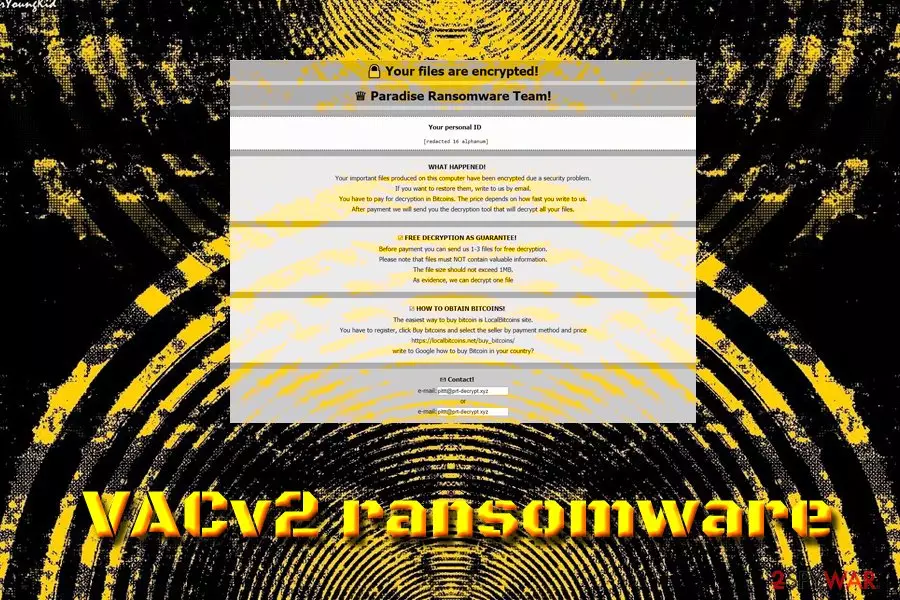
VACv2 ransomware is a cryptovirus that was discovered by the independent security researchers at the end of December 2018. The malware operates as RaaS and is a part of Paradise ransomware group. It uses a sophisticated RSA-1024 encryption algorithm to lock up pictures, videos, music, databases and other personal data, which consequently appends a lengthy extension that follows the pattern: [original_file_name].[extension]_[random]_{pittt@prt-decrypt.xyz}.VACv2. The malware also drops a ransom note called $%%! NOTE ABOUT FILES -=!-.html which explains that victims have to contact VACv2 virus authors via the email, and the price in Bitcoins will depend on how fast they do so. As usual, contacting criminals is not advisable – we suggest reading the full guide on how to proceed next if infected.
| Name | VACv2 |
| Type | Ransomware |
| Family | Paradise |
| Encryption algorithm | RSA-1024 |
| Extension | .VACv2 |
| Demands | Payment in Bitcoin |
| Decryptable? | No |
| Elimination | Use security software like FortectIntego or |
VACv2 ransomware authors use typical distribution methods, such as:
- Spam email attachments;
- Poorly protected RDP;
- Software vulnerabilities;
- Fake updates;
- Backdoors;[1]
- Torrent files;
- Malicious sites, etc.
To prevent malware from entering your machine, you should employ reputable security software that can stop the intrusion. Nevertheless, if you found encrypted files, you will have to perform VACv2 ransomware removal before you proceed with file recovery.
VACv2 ransomware is a sophisticated cyber infection that enters system unnoticed and performs various changes to the device, including Windows Registry modification, stopping/spawning of multiple processes, Shadow Volume Copies removal, and similar. After scanning the PC for personal data, it modifies the structure of the file and denies the entry to it. The files can only be decrypted with a unique personal key that is stored on a remote server that is controlled by hackers.
VACv2 ransom note that opens in a separate window informs the victim about what happened:
WHAT HAPPENED!
Your important files produced on this computer have been encrypted due a security problem.
If you want to restore them, write to us by email.
You have to pay for decryption in Bitcoins. The price depends on how fast you write to us.
After payment we will send you the decryption tool that will decrypt all your files.
As an “evidence,” hackers promise to decode one to three files that can be sent for test decryption. Additionally, they warn users not to use any other tools that may help users to recover data.
However, users should immediately remove VACv2 ransomware (using anti-virus software like FortectIntego or another program that recognizes[2] the threat) from their computers and proceed with file recovery, ignoring cybercriminals entirely. Be aware that paying crooks will only encourage them to create more viruses and infect more victims. Additionally, ransom payments might be considered as a criminal offence in the US so that fines may be applied.
When it comes to file recovery, using backups from a virtual or physical drive is the best option. However, this choice is not always available, so victims should rely on third-party software or wait till security researchers crack VACv2 ransomware's code and create a decryptor.

Do not risk your virtual safety and avoid ransomware attacks
While the initial goal of ransomware is money extortion, it does not mean that it will not be packed with various extra features, like data stealing, screen locking or crypto mining[3] capabilities. Be aware that malware authors always try to improve their code in order to receive maximum profits from the illegal activities.
For that reason, avoiding such intrusions is the best practice, as it can not only save your valued files but also prevent the disclosure of personal data or an unusable computer. Therefore, follow these simple tips when browsing the web:
- Use anti-malware software at all times;
- Use strong passwords for all your accounts;
- Avoid suspicious emails, their attachments and links;
- Download software from reputable sources only;
- Do not casually click on pop-ups and banners;
- Avoid file-sharing and torrent sites;
- Always patch your system and software immediately;
- Do not install bogus software like driver downloaders, registry cleaners, software uninstallers, and similar;
- Scan the files from the internet with anti-malware software before opening them.
Remove VACv2 ransomware from your computer and only then attempt the file recovery
To remove VACv2 ransomware, you will have to use AV software that can recognize the threat in the first place. Be aware that not all security tools detect malware straight away – it all depends how fast the internal databases are updated. Therefore, we suggest using FortectIntego – this software is based on the Avira engine and can eliminate the threat instantly. Be aware that you might have to enter Safe Mode with Networking mode if the VACv2 virus prevents the operation of the security software.
After VACv2 ransomware removal, you can recover your data by using backups. If none are available to you, try alternative methods like data recovery software mentioned below.
Did this guide help?
Be the first to comment