

Vulston ransomware is a cryptovirus that demands 0.18 Btc for encrypted files
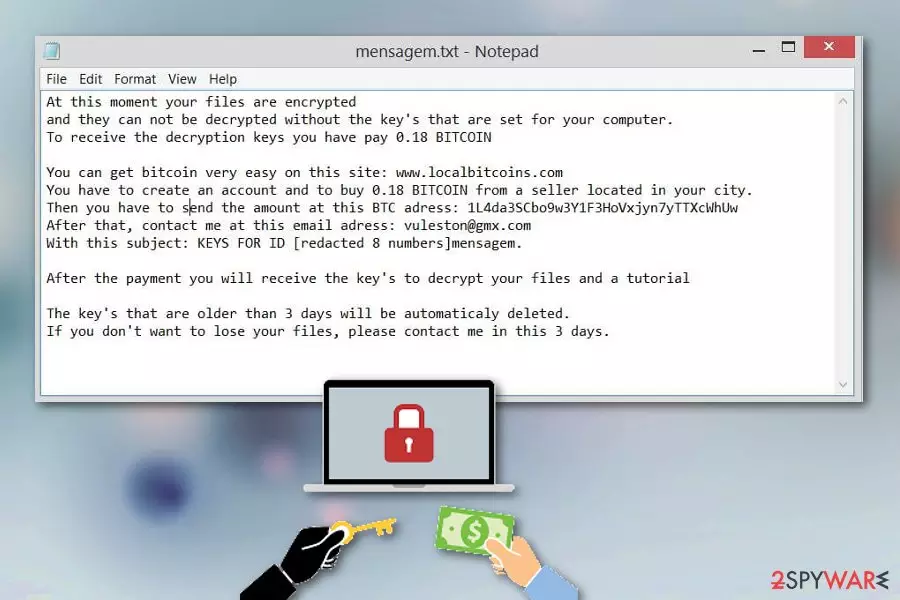
Vulston ransomware is a cyber threat that delivers a mensagem.txt file with the ransom demand after the encryption. In this file, virus developers state about the further actions that victim should take. To get your files back, you need to pay the ransom to the provided walled address, but we do not recommend going this route when dealing with ransomware because people behind this malware are considered criminals.[1] The attack starts with system changes and then your data on the device gets encoded, marked with .vulston file appendix. When these files become unreadable, you can notice the ransom note placed in every folder that contains encrypted photos, documents, audio files or even archives. Since the official decryption tool is not released, you need to get rid of Vulston ransomware virus and restore data using recovery software or file backups.
| Name | Vulston ransomware |
|---|---|
| Type | Cryptovirus |
| File extension | .vulston |
| Ransom note | mensagem.txt |
| Ransom amount | 0.18 BITCOIN |
| Contact email | vuleston@gmx.com |
| Distribution | Spam email attachments |
| Removal | Use antimalware programs to remove Vulston ransomware and fix the virus damage using FortectIntego |
Vulston ransomware virus belongs to the notorious virus category that focuses on encoding data and demanding ransom because this way there is a higher possibility to get profit from victims. However, the first step in the ransomware attack is system file modification when the virus changes files or adds new to folders:
- %Roaming%
- %AppData%
- %Local%
- %Windows%
- %Temp%.
Then Vulston ransomware scans the system of the targeted device and locates files for possible encryption. Various formats of files that you use on an everyday bases get encoded when the original code gets changed using army-grade encryption algorithm.[2]
Various registry entries may get altered or added to the Windows registry during the Vulston ransomware infiltration to make sure that the malware is executed every time you run the device. All these alterations make virus termination even more difficult, so you need to follow the suggested solution that many experts[3] recommend.
Vulston ransomware displays the ransom message in a file mensagem.txt that reads the following:
At this moment your files are encrypted
and they can not be decrypted without the key’s that are set for your computer.
To receive the decryption keys you have pay 0.18 BITCOINYou can get bitcoin very easy on this site: www.localbitcoins.com
You have to create an account and to buy 0.18 BITCOIN from a seller located in your city.
Then you have to send the amount at this BTC adress: 1L4da3SCbo9w3Y1F3HoVxjyn7yTTXcWhUw
After that, contact me at this email adress: vuleston@gmx.com
With this subject: KEYS FOR ID [redacted 8 numbers]mensagem.After the payment you will receive the key’s to decrypt your files and a tutorial
The key’s that are older than 3 days will be automaticaly deleted.
If you don’t want to lose your files, please contact me in this 3 days.
In this ransom note, virus developers demand victims to pay 0.18 BTC which is equal to $678.22. You should never consider paying the ransom because it leads to more damage or even permanent data or money loss. You should remove Vulston ransomware using professional anti-malware tools that can give you the best results because of the thorough system scan during which possible intruders get discovered and can be removed.
When you perform automatic Vulston ransomware removal, make sure to double-check and run an additional scan on the device to repair virus damage and clean the machine further. You can employ FortectIntego for the job or any other PC repair tool that you trust.

Ransomware payload gets triggered and activated when the infected file is opened on the device
The malicious file that contains this malware script may be attached to the legitimate-looking email and even come in a Microsoft Excel or Word document. These documents include malicious macros that need to be triggered by the user and when the file is downloaded and opened on the system you trigger the payload dropper, and then the computer gets infected.
Additionally to these file formats, ransomware payload can be attached to the PDF file with hyperlink redirecting to the download page. The safe-looking file displays a window with the suggestion to enable certain functions if you want to see the attached file. When you do so, malicious script is delivered to your device immediately.
Unfortunately, these emails look safe because malicious actors misuse the names of well-known companies to place them as the sender of the email. This way users tend to open those emails and download attached files more often. Make sure to pay more attention to emails you open, so that you can avoid cyber infiltrations.
Eliminate Vulston ransomware from the machine using professional tools
For the best Vulston ransomware removal results, you should rely on the help from anti-malware tools and scan the system entirely. This way you can indicate all possible threats and remove them from the system completely using one program. Also, you can repeat the scan with reliable antivirus to double-check if all threats removed.
To remove Vulston ransomware using our suggested method, you should employ professional tools like FortectIntego, SpyHunterCombo Cleaner or MalwarebytesMalwarebytes which are capable of eliminating cyber threats and other intruders from your machine. Scan the system entirely and make sure to repeat the scan, so you can be sure the computer is clean.
Otherwise, Vulston ransomware virus can affect your data again and encrypt files the second time. If you have no data backups, you can try one of the software suggestions that we list below or follow our additional virus removal tips.
Did this guide help?
Be the first to comment