

JSWorm ransomware is malware based on money extortion, although some versions are decryptable
JSWorm ransomware is a cryptovirus that was first discovered in the wild in January 2019. It stems from GusCrypter malware family, whose goal is to encrypt all personal files on the system and require a ransom to be paid for their release. The virus was released under a few different versions, the latest of which is JSWORM v.3.0, which is the only version that remains not decryptable.
JSWorm ransomware uses the AES encryption algorithm[1] to lock up pictures, databases, documents, videos, music, etc. and appends .JSWORM extension at the end of each of the affected files. Additionally, the malware also drops a ransom note JSWORM-DECRYPT.html which explains that victims need to contact criminals via NIGER1253@COCK.LI email address if they want to recover their data.
Later versions incorporated a variety compound extensions the ended with .JSWORM, although crooks switched to .JURASIK appendix briefly. The email addresses, as it is typical, were changed as well (JSWORM v.3.0 uses jurasik@cock.lt email), although the ransom note name remained the same – JSWORM-DECRYPT.hta.
| Name | JSWorm ransomware |
|---|---|
| Type | Cryptovirus |
| Category | Ransomware |
| Versions | JSWorm 2.0, JSWorm 3.0, JSWorm 3.1 |
| Ransom note | JSWORM-DECRYPT.html |
| File marker | .JSWORM, .JURASIK |
| Distribution | Spam email attachments |
| Decryptable? | First and second variants can be decrypted. For JSWorm 2.0 ransomware, use decryptor from Emsisoft. Unfortunately, there is no decryption tool available for 3.0 and 3.1 versions |
| Elimination | Use FortectIntego for JSWorm ransomware virus damage removal |
Crooks behind JSWorm virus updated the virus code in versions 3.0 and 3.1, which has no decryptors available
Without a doubt, ransomware is now a lucrative business worth $2 billion.[2] For that reason, hackers behind major ransomware strains often continue improving their malware. In April 2019, threat actors released JSWorm 2.0 ransomware which worked identically to its predecessor. In May, crooks struck again with the second version, and the appended extension was changed to [ID-XXXXXXXXX][remarkpaul77@cock.li].JSWORM. Additionally, the ransom note was now in the text format and was named JSWORM-DECRYPT.txt.
As it turned out, the provided email address would not work, and crooks behind JSWorm virus would not be able to recover all the encrypted files even if they wanted to. Luckily, security researchers from Emsisoft[3] managed to crack the code of JSWorm 2.0 ransomware and released the decryption tool that would allow victims to recover files for free.
Since the release of Emsisoft's decrypter in May, hackers altered the code with the release of JSWorm 3.0 and 3.1 versions, which remain not decryptable currently. As it is typical, crooks ask for money in Bitcoin, although the price is unknown. However, users should avoid contacting criminals and avoid falling victims to a potential scam that would not only result in a file but also money loss.

Instead, users should perform JSWorm ransomware removal and then try alternative data recovery methods. Besides, once the code of particular ransomware family gets cracked, it is highly likely that later versions will be as well.
Files encrypted by JSWorm ransomware are not damaged but rather locked
The misconception about file locking viruses is that they corrupt the files, which is not true. The sophisticated encryption algorithm is used to encrypt them, which essentially puts a unique password on each of the files. To recover the data, users need a specific key that is generated during the encryption process and is sent to a remote server which only hackers has access to.
During the encryption process, JSWorm ransomware makes use of AES algorithm to lock a variety of different files, such as:
- photos;
- documents;
- archives;
- audio files;
- videos;
- databases.
Although JSWorm ransomware cannot encrypt system files, it makes additional alterations on your system. Windows Registry values are changed, so ransomware is launched every time you restart your PC.[4] Additionally, Shadow Volume Copies are also deleted, which complicates data recovery. These changes are made before the virus starts file encryption so that it would not be interrupted during the process.

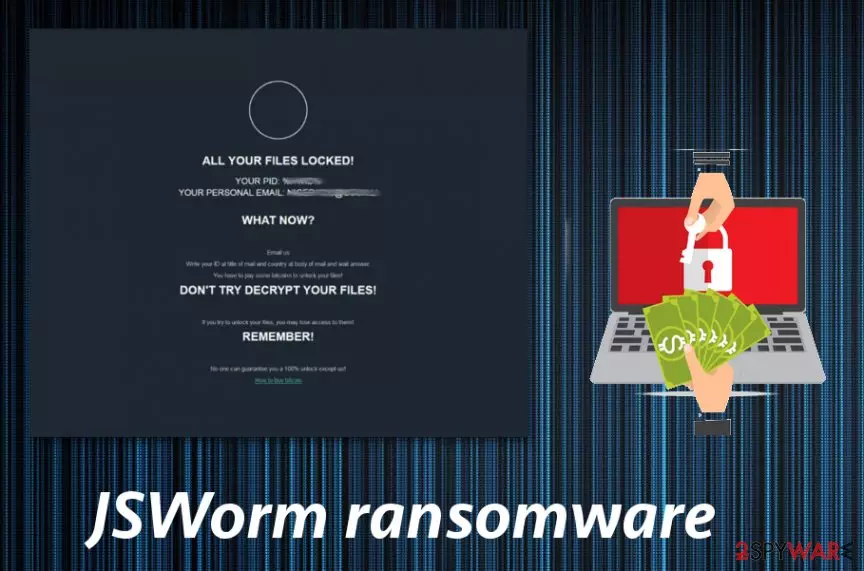
JSWorm ransomware displays a ransom note in an HTML or HTA format that reads the following:
ALL YOUR FILES LOCKED!
YOUR PID %HWID%
YOUR PERSONAL EMAIL: NIGER1253@COCK.LIWHAT NOW?
Email us
Write your ID at title of mail and country at body of mail and wait answer.
You have to pay some bitcoins to unlock your files!DON’T TRY DECRYPT YOUR FILES!
If you try to unlock your files, you may lose access to them!
REMEMBER!No one can guarantee you a 100% unlock except us!
How to buy bitcoin
You should remove JSWorm ransomware using trustworthy antivirus program as many researchers[5] advise. This is a crucial step that ensures your system is clear and prepared for data recovery. To repair ransomware-affected system files and fix virus damage, use FortectIntego or similar repair tools before file restoration processes.
JSWorm ransomware virus is one of the most dangerous cyber threats, and you may need additional help for the proper virus termination. Since this virus can alter the registry, you should enter the system in a Safe Mode with Networking, so anti-malware tools work correctly. We have prepared a few additional tips down below.
JSWorm 2.0 ransomware decryption tool and how to use it
JSWorm 2.0 ransomware was first spotted in April 2019, used a compound file extension [ID-XXXXXXXXX][remarkpaul77@cock.li].JSWORM and dropped a ransom note in a text format – JSWORM-DECRYPT.txt. This variant was prevalent in the US, Italy, France, Germany, Argentina, Brazil, Turkey, and a few other countries.
Fortunately, Emsisoft security researchers released a decrypter that can retrieve victims' files for free. To be able to decipher data with the said tool, you will have to make sure you still have the ransom note JSWORM-DECRYPT.txt, as it is required for decryption. You can find such a file in any folder that holds the locked data.
- Download the decrypt_JSWorm2.exe file from the official Emsisoft site
- Run the executable
- If User Account Control shows up, click Yes
- Agree to License Terms
- Once the program opens, click on Browse and locate the ransom note
- Click on Start
- The decryptor will show the key it detected
- Click OK and wait till the process finishes
Do not forget that you need to remove JSWorm 2.0 ransomware before you proceed with file recovery, as all the data would be encrypted repeatedly.
Email spam campaigns are one of the most popular ransomware distribution techniques
Phishing[6] tactics can be used to infect devices with various cyber threats including ransomware. People get tricked that they received a legitimate email and when the attachment is opened malicious script launches the virus on your system directly. Infected documents or even direct links contain malicious macros, and you enable them with one click of the button.
Document files, presentations or databases attached to these emails contain the payload or direct malware. You can avoid getting these threats by scanning the file before opening and deleting suspicious emails from the box immediately. Any email from the company or service you are not using can be designed to infect your computer. Pay more attention to emails you get when you are not expecting them.
Use professional help for JSWorm ransomware elimination
When you need to remove JSWorm ransomware from the system completely, employ a reputable and trustworthy anti-malware program or your antivirus tool. This step ensures that every cyber threat is eliminated from the system. You should also clean the virus damage or fix additional changes with tools like FortectIntego, SpyHunterCombo Cleaner pr MalwarebytesMalwarebytes.

However, JSWorm ransomware removal might get difficult when the system is altered further. For that, we offer you to reboot the device in Safe Mode before scanning the system thoroughly. This way your anti-malware program is performing properly.
If you still focusing on data recovery using file backups or data restoring software, make sure that the computer is clear after the .JSWorm virus termination. Ransomware can perform yet another round of encryption on your files if you restore them while the computer is still infected.
Did this guide help?
Be the first to comment