

Obfuscated ransomware – a decryptable cryptovirus which is also known as BigBobRoss
| Name | Obfuscated ransomware |
|---|---|
| Type | Cryptovirus |
| Also known as | BigBobRoss |
| Danger LEVEL | High. This virus locks all found files, gladly, they can be recovered |
| Ransom note | Read Me.txt |
| Contact email | bigbobross@protonmail.com |
| Main executable | bedoneupx.exe |
| File extension | .obfuscated, .[id=] |
| Distribution method | Spam email attachments |
| Elimination | Use FortectIntego for Obfuscated ransomware removal, then recover your files by contacting Michael Gillespie. |
Obfuscated ransomware virus can also be called BigBobRoss ransomware due to the contact email left in the ransom note — bigbobross@protonmail.com. There are also a few different payload versions discovered in the wild, but the danger behind the cyber threat remains the same. The most dangerous thing about the ransomware is the file encryption that affects the original code of your photos, audio files, documents, and even archives.
Unfortunately, when your files get the .obfuscated extension, you cannot open or use them. Keep in made, that Obfuscated ransomware can lock a big variety of data, including audio, video, image, text document, archive, virtual drive, template files. We recommend cleaning the system thoroughly and then focusing on the data recovery using backups because it is the safest way.
Obfuscated ransomware developers cannot be trusted because these people only care about your money and there is little to none possibility that encrypted files can be recovered.[2] Use a reputable anti-malware tool like FortectIntego, eliminate all threats including this cryptovirus and avoid the risk of getting scammed by the crooks.
For further information, Obfuscated ransomware developers also urge paying the ransom price in Bitcoins. They provide the users which a site where such cryptocurrency can be obtained. It is known that cybercriminals who demand ransom always ask for some type of cryptocurrency (Bitcoin mostly) in order to stay safe and untrackable.
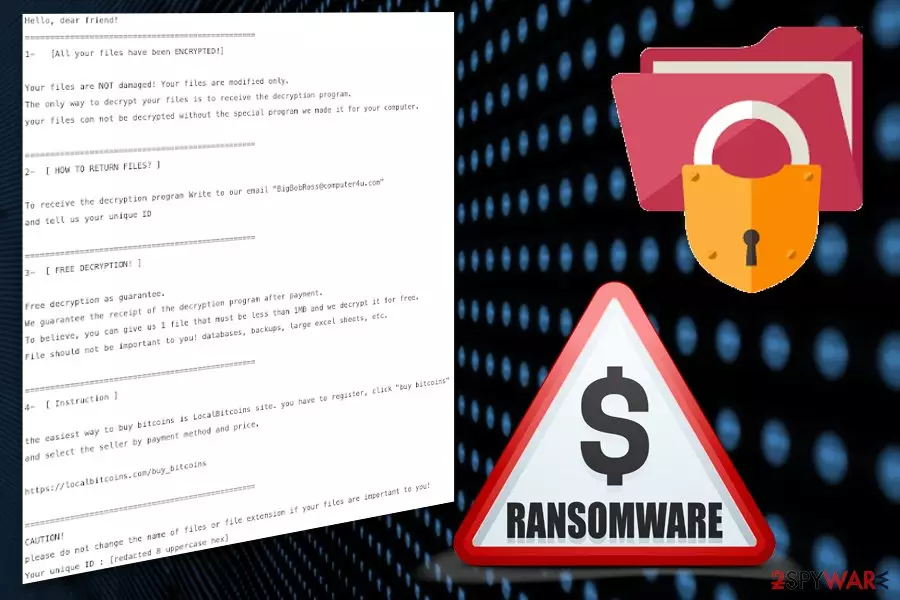
When Obfuscated ransomware is done encrypting your files the ransom note Read Me.txt is displayed on the screen and has the following message:
Hello, dear friend!
=================================================
1- [All your files have been ENCRYPTED!]Your files are NOT damaged! Your files are modified only.
The only way to decrypt your files is to receive the decryption program.
your files can not be decrypted without the special program we made it for your computer.=================================================
2- [ HOW TO RETURN FILES? ]To receive the decryption program Write to our email “BigBobRoss@computer4u.com”
and tell us your unique ID=================================================
3- [ FREE DECRYPTION! ]Free decryption as guarantee.
We guarantee the receipt of the decryption program after payment.
To believe, you can give us 1 file that must be less than 1MB and we decrypt it for free.
File should not be important to you! databases, backups, large excel sheets, etc.=================================================
4- [ Instruction ]the easiest way to buy bitcoins is LocalBitcoins site. you have to register, click “buy bitcoins”
and select the seller by payment method and price.https://localbitcoins.com/buy_bitcoins
=================================================
CAUTION!
please do not change the name of files or file extension if your files are important to you!
Your unique ID :
Additionally to the first encryption function, Obfuscated ransomware can alter various parts of the system and change various settings:
- modify Windows Registry Keys;
- disable security programs;
- delete shadow volume copies;[3]
- add files to system folders;
- run malicious processes in the Task Manager section.[4]
Since victims of Obfuscated ransomware have contributed to the analysis, there are a few versions of the same ransomware that can easily distribute around the world. However, the solution for most of the cryptovirus is the same – anti-malware tools and a full system scan. Expert-tested software is necessary for this process as the user himself/herself might cause even more damage while trying to delete the notorious infection on his/her own.
You need to remove Obfuscated ransomware using professional tools so that every related file can be deleted from the system entirely. Also, remember that the name of a threat may differ depending on the antivirus program you are using. You should follow the suggested steps of your anti-malware tool.

We want to remind you that Obfuscated ransomware is a ransom-demanding virus and its developers cannot be trusted. Even though the crooks offer 1 file for free decryption to prove that the decryption key is real, there still is no need of contacting them. First of all, you risk being left with no money. Second, cybersecurity experts have already released a decryption tool for .obfuscated files.
Researchers[5] note that Obfuscated ransomware can be detected as:
- TR/Encoder.cjfbq;
- TR/Crypt.XPACK.Gen;
- Trojan.Ransom.Filecoder;
- Trojan.Heur.RP.7mqaaiAmoeki;
- Win32:Malware-gen;
- TR/FileCoder.iirhw;
- Gen:Trojan.Heur.RP.7mqaaiAmoeki (B);
- etc.
Make sure to check if the system is malware-free after the automatic Obfuscated ransomware removal. You can do so by scanning the device again or with an alternative antivirus tool. This way you can be sure that data backups can be used to restore encrypted files. If you have no backups and still want to recover locked data, check our tips below the article.

Email attachments help infect the system with malware
There are many other variants of ransomware-type threats that get on the network using Word, Excel or PDF documents attached to the email spam. This is a common technique used by malware developers and distributors. When the email poses as a legitimate notification from companies like PayPal, FedEx or Amazon people tend to open them without consideration.
However, when the email is opened, and the attached file downloaded, malicious script is automatically launched on the device. The payload might also inject the system via the direct link on the PDF file or the email itself. You can avoid the infiltration if you pay more attention to the content of your email box. You should delete suspicious emails or the ones you were not expecting to get in the first place.
Continuously, ransomware infections are commonly distributed thru unprotected networks such as Torrents and The Pirate Bay. While downloading certain applications, movies, and TV series from these websites, you take risks of infecting your computer system with malware. We suggest staying away from third-party sources and downloading content only from primary distributors.
Get rid of the Obfuscated ransomware virus during a thorough system clean
The main tip we can give you when dealing with Obfuscated ransomware virus is to employ professional programs designed to terminate threats like this. Reputable anti-malware gives you the advantage because it can indicate possible risks and remove them from the computer once and for all. Eliminating the cyber threat on your own, you risk causing more damage to your system.
Remove Obfuscated virus using FortectIntego or SpyHunterCombo Cleaner and scanning the system entirely. This should take less than 15 minutes, and your device is safe to use again. Remember, wait until the process is finished and do not forget to refresh your entire computer system after the elimination just to ensure that the cyber threat has been taken care of properly.
Note that you need to perform Obfuscated ransomware removal before any data recovery attempts so that your computer is clear and safe. If you plug in the external device with your file backups on the infected system, ransomware encrypts your data once again. So, make sure that you accomplish your goals as required.
Did this guide help?
Be the first to comment